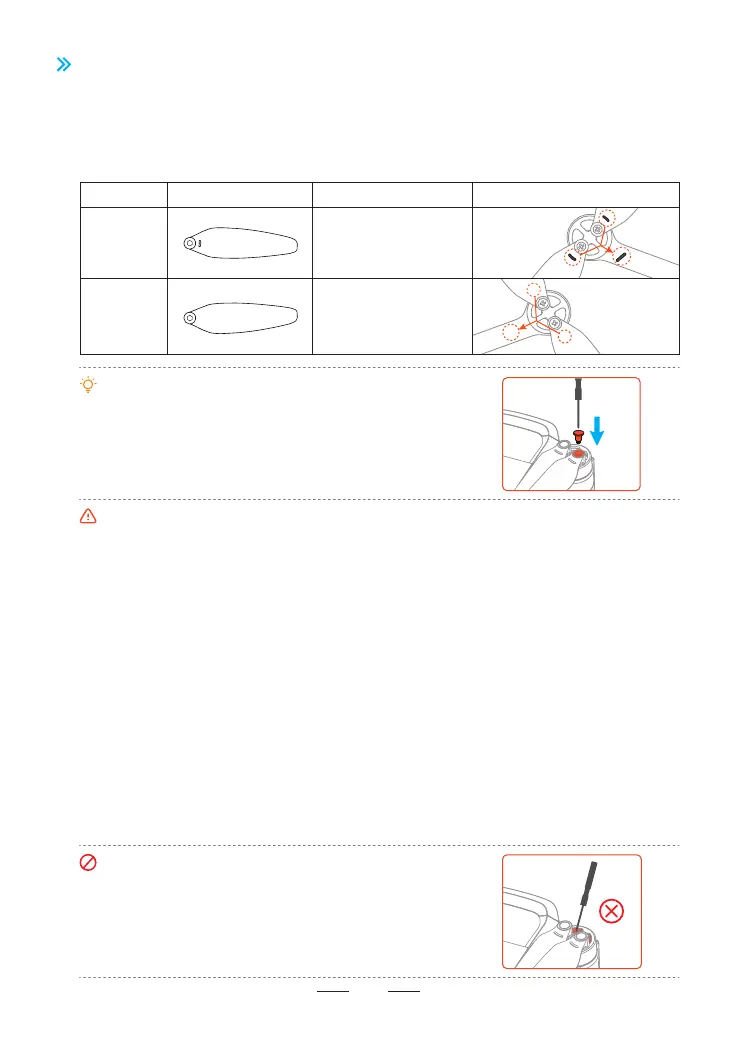
5.5 Propellers
ATOM 2 uses a newly designed second-generation silent propeller, which enhances power peormance
while eectively reducing noise during blade rotation. The propellers are divided into clockwise and
counterclockwise types. Attach the marked propellers to the motors of the marked arm, and the unmarked
propellers to the motors of the unmarked arm. The two propellers attached on the same motor should be
identical.
Propeller
Marked
propeller
Attach the marked
propeller blades on
marked arm
Unmarked
propeller
Attach the unmarked
propeller blades on
unmarked arm
Installation Instructions Schematic Diagram of Installation
•Use the the screwdriver from the package to mount the
propellers.
•When replacing the propeller blades, it is easier to handle
by gripping the motor with your hand.
•The ATOM 2 propellers are not compatible with ATOM/ATOM SE/ATOM LT propellers and are currently
only suppoed for the ATOM 2 model. Please be sure to take note when replacing the propellers.
•Make sure you attach the marked propellers to the motors of the arm with marks and the unmarked
propellers to the motors of the arm without marks. Otherwise the drone will be unable to y.
•If a propeller is damaged, remove the two propellers and screws on the corresponding motor and
discard them. Use two propellers from the same package. DO NOT mix with propellers in other
packages.
•Propeller blades are sharp. Handle with care. DO NOT squeeze or bend the propellers during
transpoation or storage.
•Purchase the propellers separately if necessa.
•Stay away from the rotating propellers and motors to avoid injuries.
•Please check the propeller blades immediately if there are any jitters or speed loss in ight, and timely
replace the propellers if it's damaged or deformed.
•Make sure the motors are mounted securely and rotating smoothly. Land the drone immediately if a
motor is stuck and unable to rotate freely. Stop ying the drone and contact suppo if there is any
abnormal sound with the motor.
•Make sure that the propellers are installed securely before each ight. Check to make sure the screws
on the propellers are tightened.
•When mount or remove the propellers, do not put the
screwdriver or other foreign materials inside the motors,
otherwise the motor may be damaged.
15



 To Next Page