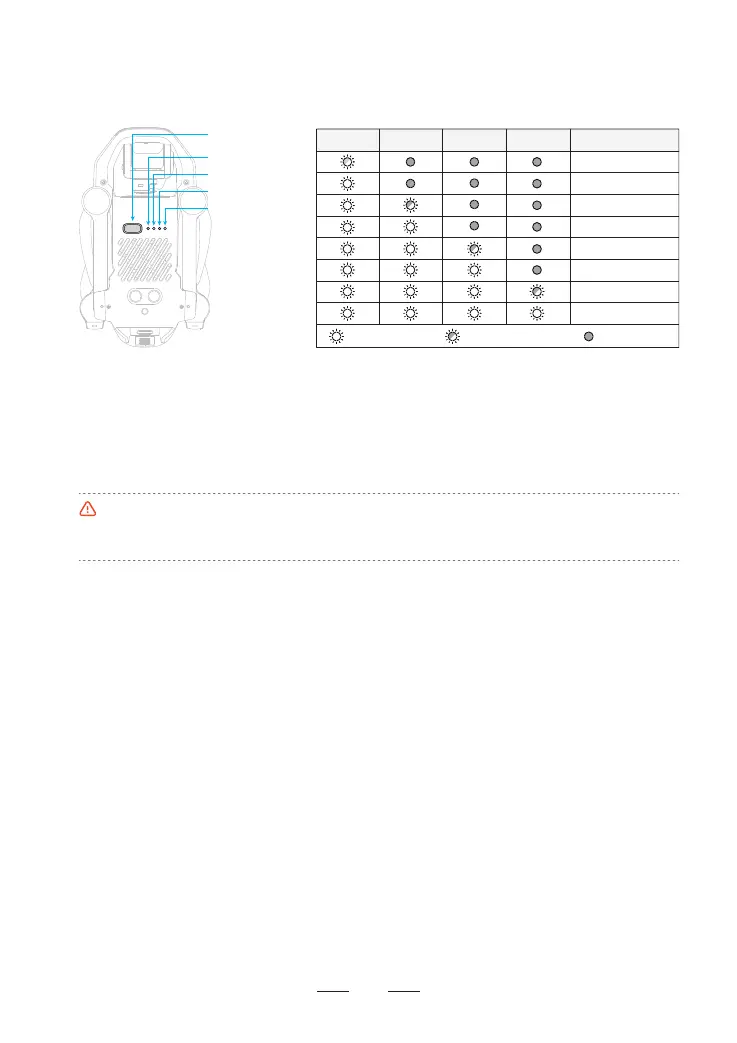
5.4.4 View Power Level
Once the batte is inseed in the drone, sho press the power button to view the power level of sma
batte, as shown in the picture below:
•The discharge capacity will be weakened greatly and ight duration will reduce at a low temperature,
which is normal.
•Avoid long-term running at a low temperature, otherwise, the batte life can be shoened.
0% ~ 25%
25% ~ 30%
30% ~ 50%
50% ~ 55%
97% ~ 100%
80% ~ 97%
75% ~ 80%
55% ~ 75%
LED 1 LED 2 LED 3 LED 4 Current power level
Indicator is ashing
Indicator is oIndicator is on
5.4.5 Operation Instructions of Sma Batte at High/Low Temperature
When the batte temperature is <5°C, the App will prompt a low temperature warning of the batte, and
the batte needs to be preheated before ying.
When the batte temperature is >70°C, the App will prompt a high temperature warning of the batte, and
the drone will not be able to y.
14
Power Button
LED 1
LED 2
LED 3
LED 4



 To Next Page