5.4.3 Charging
See 3.6 for charging method
5.4.2 Batte Installation & Removal
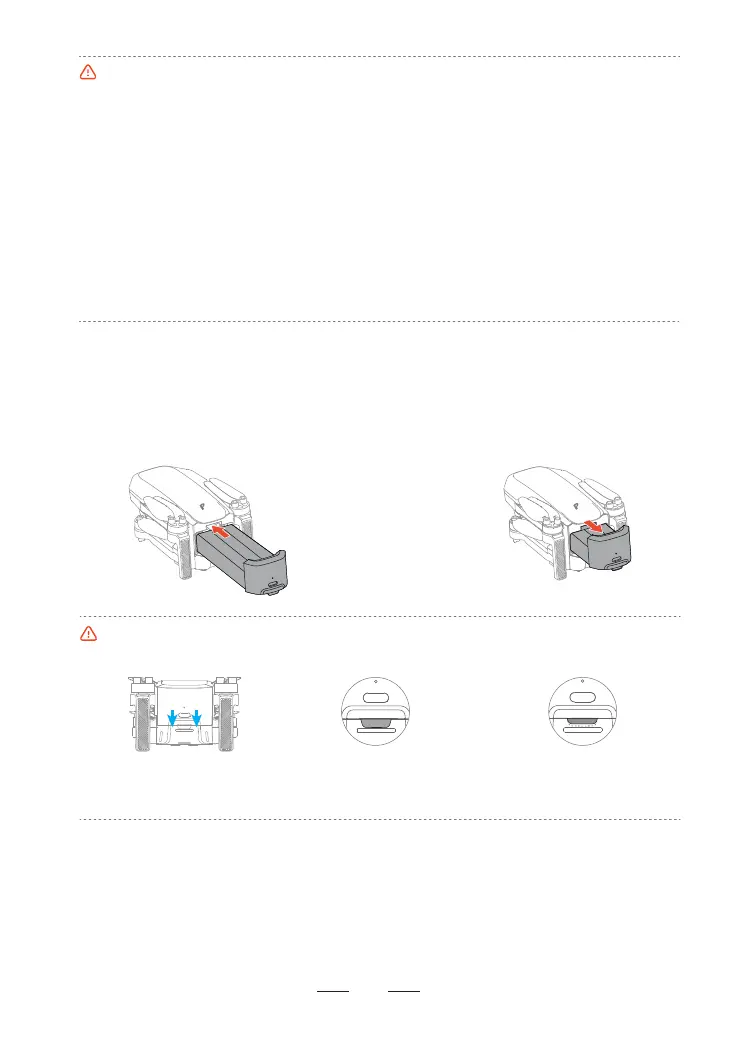
Installation:
Inse the batte in the batte compament
and secure the buckle. You will hear a clicking
sound when the batte is fully engaged.
Buckle is not in position,
which may result in the
batte falling during ight.
Make sure to power o
the product before
removing the batte.
•After inseing the batte, please ensure that the batte buckle snaps back into place. This is crucial
for ight safety.
Buckle is in
position, safe
Removal:
Press the batte buckle and detach the
batte from the batte compament to
remove it.
•Prolonged inactivity can negatively impact batte peormance and may even cause permanent
damage. To maintain batte health, recharge it approximately eve three months to ensure its
activity.
•Please store the batte in a cool and d place where children cannot reach.
•Precautions for low-temperature environments:
1. Batteries cannot be used for ight when the ambient temperature is below 0°C.
2. In low temperatures, hover the drone to preheat the batte before ying.
3. Batte output power is limited in cold environments, reducing wind resistance; y with caution.
4. Peormance is diminished in cold, high-altitude environments; y with caution.
• Post-ight batte care: After ight, allow the batte to cool to the charging temperature range (0 ~
40°C) before charging.
• Batte safety during transpo: To ensure safe transpoation, keep the batte at a low charge level.
Discharge the batte to below 30% before transpo.
13



 To Next Page