Tap on the left of the App inteace or keep pushing the throttle control stick up for 2 seconds to exit
the descending return. The drone will switch to the regular return maintaining the current altitude.
43
1. When encountering strong winds, the descending return can save power consumption and guarantee
a more successful return.
2. If the drone is disconnected from the remote controller during the descending return, it will switch to
the regular return.
• This product does not have an obstacle avoidance function. Please pay attention to ight safety
during the return process.
• This feature is only available for countries or regions where drones are legally allowed to y over
120 m.
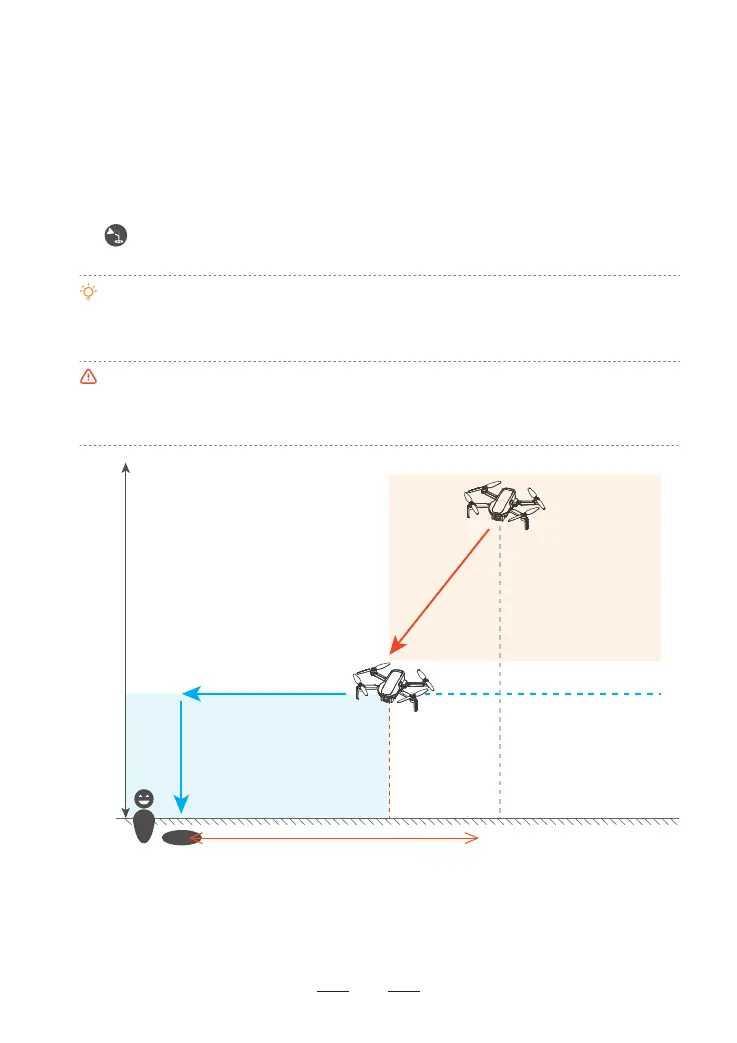
8.8.2 Descending Return
After 10 seconds into the RTH course, if the ight altitude is greater than 150 m and the ight distance greater
than 300 m, the App will prompt a message for you to conrm whether to initiate the descending return. Once
conrmed, the drone will sta the descending return (the drone will descend its altitude while approching the
HOME point). When its altitude descends to 120 m, the drone will switch to the regular return maintaining its
current altitude till it reaches the HOME point and lands automatically.
How to Activate
How to Exit
H
Altitude/m
Flight Altitude > 150 m
Flight Distance > 300 m
Regular Return
120 m
Flight Distance/m
Descending Return
> 300 m



 To Next Page