25
www.powerbox-systems.com
• Text
At the Text option you can enter any text, which is then spoken by the TTS system, for example, by a switch.
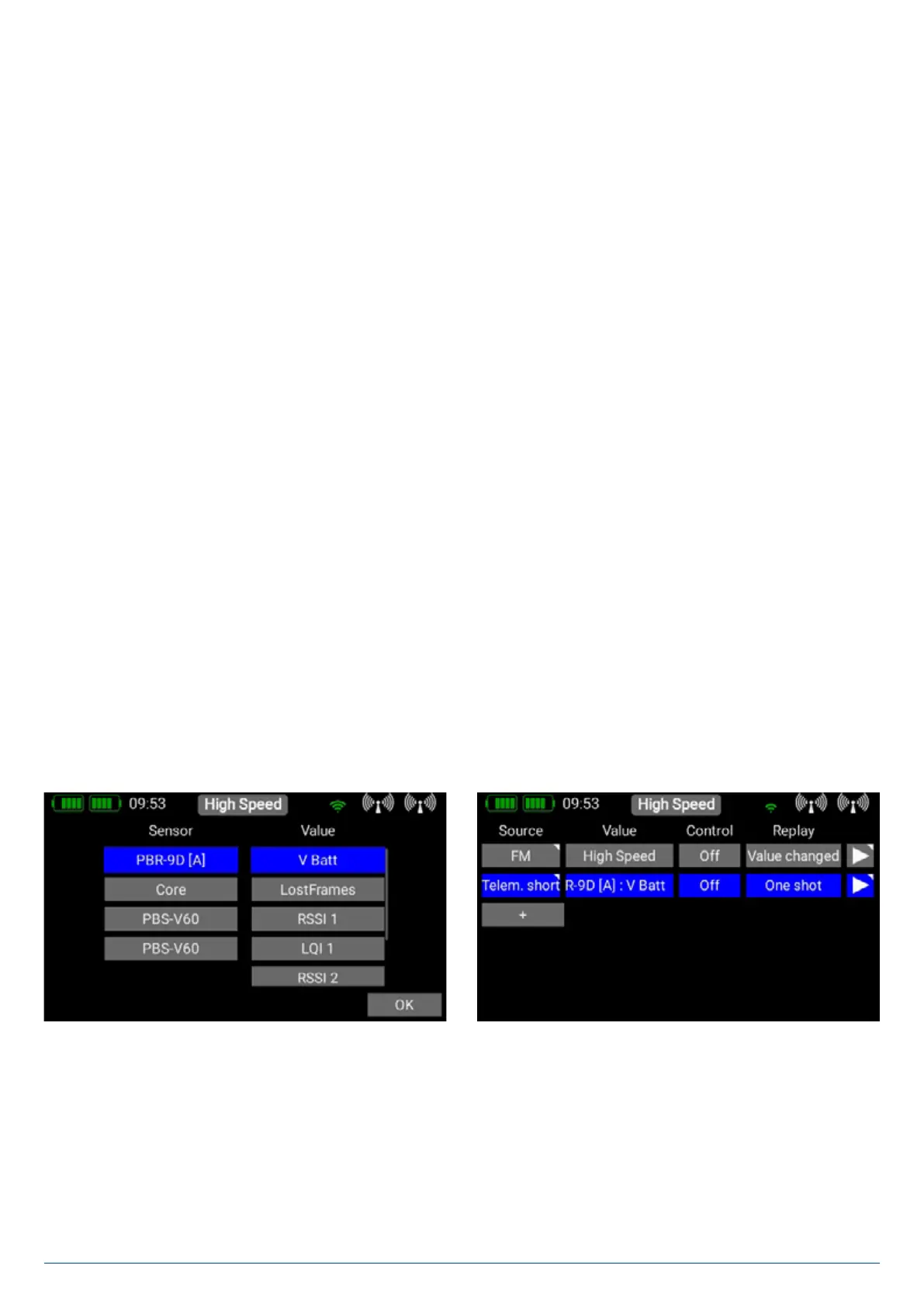
• Telemetry short
The selected telemetry value is spoken together with its unit. The message can be triggered by switch activation, at regular
intervals, or by a change in the value.
• Telemetry medium
The sensor name and the value - without unit - is spoken.
• Telemetry all
The sensor name, sensor value and unit are spoken.
• Timer
The current timer value is spoken, together with the name of the timer. The message can be triggered by a switch, or at regular
intervals.
• Timer short
The current timer value is spoken, without the name of the timer. The message can be triggered by a switch, or at regular inter-
vals.
3.9.2. Value
If you want the system to speak free text or a telemetry value, at this point you should select the sensor value which is to act
as data source.
• Text
In the case of free text, you can enter up to 64 characters here.
• Telemetry
If Telemetry was selected as the source, you can choose here what value should be spoken.


 To Next Page