47
www.powerbox-systems.com
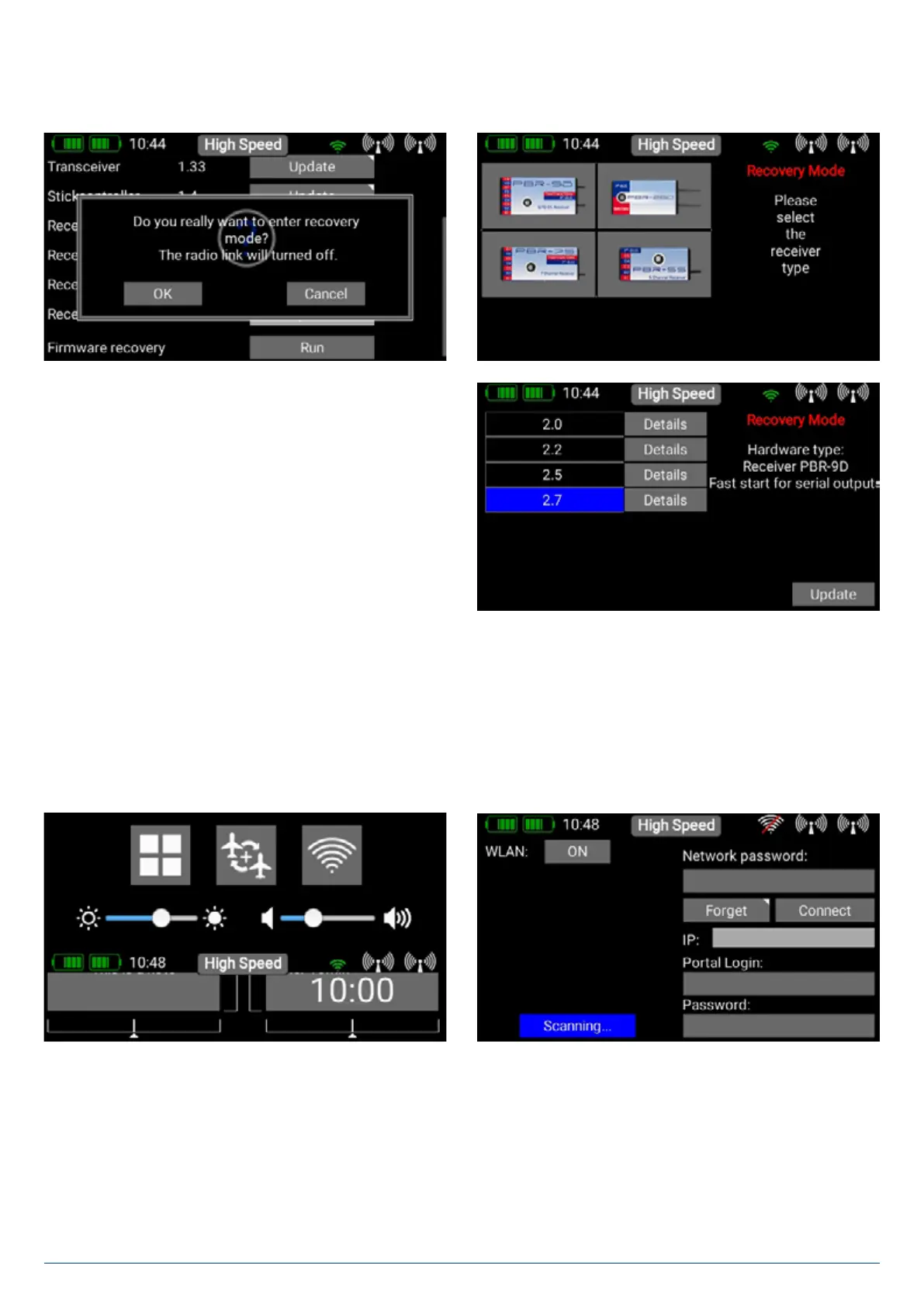
Important: if a radio update - for whatever reason - should fail, that is not a problem. Right at the bottom of the Update menu
you will find the Restore Firmware button. Disconnect all other bound receivers from their power supply, and re-connect the
receiver which you wish to update. Now press Restore Firmware.
The Update procedure itself is the same like a regular update.
6. Wifi
If you wish to use the Online Update function you must first set up your WiFi connection. The CORE transmitter can be bound to
your stationary router at home, or to a hotspot which you create with your mobile phone. This means that you can even update
your system at the flying field!
You will find the WiFi settings in the right-hand pulldown menu. First switch on the WLAN module by pressing the OFF button.
The WiFi module in the transmitter immediately searches for all WLAN hotspots which are in range.
Select the hotspot you wish to use. You will now see the Network Password mask. Enter this, and press Connect. As soon
as the connection is made, your IP address is displayed, and the WiFi symbol at the top turns green.


 To Next Page