38
PowerBox-Systems − World Leaders in RC Power Supply Systems
4.1.6. Menu
The Telemetry menu is an important function, since it enables you to configure and set up sensors and other devices which are
connected to the P²BUS. An example of this is the iGyro SAT, which can be connected to PBR receivers.
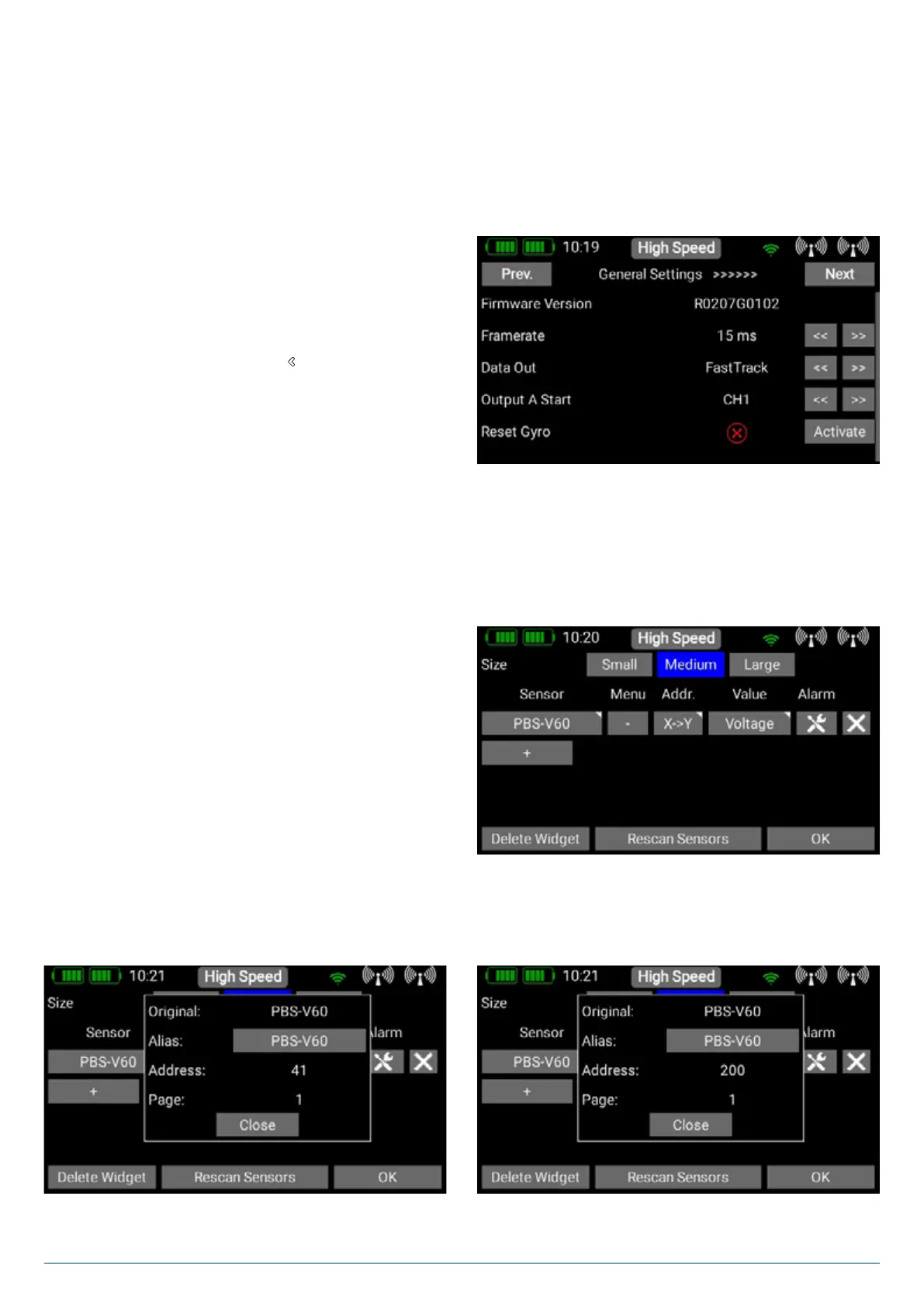
The receiver’s Setup menu can be called up by pressing the Menu button at the corresponding sensor. The three thick bars in the
Menu column indicate whether the sensor has an integral menu or not.
Briefly press these three bars to access the sensor’s menu.
The Next and Previous buttons at top left and right can be
used to navigate through any sub-menus which the sensor
offers. Briefly pressing the arrow buttons to the right of the
sensor values allows you to alter the sensor values. You can set
larger values more quickly by keeping your finger on the arrow
buttons. To leave the menu press the
-button at the bottom of
the touch-screen.
4.1.7. Address
The Addr. button is important if you wish to connect multiple sensors of the same type. For example, if you wish to use two PBS-
V60 sensors to monitor two flight batteries in an electric-powered model.
This is the procedure for registering two sensors of the same type
• Connect one of the sensors, and carry out a Rescan.
• Press + in order to select one (or more than one) of the tele-
metry values generated by this sensor. The sensor appears in
the list. In our example this is the PBS-V60.
• You can now display the current address by keeping your
finger on the sensor name, as explained above. This is purely
for information, as the CORE automatically manages the ad-
dressing. The standard address 41 of the PBS-V60 is shown
on the left of the picture.
• Press the X->Y button in order to shift the address.
• If you again hold your finger on the sensor name, you will see
that the address is different from the previous one. As you
can see in the right-hand illustration, the address has been
shifted automatically to 200.


 To Next Page