52
PowerBox-Systems − World Leaders in RC Power Supply Systems
10. Calibrating the transmitter controls
Naturally the PowerBox CORE is supplied with all functions correctly calibrated. However, if you wish to swap a switch or repla-
ce a broken switch, we recommend that you re-calibrate the new switch. Re-calibration is also necessary if, for example, you limit
the throttle stick travel, or change the transmitter mode mechanically.
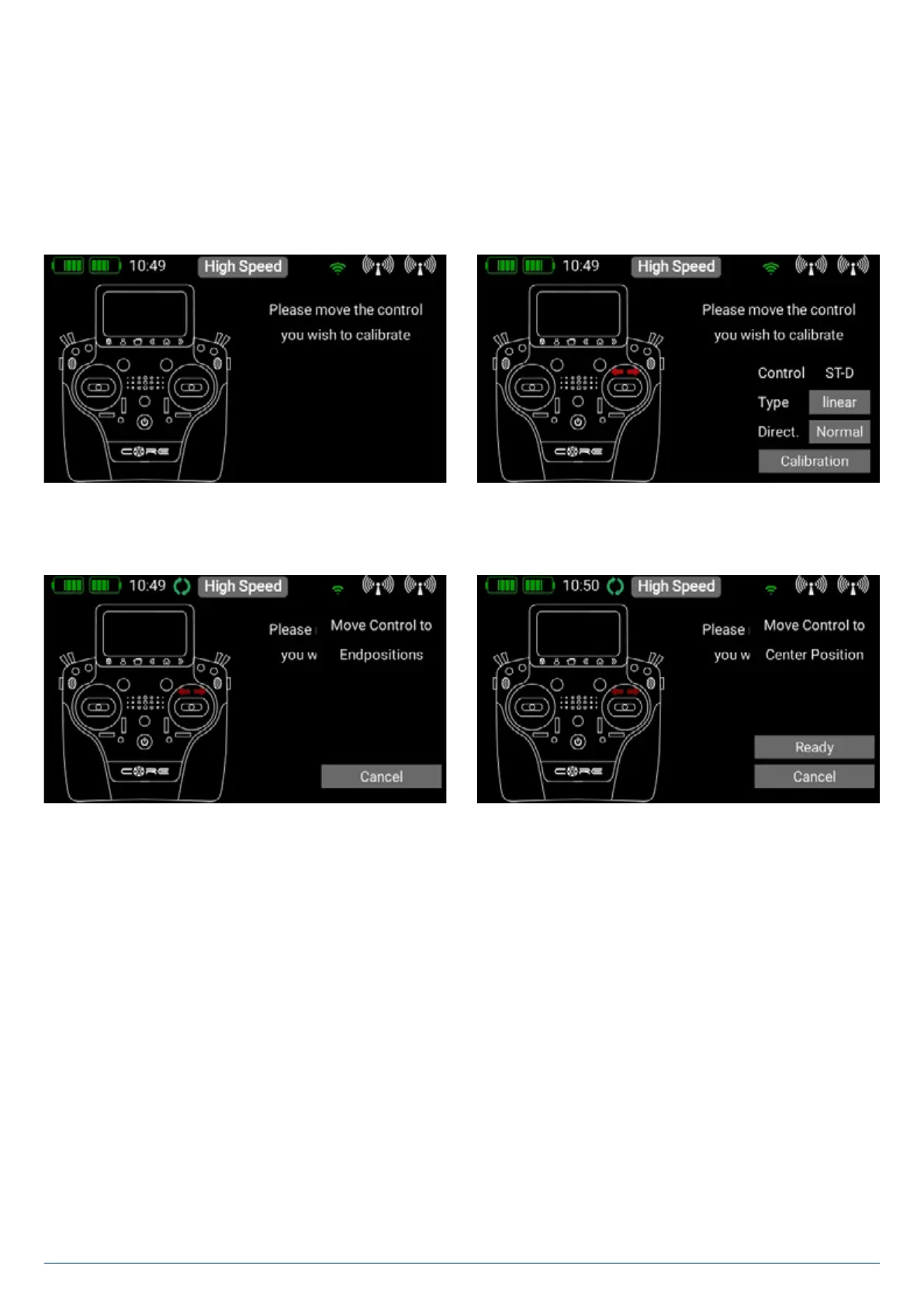
Move to the Calibration menu by this route: Settings > System > Calibration.
Move the transmitter control you wish to calibrate in order to select it. The information relating to this transmitter control is now
superimposed on the right. For example, if you wish to change from a 3-position switch to a 2-position switch, select the appro-
priate switch type in the Type field.
Once you have done this, touch Calibration at the bottom, then move the control to both end-points. The Continue field now
appears.
If you have installed a proportional control or a 3-position switch, you also need to move the transmitter control to the center.
Touch Finished to complete the process. The Direct button can be used to reverse the transmitter control’s direction of opera-
tion.
Caution: This has the same effect as installing the switch the other way round, i.e. this change affects all models!


 To Next Page