46
PowerBox-Systems − World Leaders in RC Power Supply Systems
• Update from Version 1.0 or 1.4:
Pressing Update opens a window, and the transmitter invites you to carry out a restart. Do not switch the transmitter off imme-
diately!! It is essential to wait for about 20 seconds, as the files must first be copied. When this period has elapsed you can
restart the transmitter, and the update will be completed automatically.
• Update from 1.5:
Nothing happens when you press Update. Do not press Update a second time – the transmitter is already working, and
copying the files. Simply wait until the transmitter displays the message that you need to restart the transmitter. You can then
restart the transmitter, and the update will be completed automatically. As of Version 1.6 a Status message relating to the copy
process appears immediately, followed by a Complete message when the copy process is finished.
• Update from 1.6 or higher:
As of Version 1.6 a Status message relating to the copy process appears immediately, followed by a Complete message when
the copy process is finished.
5.1.2. Wifi Update
The WiFi update is only from version 2.0. The essential preparation is to set up the WiFi system as described under Point 6.
Access to your router or mobile hotspot must be present. The rest of the process operates automatically. If you press Update and
a connection to your WiFi exists, all the necessary files will be downloaded from the web and installed. Afterwards the transmitter
must be powered down and then rebooted, exactly as with a USB update.
5.2 Receiver
Version 1.6 introduces a feature which is unique in the entire RC market: from this version all PBR receivers (except the PBR-8E)
can be updated from the transmitter, provided that they are already bound to it. For this to work you must first switch on the mo-
del, i.e. the bound receiver. Now navigate to the System -> Software -> Check menu.
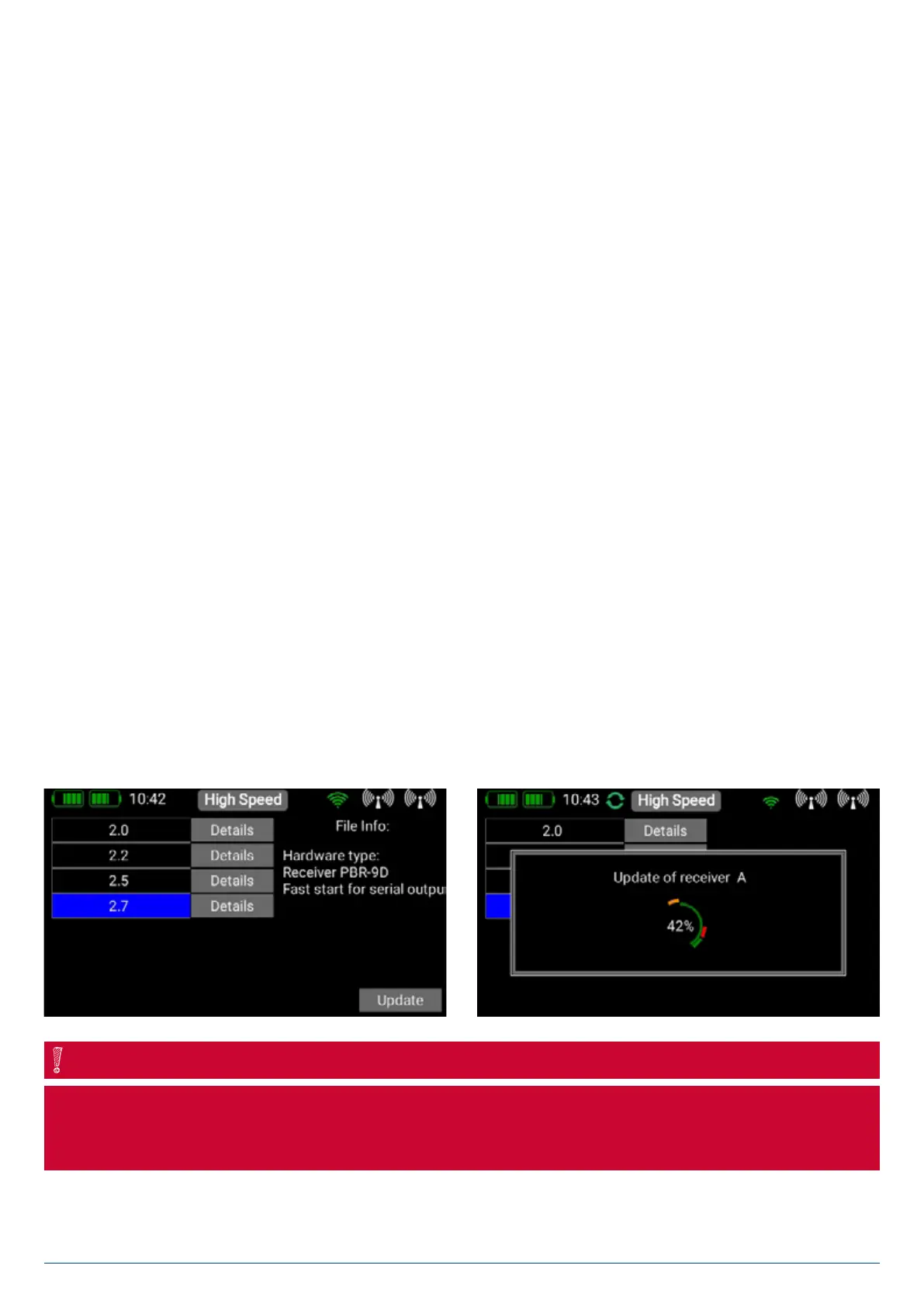
Briefly press Update for one of the bound receivers. The following screen displays the software version which is currently in the
transmitter’s memory. Select the latest version, and wait until the update is complete. If multiple receivers are bound to the
transmitter, repeat the procedure with each one.
Don’t hold the transmitter too close to the receiver, as transmission is very poor at a range of less than 50 cm. The transmit-
ter and receiver are designed to operate at long range, and at very close range the input amplifiers may be overloaded. At a
range of 1m to 9km the update process functions without any delay!
NOTE


 To Next Page