37
www.powerbox-systems.com
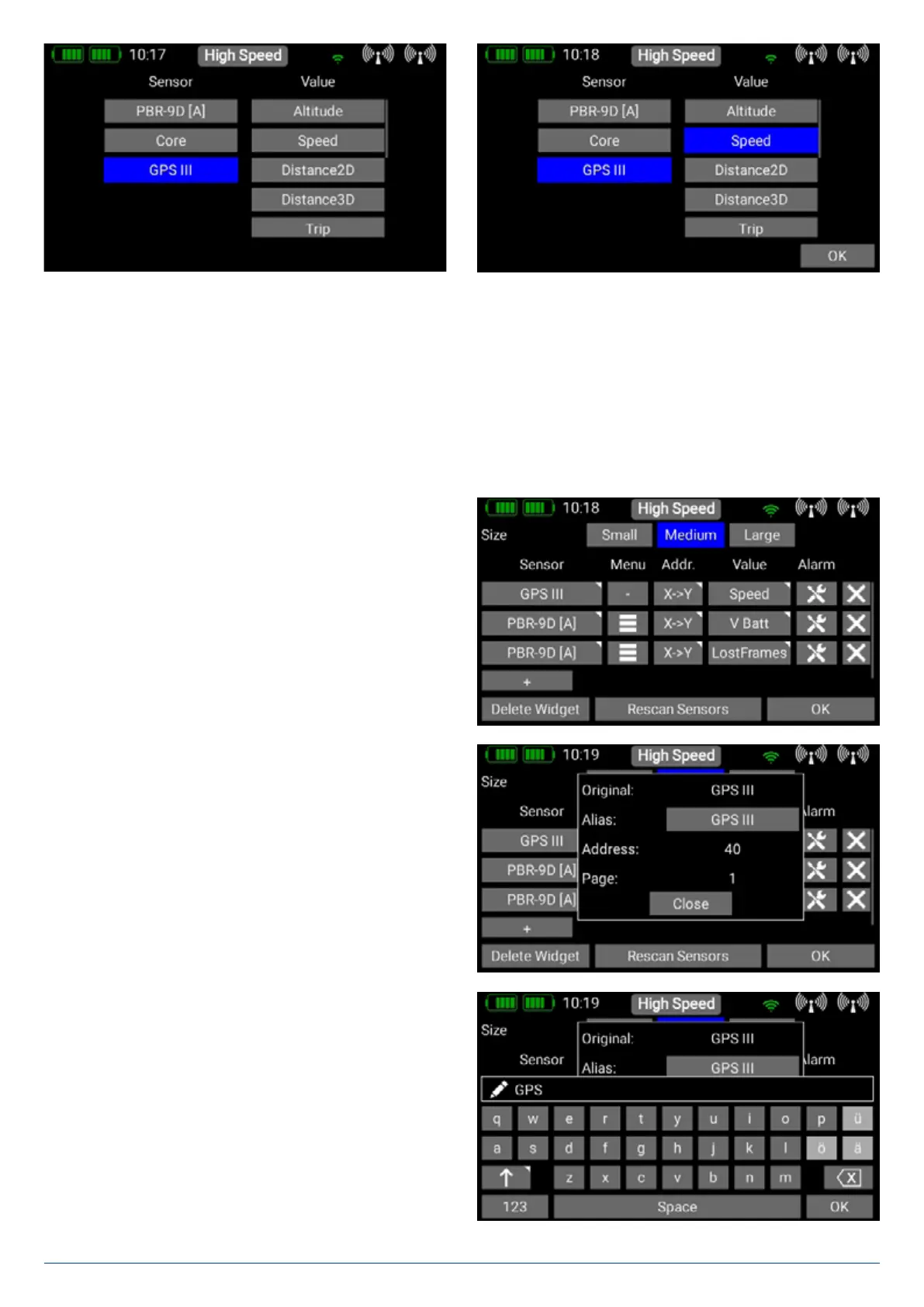
The left-hand column shows all the connected sensors, while the right-hand column shows all the values which these sensors
supply. The P²BUS is an in-house development, and is capable of transmitting up to 255 sensors each with 32 individual values
– and at a speed of up to 800 values per second!
At this point you can select which sensor value this widget is to display, and press OK to confirm your choice. It is possible to
set up each widget to display multiple sensor values, even from different sensors; these values are then displayed in turn by the
widget. This is accomplished by selecting one or more sensor values which you want your widget to display, then confirming your
choice with OK. The selected sensor value now appears in the list. In the example below several sensor values have already
been selected.
When one or more sensors is selected - as shown above - ad-
ditional functions are displayed.
4.1.5. Sensor
If you briefly press one of the values in the Sensor column, you
can place a different value at this point. Keep your finger on a
sensor name, and the following display appears:
In this menu you can change the sensor name, and see the
current sensor Address. To rename the sensor, open the
keypad by pressing the field after Alias. Note that long sensor
names, in particular, can result in extended spoken messages.
If you are using M-Link sensors, the standard M-Link-XY can
be changed to a more informative name. If you wish to restore
the original name supplied by the sensor, simply erase all the
characters in the Alias field, and confirm the empty field.
4.1 Telemetry
This can be used to display all the sensors connected to the P²BUS, and show the data they generate. This information also
includes the receiver and transmitter data.
Technical information:
The PowerBox CORE telemetry system and the P²-BUS are designed in such a way that each sensor supplies its own informa-
tion, including sensor name, unit, number of sensor values, decimal point, priority and other data. A new sensor designed for use
with the P²-BUS can be connected to the system at any time without updating the transmitter. The advantage of the system is
that all the text information relating to the sensor values is collected only when the system is switched on, i.e., when the system is
booting.
Once the system is running, only the pure sensor values are transferred; this permits very fast data transmission with maximum
flexibility, and ensures a thoroughly user-friendly system.
If you have selected the Telemetry widget type, this display appears, and the following options become available:
4.1.1. Size
With these three buttons you can adjust the size of the widgets:
Small, Medium and Large.
4.1.2. Delete Widget
You can delete the widget with this button.
4.1.3. Rescan Sensors
You will need this function if you connect new sensors when the system is already running. The process gathers all sensor infor-
mation on the P²-BUS. Basically, all sensor information is automatically collected when the system is switched on.
4.1.4. + Button
At this point you can select sensor values using the + button. Each widget can display multiple sensor values, even from
separate sensors; the values then alternate in the widget’s display. This is accomplished by selecting one or more sensor values
which you want to appear in your widget, and pressing OK to confirm.


 To Next Page