2.2.3 Pressure Threshold
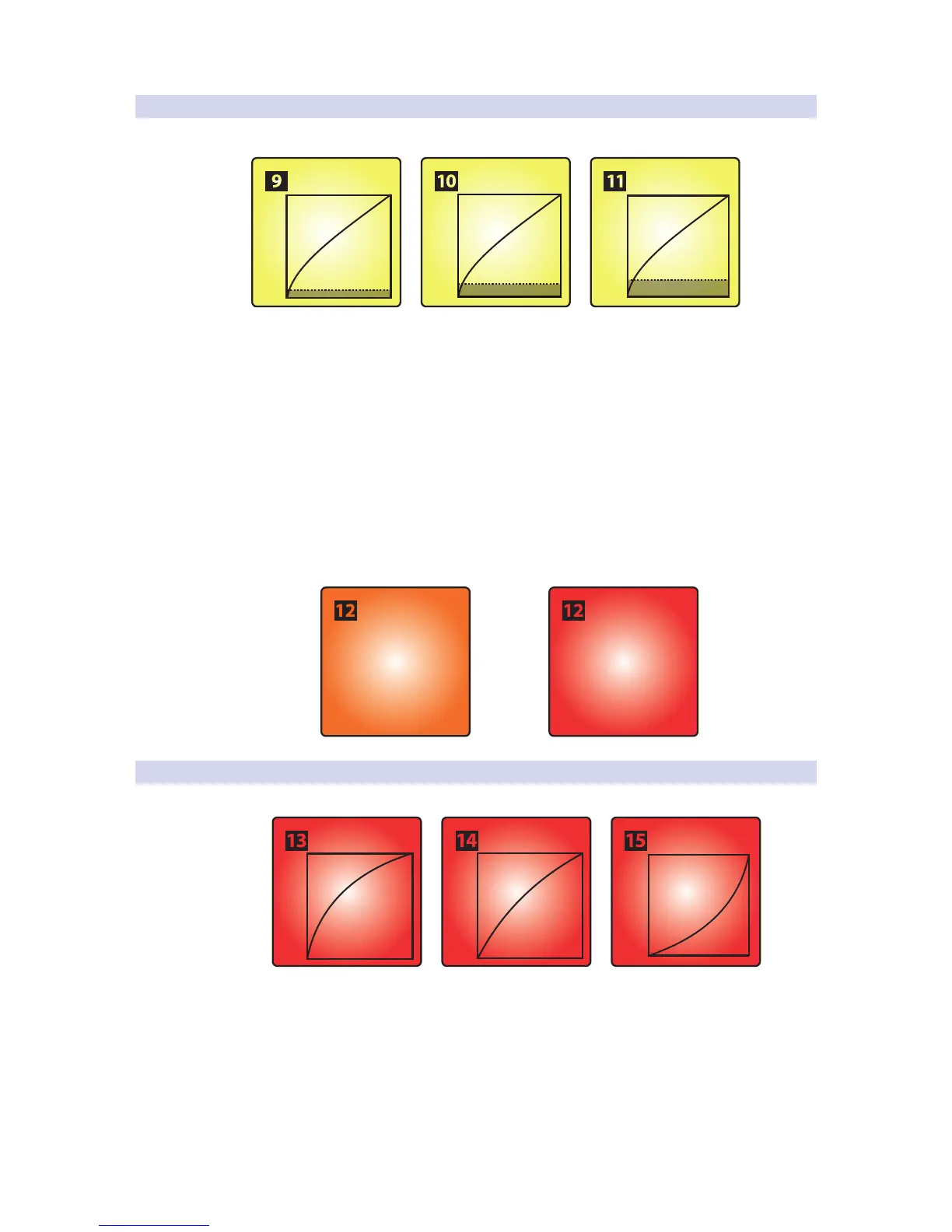
The Pressure Threshold for your ATOM controller pads has three settings:
• Low. This setting requires the least amount of pressure after the
initial strike before sending a MIDI pressure message.
• Medium. While this setting is enabled, the pressure
message is delayed slightly after the initial strike.
• High. This is the default setting for the ATOM and requires the greatest
amount of pressure after the strike for the MIDI pressure message to send.
Power User Tip: Regardless of the Pressure Threshold setting, the pressure value always
starts from 0 or 127 (depending on the Global Pressure setting).
The Global Pressure range can be toggled to transmit values from 0
to 127 or from 127 to 0. By default, the range is from 0 to 127.
0 to 127
(Default)
127 to 0
Pressure Range Toggle
OR
2.2.4 Strike Velocity
The Strike Velocity for your ATOM controller pads has three settings. Use Pads
13-15 to adjust how responsive your pads will be as you press them:
• Soft. This setting is optimized for players who prefer to play
softly. Soft pad strikes will result in higher MIDI values.
• Medium. This is the default setting for the ATOM and has been
optimized for a wide range of players and performance styles.
• Hard. This setting is optimized for players who prefer to play with a
lot of force. Harder pad strikes will result in lower MIDI values.


 To Next Page