5.4 Advanced Setup Mode
Your ATOM controller allows you to customize the MIDI channels
for several functions using Advanced Setup Mode.
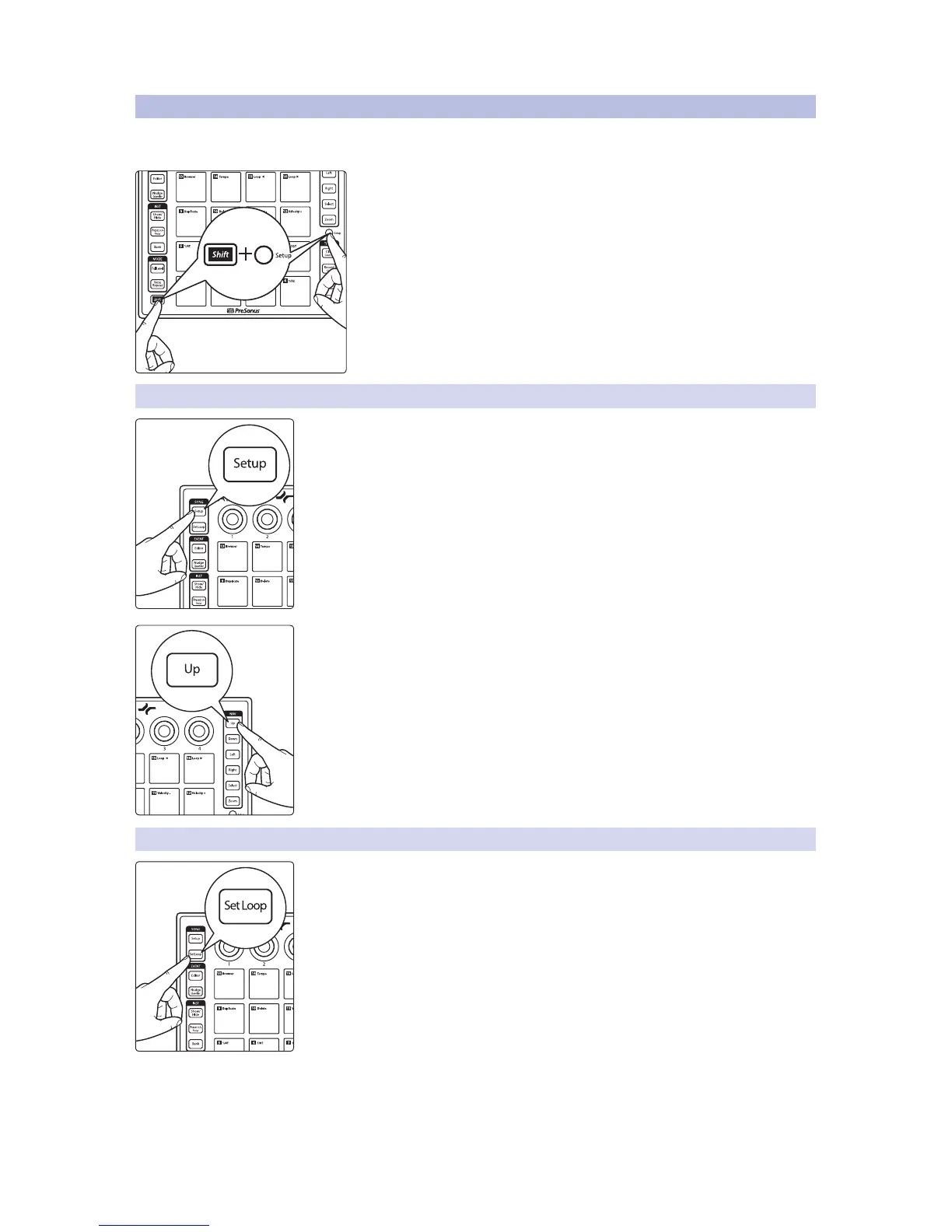
To launch Advanced Setup Mode, press and hold the Shift and Setup
buttons simultaneously.
While Advanced Setup Mode is active, the 16 pads on your ATOM controller
will not send MIDI messages, rather they will act as channel select buttons.
Note: Changes made in Advanced Setup Mode will not be reflected while Studio
One Native control is active. This mode is designed to customize ATOM for use
with 3rd party applications.
5.4.1 Select Pad MIDI Channel
By default, the 16 pads send their MIDI messages on MIDI Channel 10. Pressing the
Song Setup button while Advanced Setup Mode is active will allow you to change
the MIDI channel for the 16 pads on your ATOM.
Press the number of the pad for the desired MIDI channel. For example, to changed
the MIDI channel to Channel 3, press Pad 3.
To reset the MIDI Channel to default (MIDI Channel 10), press the Up button.
5.4.2 Select Knob MIDI Channel
By default, the 4 knobs send their MIDI messages on MIDI Channel 1. Pressing the Set
Loop button while Advanced Setup Mode is active will allow you to change the MIDI
channel for the 4 knobs on your ATOM.
Press the number of the pad for the desired MIDI channel. For example, to changed
the MIDI channel to Channel 3, press Pad 3.


 To Next Page