75
Install the Thunderbolt 3 ASIO Driver on Windows
To install the Thunderbolt 3 module ASIO driver on Windows:
1 Download the Thunderbolt 3 module driver.exe file to your computer from your Avid Master account.
2 Double-click the downloaded installer file.
3 Follow the on-screen instructions.
4 When prompted, click Next and then Install.
5 Once the driver is installed, open your audio application and select the Digital Audio Denmark ASIO driver.
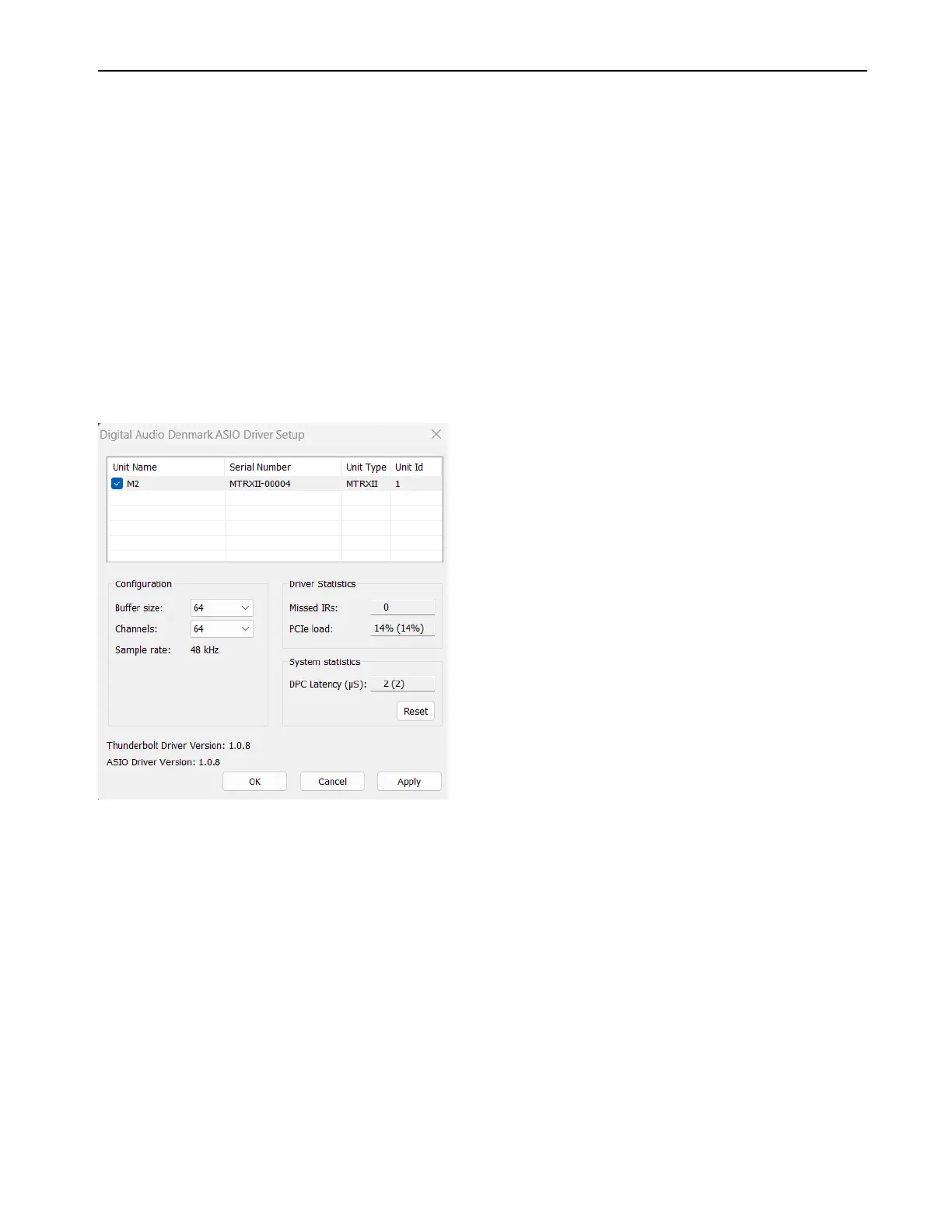
To configure the ASIO driver:
1 Open the ASIO Driver Setup control panel from the audio configuration section of your audio application.
2 Configure the control panel as desired.
ASIO Driver Configuration
Device Selection
Lets you select any of the interfaces connected by Thunderbolt.
Buffer Size
Select the desired Buffer Size (in samples): 16, 32, 64, 256, 512, or 1,024.
It is recommended that you start with a large buffer size to ensure you have stable audio.
Sample Rate
Select the desired sample rate for the connected audio interface: 44.1, 48, 88.2, 96, 176.4, 196, 352.8 or 384 kHz
Channels
Select the desired number of channels you want to make available for Core Audio applications on your computer: 64, 128,
or 256 channels.
The driver window provides various status information for monitoring the PC and audio transfer performance.
ASIO Driver Setup dialog



 To Next Page