page 35
Industrial Power Corruptor Manual Rev 1.00
3.5.4 Planning your test
3.5.4.1 Starting the IPC software
To operate, your IPC requires a connection to a
W
indows
TM
PC running the IPC software package.
The IPC software package manages the IPC functions,
in cooperation with the five processors inside your IPC.
The internal processors are responsible for precision timing,
data acquisition, and all power controls. The IPC software
package on your computer is responsible for parts of the
user interface, general timing, making decisions, and data
recording.
Look in your Program/Start menu for a folder called
“Power S
tandards Lab”. Double click on the IPC Software
package.
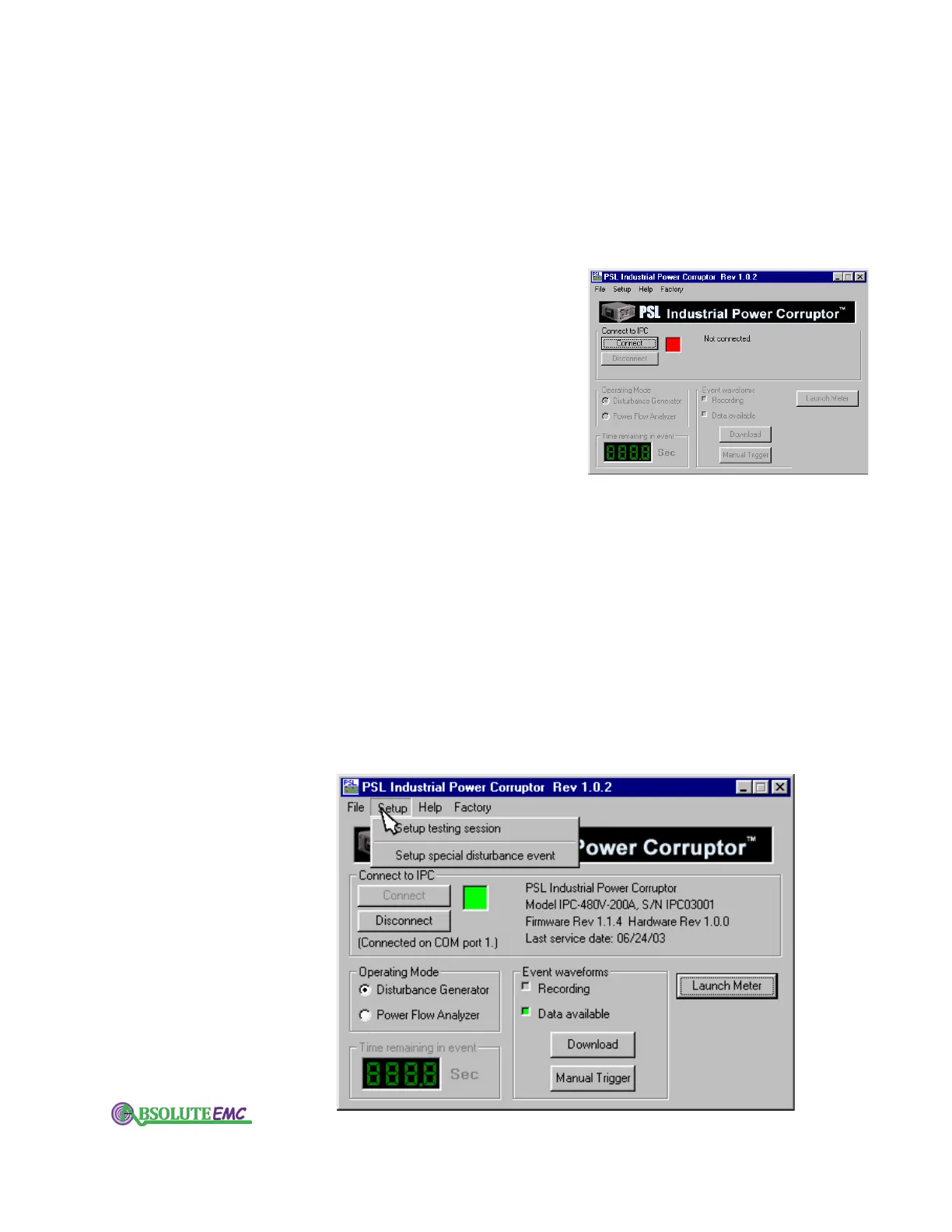
When it starts, click on the “Connect” button.
3.5.4.2 If you can't connect
1. Check that your IPC is showing "Waiting for PC…"
in its status display.
2. Check that the coms cable is plugged into the correct
connector on the front of your IPC.
3. Check that the coms cable is plugged into the DB9
connector
, and that the DB9 connector is plugged into an
available serial port on your computer.
4. Verify that the COM port is actually available. There
may be another program that has seized that port, such as a
hot-sync program for a hand-held computer. You can use
the "COM Port Diagnostics" program from PSL to check
your com ports.
Properly connected to your IPC, the software is ready to help you set up your testing session.
absolute-emc.com
Phone:703-774-7505
info@absolute-emc.com


 To Next Page