page 34
Industrial Power Corruptor Manual Rev 1.00
3.5.3 Installation
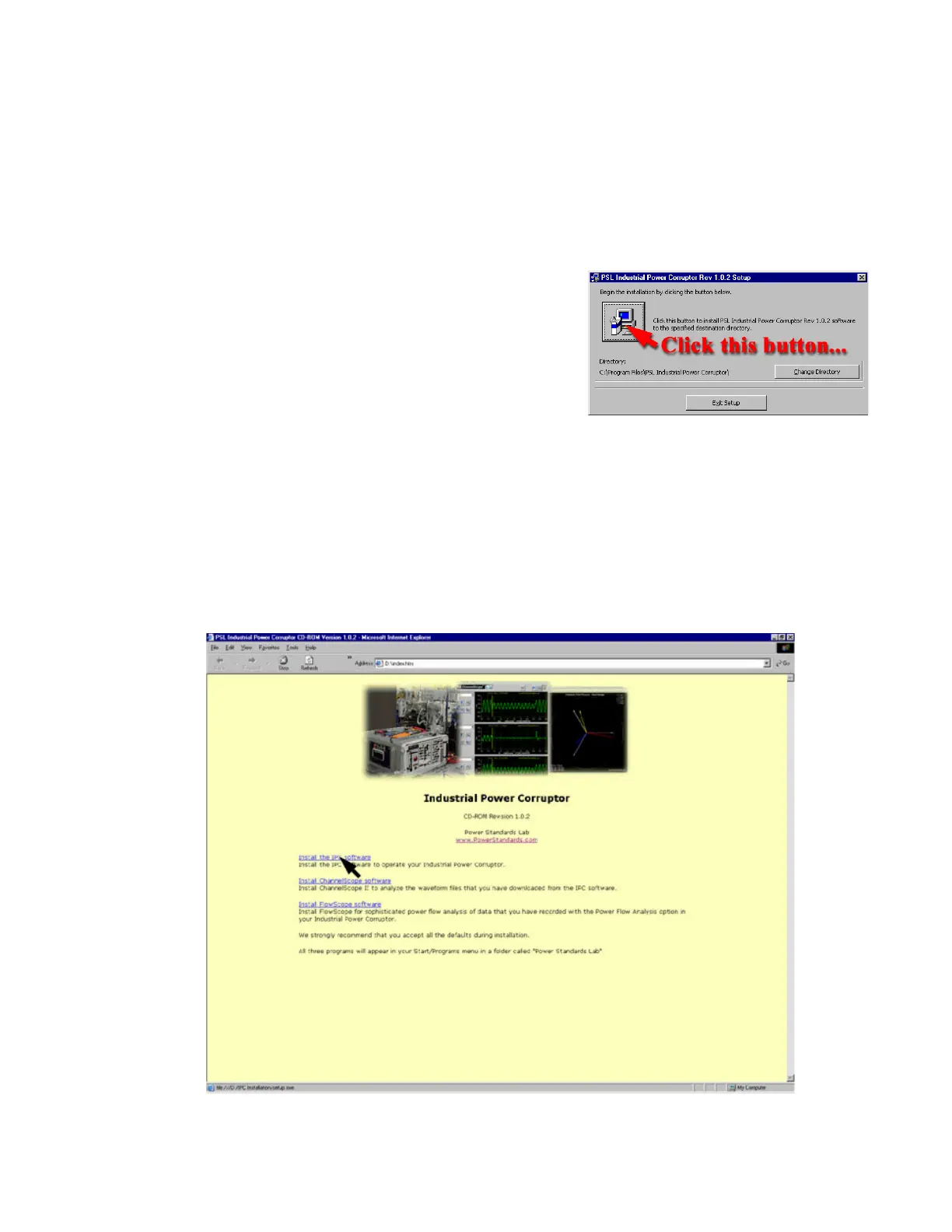
1. Insert your IPC CD-ROM. It should automatically
start. (If it does not start, browse your CD-ROM and double-click
on the "CDS
tart" application.)
2. Click on the "Install IPC Software" link. You will
probably be asked if you want to download the program, or run it or
open it in its existing location.
We recommend running it from its
existing location. (Some browsers, such as Mozilla, may require
you to download the software
and save it. If you take this approach, browse to the location
where you saved it and double-click on the "Setup" application.)
3. We strongly recommend that you accept all of the
default installation parameters.
4. Repeat the installation process for the other two
programs on the CD-ROM.
5. In your Start / Programs menu, you will find a new
folder called "Power S
tandards Lab". All three programs will be
inside this folder.
6. If you need to remove one or more of the programs,
use your Control Panel's "Add/Remove Programs" feature.
Install all three programs on the CD-ROM. They will appear in your “Program – Start” menu in a folder
called “Power Standards Lab”.
We strongly recommend that you accept all of the
default values during setup.


 To Next Page