page 50
Industrial Power Corruptor Manual Rev 1.00
3.5.9 FlowScope
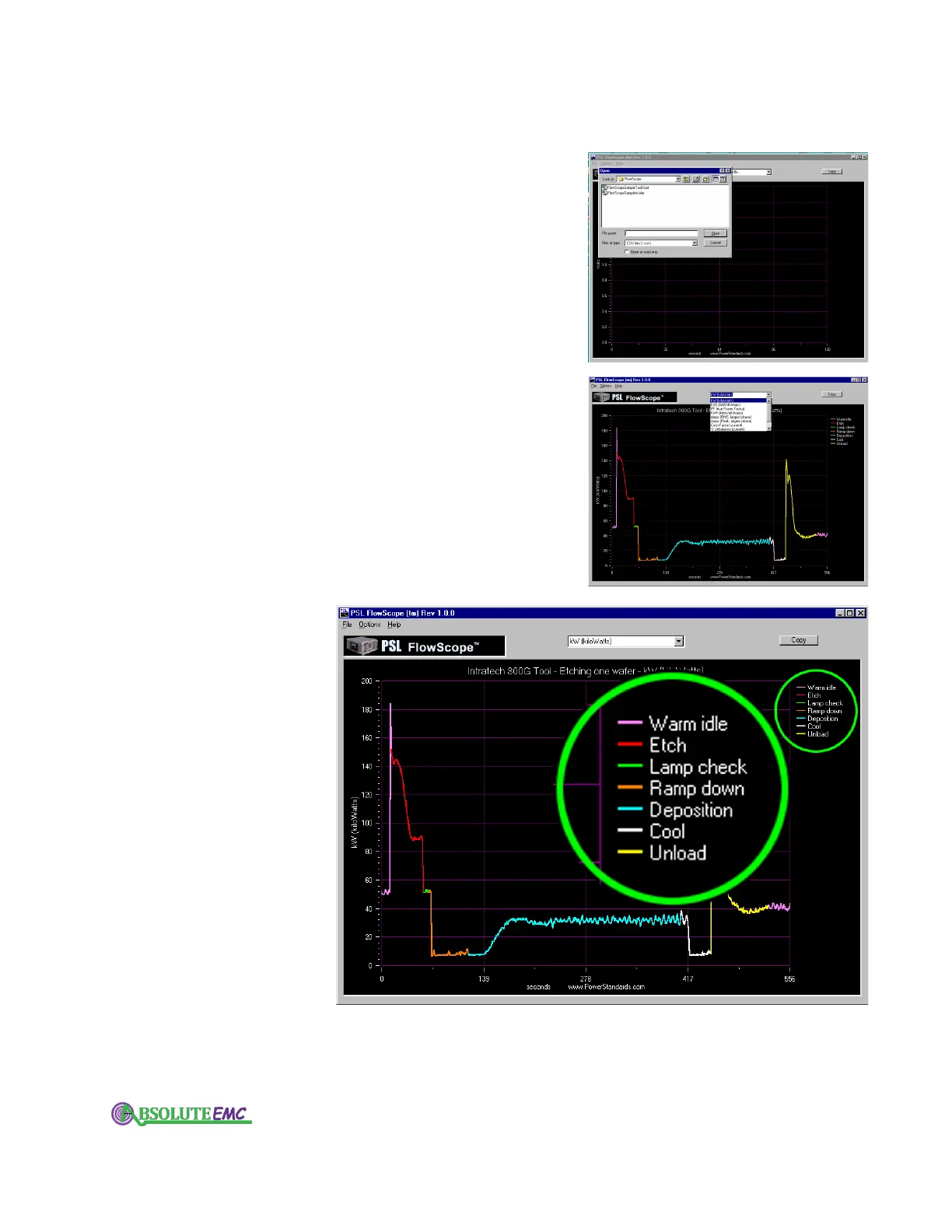
The FlowScope software lets you analyze and graph power
flow parameters. It is optimized for analyzing industrial processes.
Use your IPC's Power Flow Recorder (part of the Power Flow
Analysis option) to record a data file for the FlowScope software.
Two sample data files are provided with the program. All of the
data is stored in industry-standard CSV files, which can be opened
by any spreadsheet program. However, we recommend using the
FlowScope software because it is optimized for presenting this
type of data.
Start the FlowScope software, then use its File menu to open
a file. Use the Options menu to select the type of graph you would
like to display
. Double-click on the graph (or click the Copy button)
to place the graph on your computer's clipboard.
Use the drop-down box, at the top center, to choose the power
flow parameter you want to display
.
absolute-emc.com
Phone:703-774-7505
info@absolute-emc.com


 To Next Page