page 38
Industrial Power Corruptor Manual Rev 1.00
3.5.6 Triggering, selecting channels, and downloading
Your IPC contains a 35-channel digital oscilloscope, capable
of recording several seconds of high-speed data on every channel.
This oscilloscope is automatically triggered whenever you use
your IPC to generate a disturbance event, but you can also manually
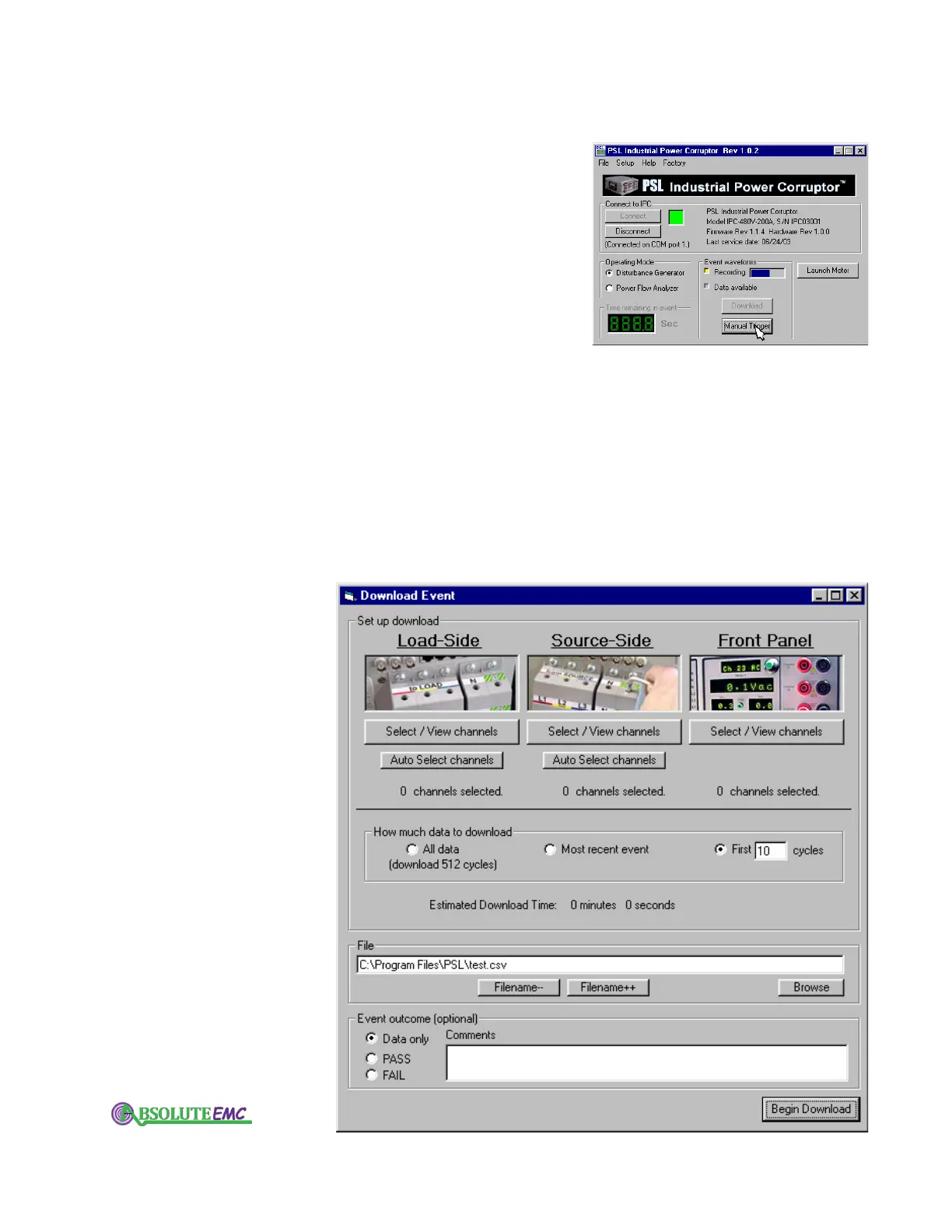
trigger it with the "Manual trigger" button on the opening screen.
Try clicking on the "Manual trigger" button.
For very long events, such as 3-phase interruptions designed
to examine start-up current, you may want to manually trigger the
scope near the end of the event, so you can capture all of the data
at the end.
Your IPC's digital oscilloscope stores the waveforms in RAM.
If you want to save the waveforms, or look at them, you must
download them to your PC.
Click on the "Download" button on the opening screen. You
can choose which channels to download, and you can choose how
much data to download. The software will automatically calculate
how long the download will take.
You can also choose where to store the downloaded waveforms
on your computer
. You will use the ChannelScope software package
to view the waveforms.
Use the "Select Front Panel Channels" button both to choose
absolute-emc.com
Phone:703-774-7505
info@absolute-emc.com


 To Next Page