How to Use the Jet with the PVA JDX 6.
Jet Valve Controller
If your valve is on a workcell with the PVA JDX Jet Valve Controller, use the screens that
follow to operate your valve.
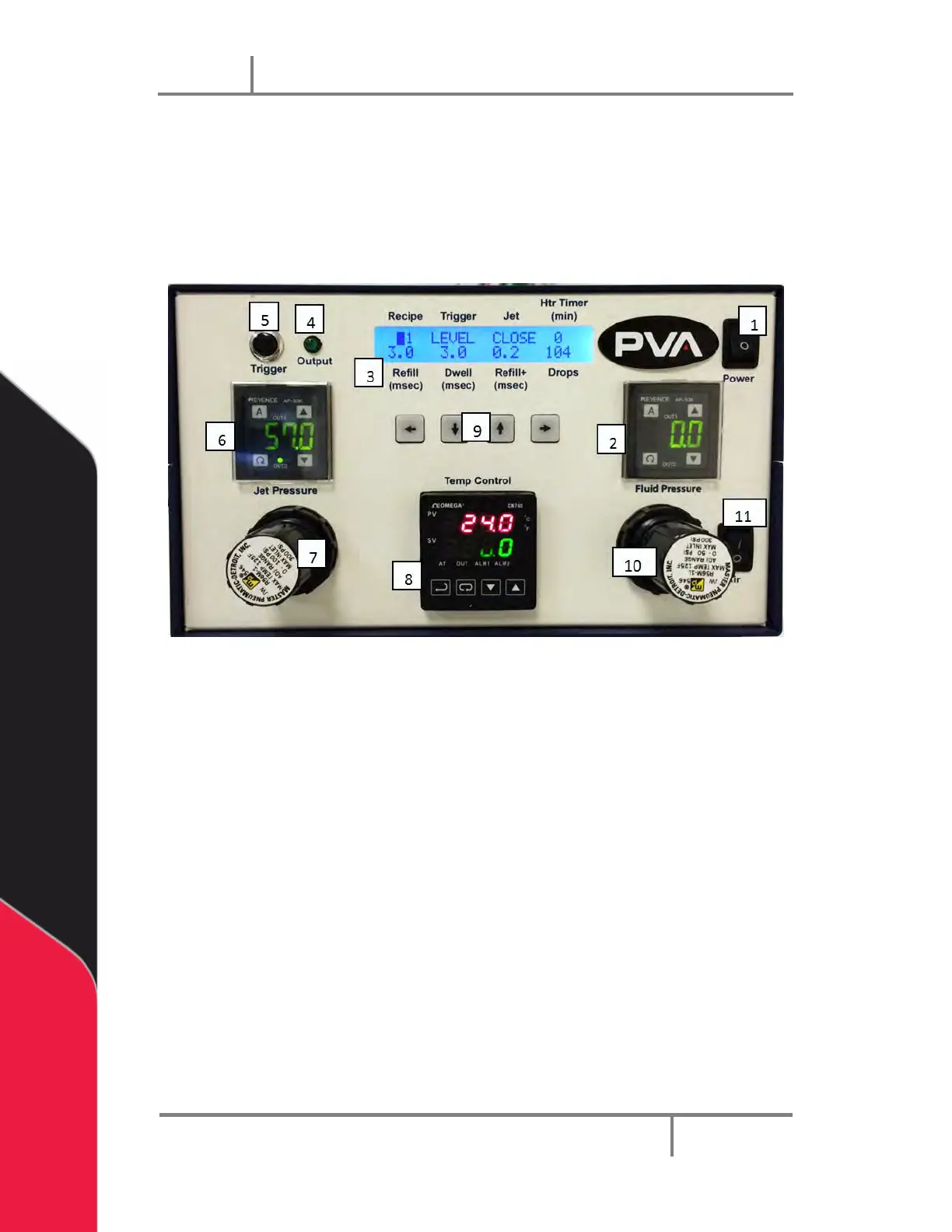
Figure 31: PVA JDX Jet Valve Controller Front Panel
1. Power switch – Turns on/off device power
2. Fluid Pressure gauge – Displays fluid delivery pressure
3. LCD display – Displays the program parameters
4. Trigger LED – Turns on when dispensing
5. Trigger switch – Activates current recipe displayed on LCD once
6. Jet Pressure gauge – Displays jet actuation pressure
7. Jet Pressure regulator – Regulates the jet actuation pressure
8. Temperature controller – controls the temperature of the dispensing nozzle
9. Keypad – Moves the curser on the LCD display and changes the parameter
values
10. Fluid Pressure regulator – Regulates the fluid delivery pressure
11. Air switch – Turns on and off the fluid delivery pressure


 To Next Page