LCD Display Functions and Selection Keys 6.3
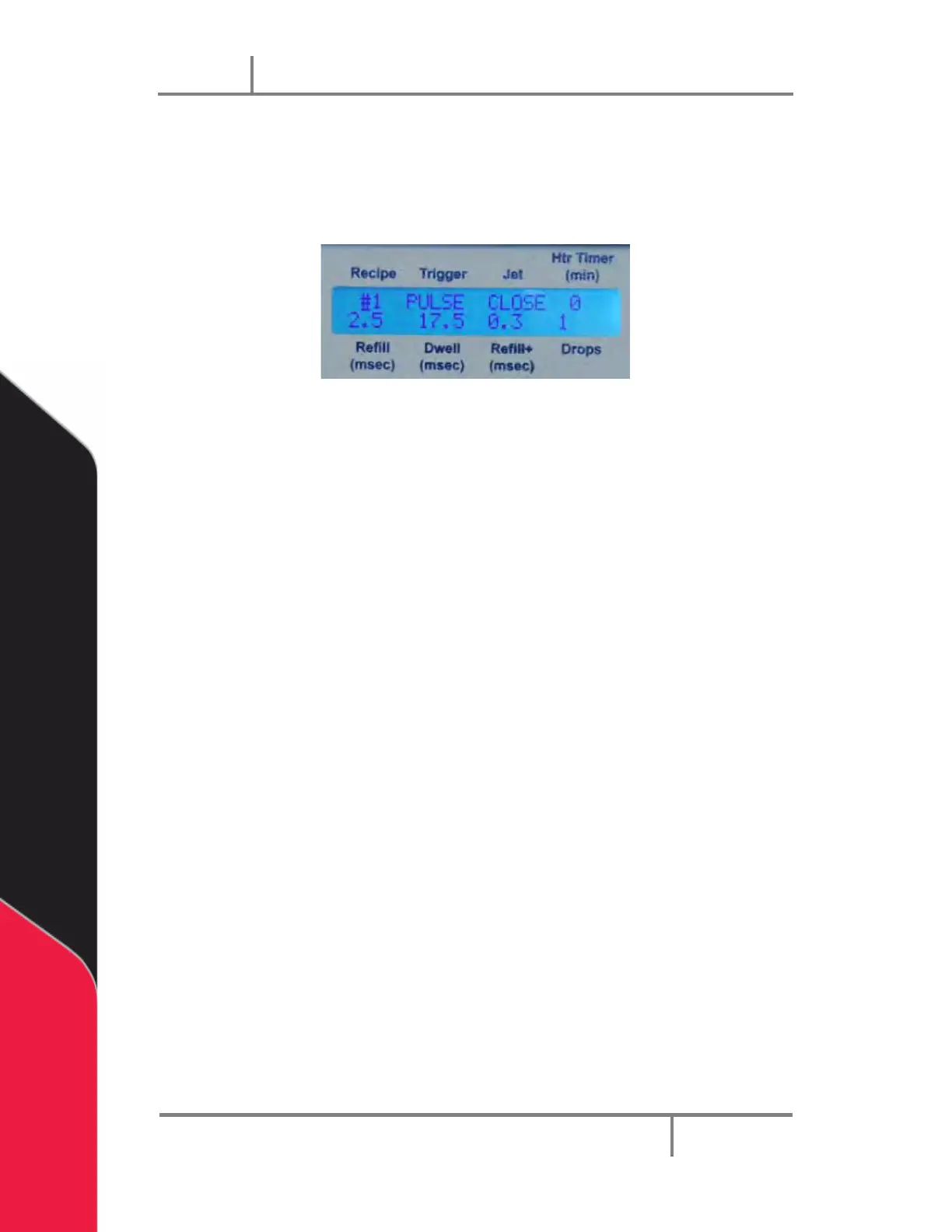
There are 8 settings available on the main LCD menu. The UP/DOWN keys are used to
change the values in the settings. The LEFT/RIGHT keys are used to select the settings.
The selected setting is shown with a blinking cursor. The settings are described below.
Figure 37: LCD Display
• Recipe - You can have up to 6 timing recipes saved in the controller.
• Trigger - You can choose between PULSE and LEVEL for Trigger Mode.
• Jet - Use this option to CLOSE or OPEN the Jet valve.
• Htr Timer (min) - Setting a value n greater than zero will cause the controller to
turn off the Heater after n minutes of idle time.
• Refill (msec) - Specify the Refill Time in msec for Recipe #n. Sets the Flow time
required for the material to flow into the orifice after each drop has been
ejected. Time is set in msec with 0.1 msec resolution.
• Dwell (msec) - Specify the Dwell Time in msec for Recipe #n. Sets the time
required for the material to be ejected from the orifice. Time is set in msec with
0.1 msec resolution.
• Refill+ -Specify the Refill+ Time in msec, used to compensate for small first
drops. Refill+ is a time value that is added to Refill Time. This value is added to
every drop in DROP Mode. However, this value is added only to the very first
drop in LINE Mode. i.e. The Refill Time for all drops in DROP mode would be 2 +
0.5 = 2.5 msec. The value of Refill Time in LINE mode is 2 msec except for the
very first drop which is 2.5msec.
• Drops - Specify the number of drops to be repeated. For example, if you want a
single drop per trigger signal, then enter 1. If you want 10 drops to be dispensed
per trigger signal, enter 10.
NOTE: To set the additional parameter Refill ++, you will press the LEFT and
RIGHT keys simultaneously below the LCD display and the following screen
will appear on the LCD display:


 To Next Page