3.6.4 Display Page 10
3.6.4 Display
1
2
3
8
4
9
7 5
6
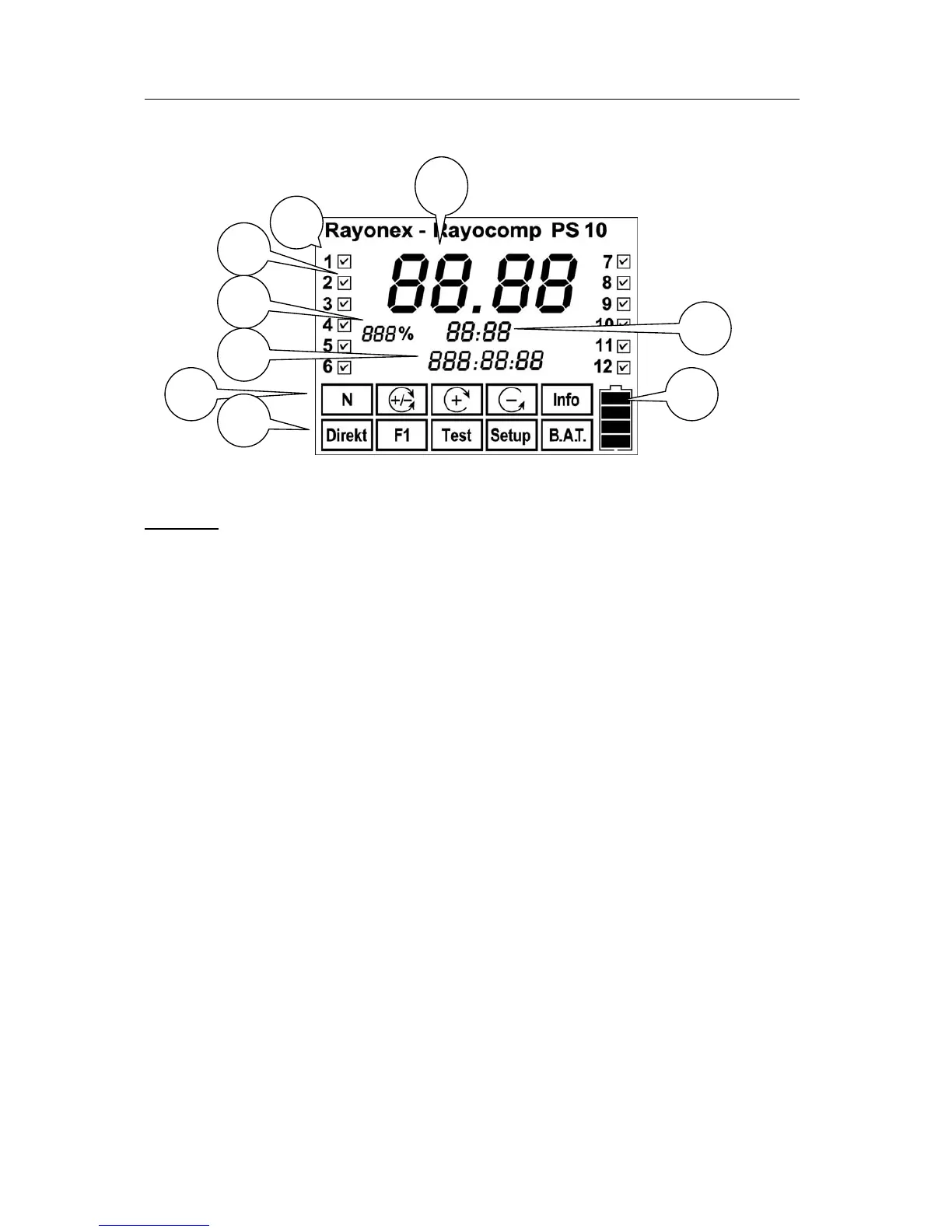
Display of the Rayocomp PS 10
Caption:
1/2: Numbering the modules. All in all, the Rayocomp PS 10 is intended for
the activation of 12 different modules. If you select the menu item “Info”
the modules already activated in the device are displayed.
3: Here, the current service state of the device is indicated. After approx.
6000 operation hours or when your device hasn’t been in service for
about three years, it will indicate 100 % (service is due).
4: In the menu item “F1“, you can read the remaining total harmonising
time here.
5: This displays the polarisation type which is currently set.
6. Here you can read, which menu item has been selected.
7. This symbol shows you the charge status of the battery pack. If all 4
bars can be seen on the display, the accumulator is full. If no bar is
indicated, the accumulator is empty.
8. During harmonisation with BnPS-programmes, the remaining duration of
the harmonising appertaining to the current basic frequency value will
be shown at this place.
9. Here, the currently set fundamental frequency value is indicated. We
have selected a large numeral display for better reading comfort.


 To Next Page