3.6.3 Keyboard Page 9
3.6.3 Keyboard
1
2
3
6
8 9 10 11
12
13
14
7
5
4
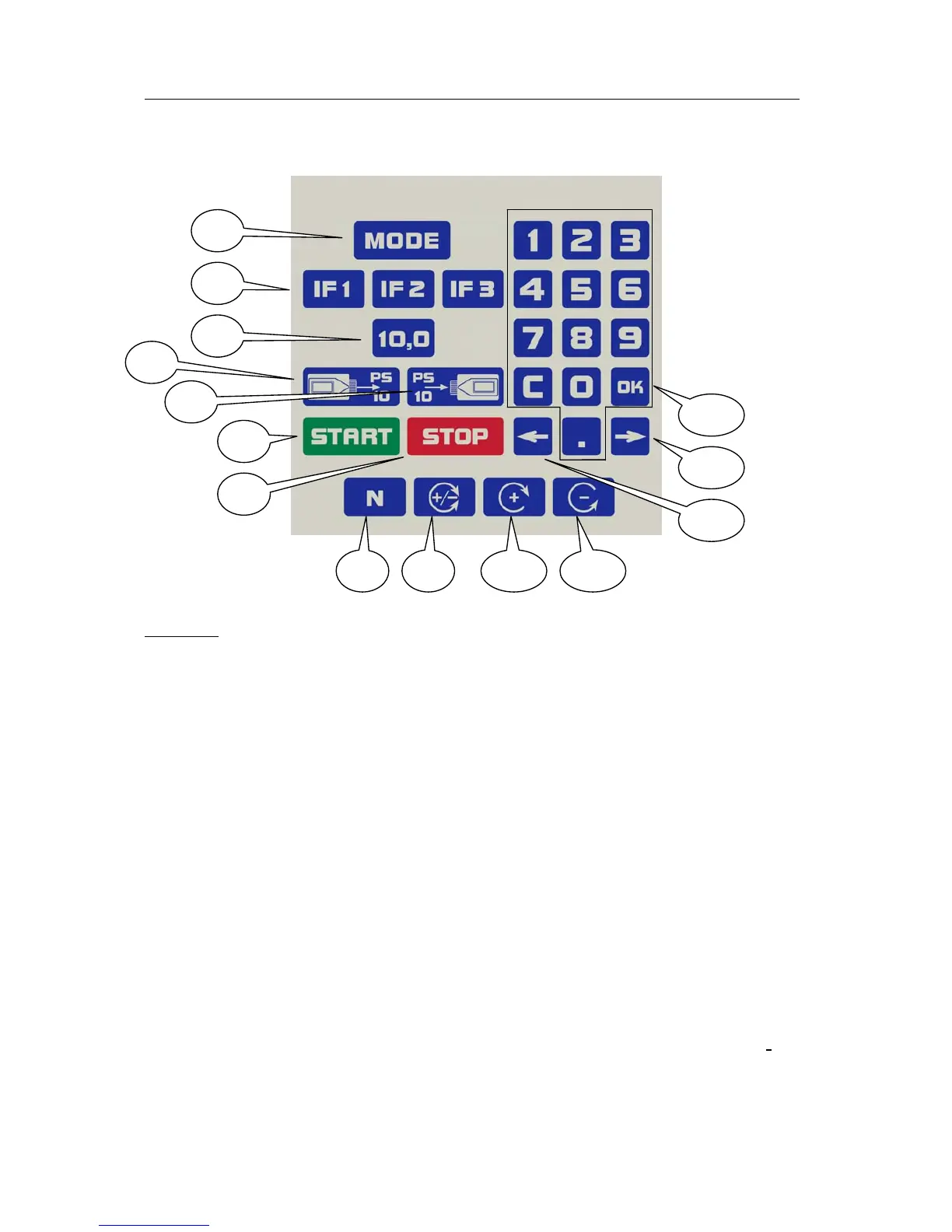
Keyboard of the Rayocomp PS 10
Caption:
1: Mode key for selecting the menu item
2: IF1 – IF3 keys for determining frequently used fundamental frequency
values
3: 10.0 key for the rapid access to this special value and for activating the
M10 test protocol.
4: Key for loading the values from a memory card into the device
5: Key for storing values from the device on a memory card
6: Start key for starting F1 programs, for example
7: Stop key for interrupting an automatic run or for deleting the function
8: N key of the polariser to switch the polariser to neutral
9: +/– key of the polariser to switch on the bipolar function
10: + key of the polariser to activate a polarisation gyrating to the right
11: - key of the polariser to activate a polarisation gyrating to the left
12: Arrow-left key, i.e. for selecting the previous value during an automatic
program course
13: Arrow-right key, i.e. for selecting the following value during an automatic
program course
14: Numerical block for entering digits, numbers, fundamental frequency
values – C deletes, the decimal point indicates a precise value (i.e. 12.75).


 To Next Page