4.3.5 Utilising the Harmonising Programs of the new RAH Page 31
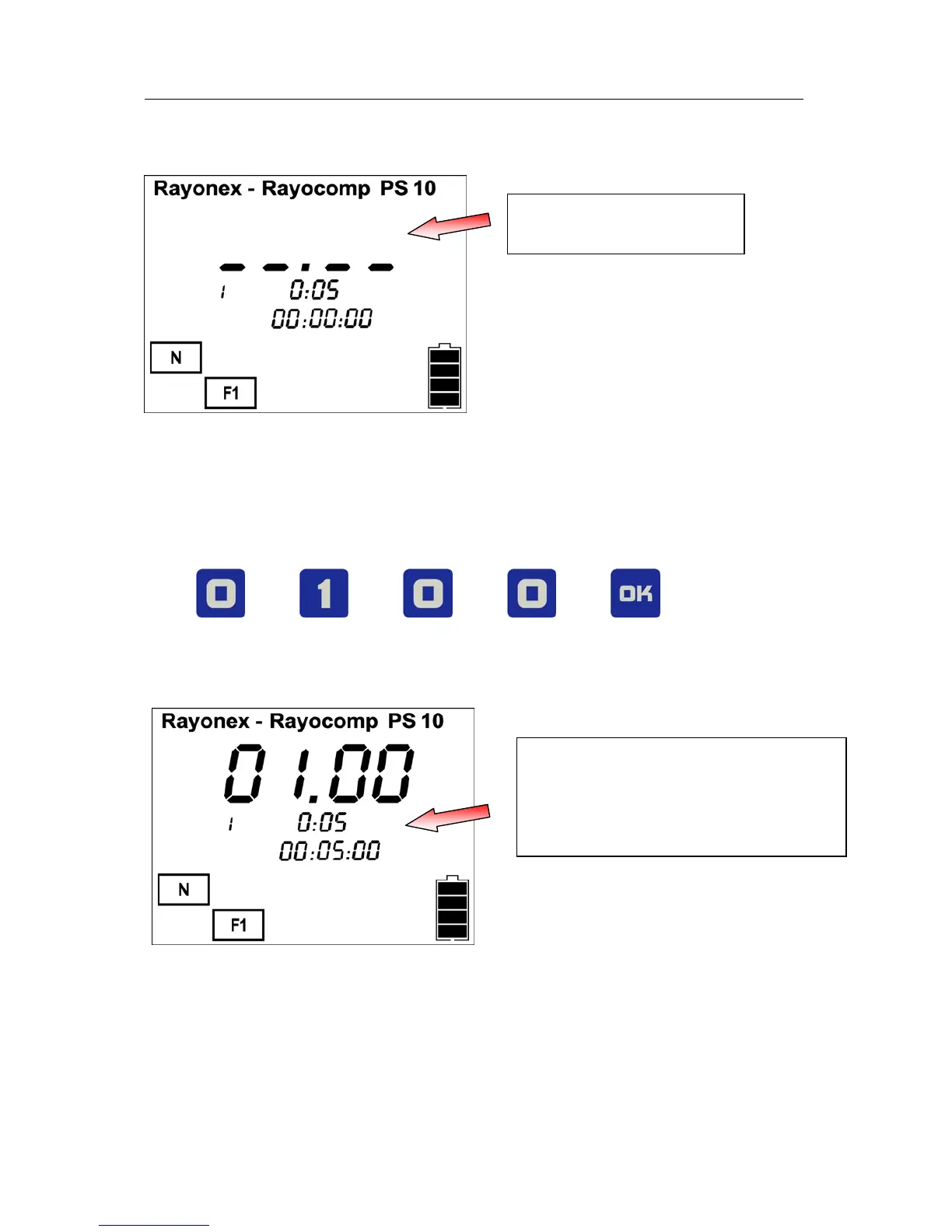
The illustration below shows the display of the input mask.
The program number
is entered here
The PS 10 is waiting for the entry of a program number now. We choose the
programs “Vitalisation, complete” and “Upper respiratory system” in this case.
Looking at the respective lists, you will see that the program “Vitalisation,
complete” has the number 01.00 and the program “Upper respiratory system”
is assigned to the number 70.16. In order to determine the treatment course
with these programs, please press the following keys
Now the display will look like this:
These values indicate the length of
the harmonising time of the
currently selected program and the
total time needed for the programs
already selected
The next step is for setting the harmonising time. The already set default
value is 10 minutes. This value can be taken over directly with the OK key. As
an option, this value can also be altered in steps of one minute length to suit
your own needs. If this entry is altered, the value is taken over as the new
default value. This simplifies the entry for the user if a harmonising time
other than the given value is required.


 To Next Page