Picture Settings
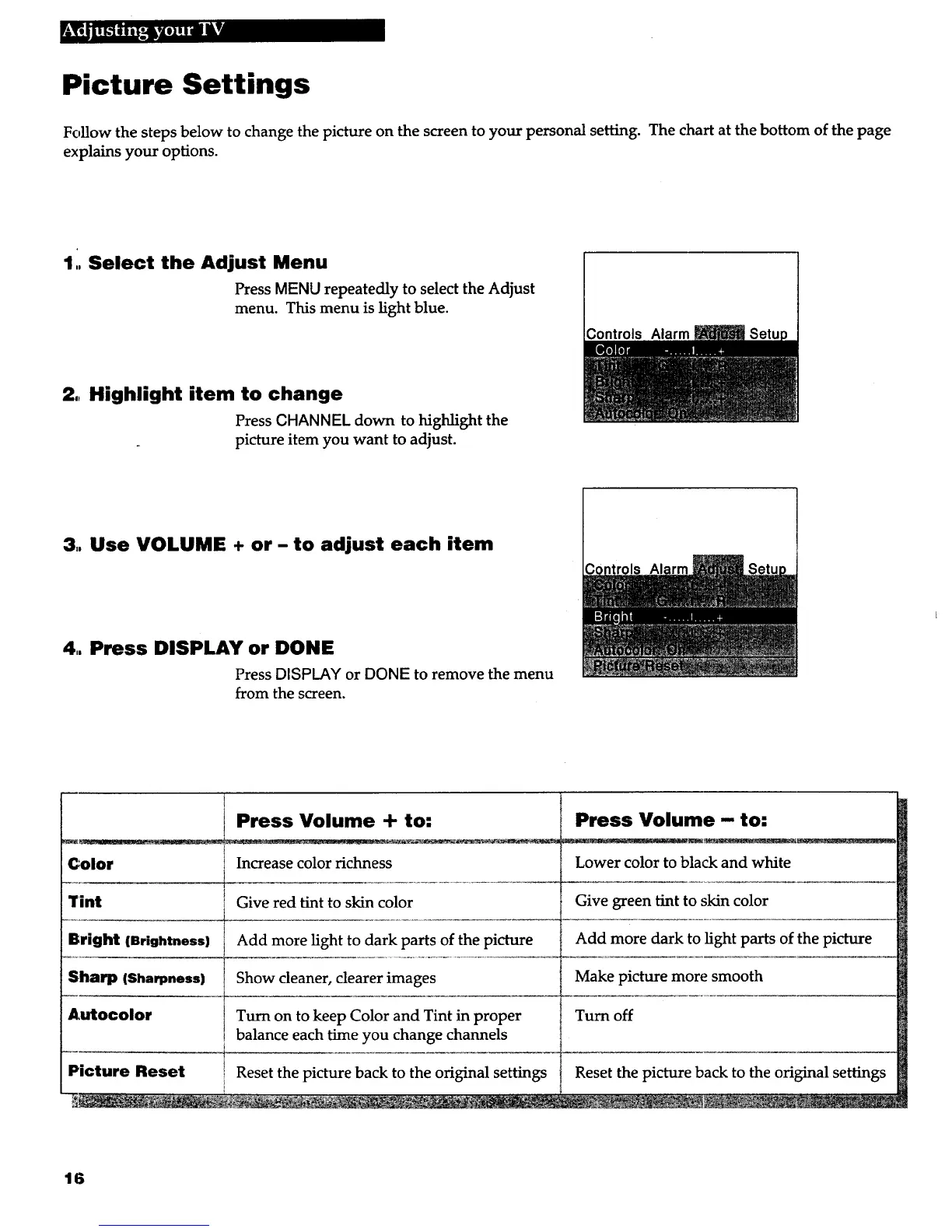
Follow the steps below to change the picture on the screen to your personal setting. The chart at the bottom of the page
explains your options.
1,, Select the Adjust Menu
Press MENU repeatedly to select the Adjust
menu. This menu is light blue.
2., Highlight item to change
Press CHANNEL down to highlight the
picture item you want to adjust.
Controls Alarm
3,. Use VOLUME + or- to adjust each item
4.. Press DISPLAY or DONE
Press DISPLAY or DONE to remove the menu
from the screen.
Color
Tint
Bright (Brightness)
Sharp (Sharpness)
Autocolor
1
Press Volume - to:
Lower color to black and white
Give green tint to skin color
Add more dark to light parts of the picture
Make picture more smooth
Turn off
Press Volume + to:
Increase color richness
Give red tint to skin color
Add more light to dark parts of the picture
Show cleaner, dearer images
Turn on to keep Color and Tint in proper
balance each time you change channels
Reset the picture back to the original settingsPicture Reset Reset the picture back to the original settings
16



 To Next Page