Cable Box and VCR Connection
1. Use this connection to:
Connect a cable box for premium
channels and a VCR.
Record a scrambled channel on the VCR
at the same time you are watching an
unscrambled channel through the TV.
.
Accessories needed
Order form is on pages 37-38.
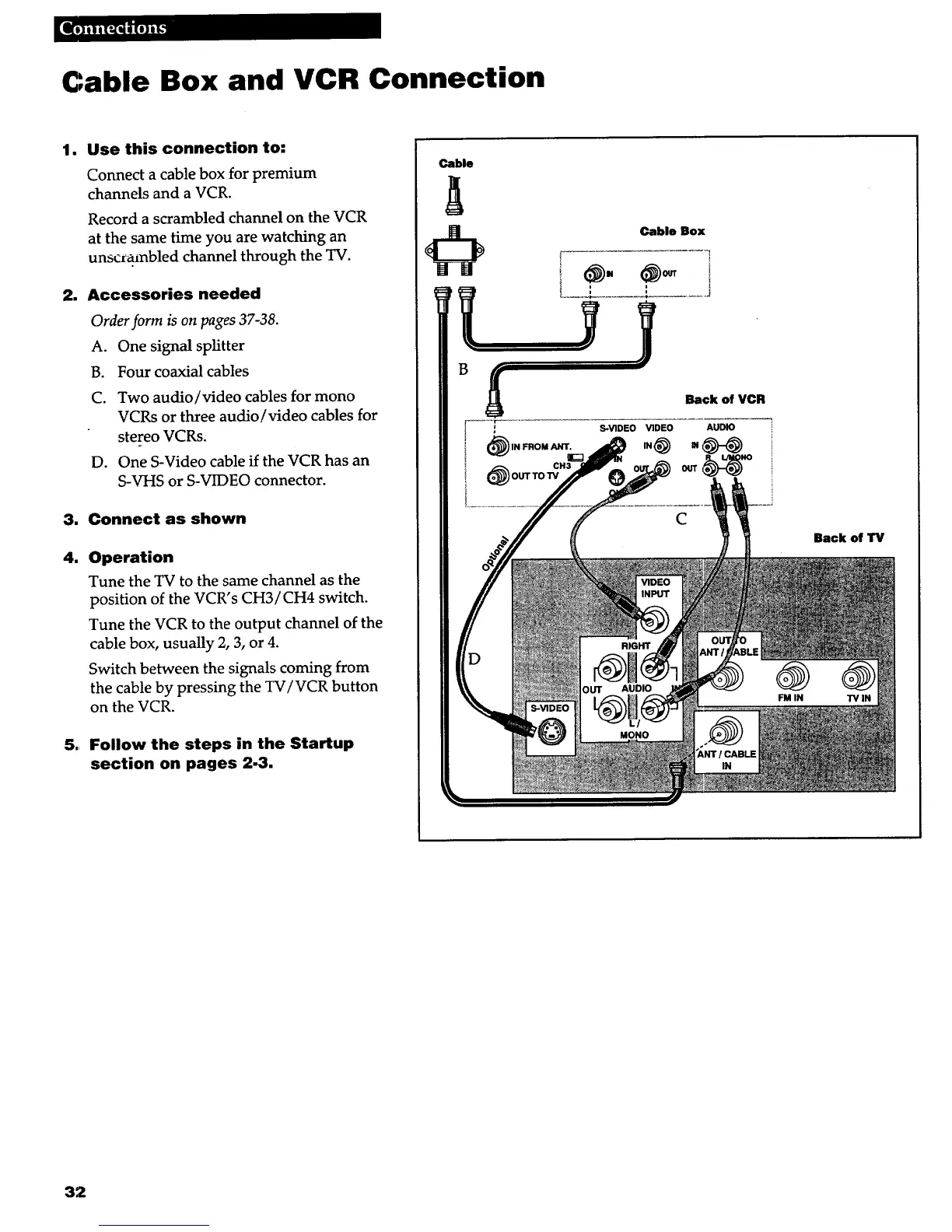
A. One signal splitter
B. Four coaxial cables
C. Two audio/video cables for mono
VCRs or three audio/video cables for
stereo VCRs.
D. One S-Video cable if the VCR has an
S-VHS or S-VIDEO connector.
3. Connect as shown
4. Operation
Tune the TV to the same channel as the
position of the VCR's CH3/CH4 switch.
Tune the VCR to the output channel of the
cable box, usually 2, 3, or 4.
Switch between the signals coming from
the cable by pressing the TV/VCR button
on the VCR.
5, Follow the steps in the Startup
section on pages 2-3.
Back of VCR
S-VIDEO VIDEO AUDIO
m
OUT
C
Back of TV
RIGHT
OUT AUDIO
MONO
IN
FM IN "l"VIN
32



 To Next Page