Setting the Alarm Clock
The 'IV can be set to mm on or off each day like an alarm clock It can be set to turn on to a specific TV channel or FM
radio station at a designated time. However, the Alarm cannot be used until the clock is set.
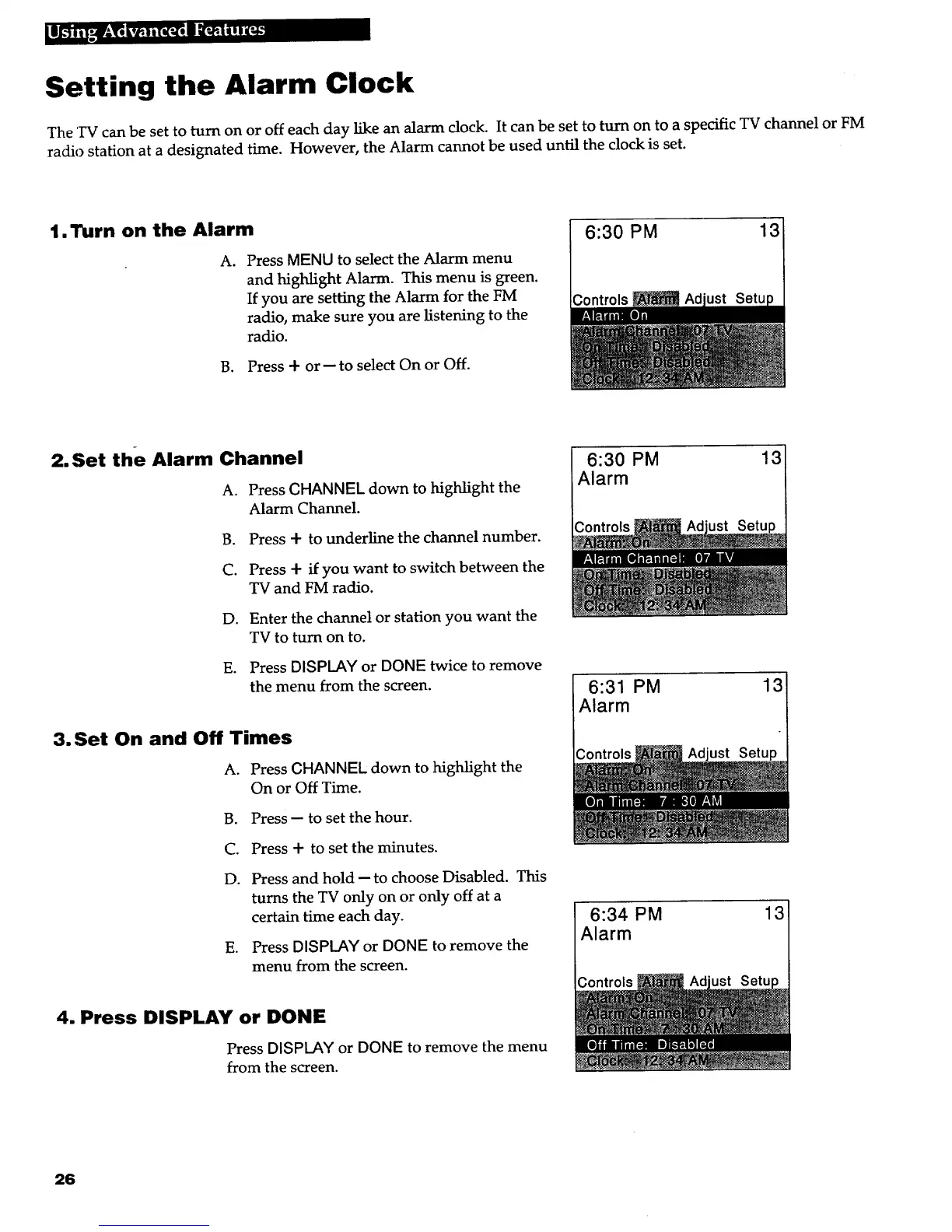
1. Turn on the Alarm
A. Press MENU to select the Alarm menu
and highlight Alarm. This menu is green.
If you are setting the Alarm for the FM
radio, make sure you are listening to the
radio.
B. Press + or-- to select On or Off.
6:30 PM 13
2.Set the Alarm Channel
A. Press CHANNEL down to highlight the
Alarm Channel.
B. Press + to underline the channel number.
C. Press + if you want to switch between the
TV and FM radio.
D. Enter the channel or station you want the
TV to turn on to.
E. Press DISPLAY or DONE twice to remove
the menu from the screen.
3. Set On and Off Times
A. Press CHANNEL down to highlight the
On or Off Time.
B. Press-- to set the hour.
C. Press + to set the minutes.
D. Press and hold -- to choose Disabled. This
turns the TV only on or only off at a
certain time each day.
E. Press DISPLAY or DONE to remove the
menu from the screen.
4. Press DISPLAY or DONE
Press DISPLAY or DONE to remove the menu
from the screen.
6:30 PM 13
Alarm
6:31 PM 13
Alarm
6:34 PM 13
Alarm
26



 To Next Page