Audio Connection
Audio Cassette Recorder or
Amplifier
!Use this connection if your amplifier is not
part of a system with its own remote. Consult
_!heAmplifier's owner's manual for the recom-
mended hookup.
This TVincorporates special circuits which
,enhance stereo imaging and effect when used with
the TV's own speakers. If external speakers are
used, the enhanced stereo effect may decrease.
1. Use this connection to:
Adjust and mute volume with the TV's
remote.
2. Accessories needed
Order form is on pages 37-38.
Two audio/video cables
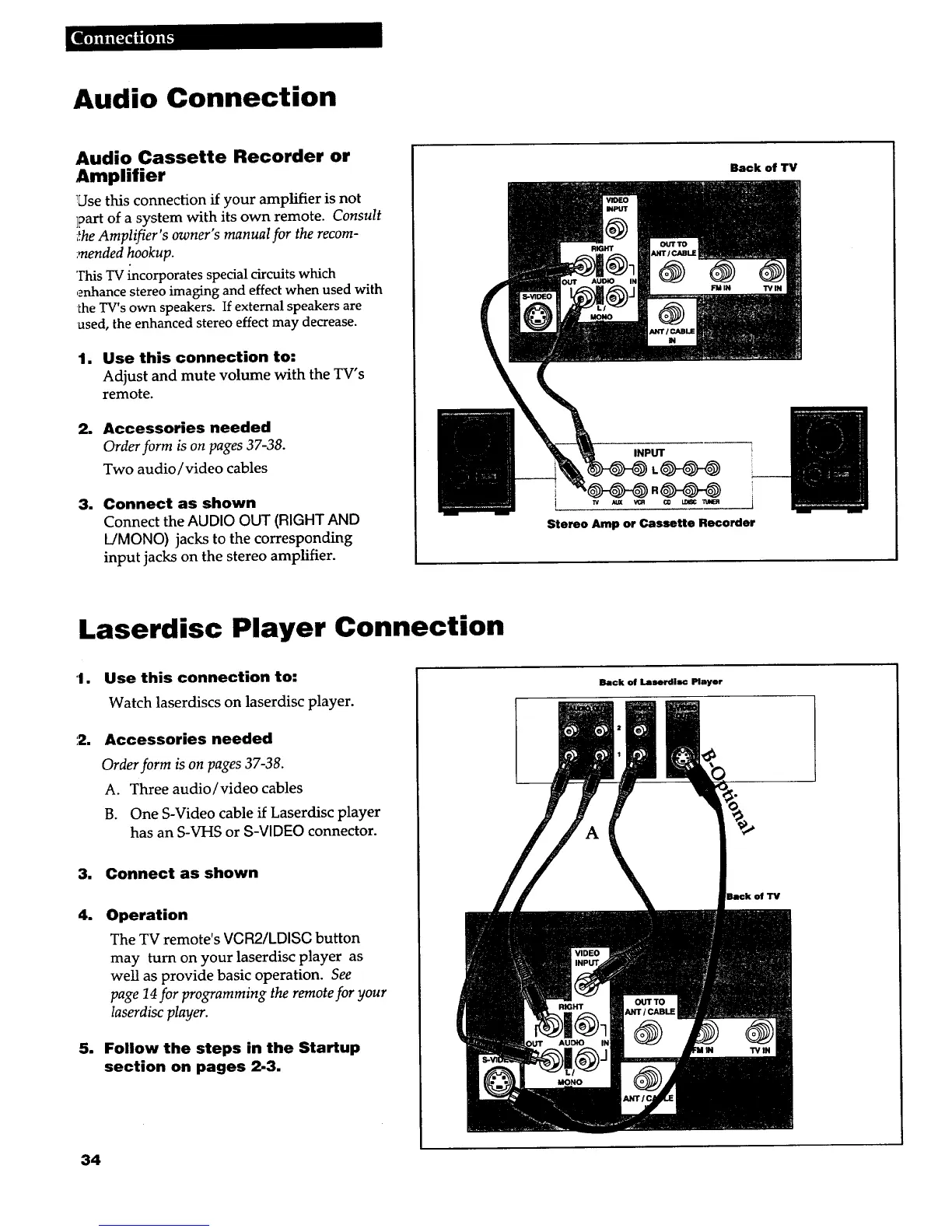
1 Connect as shown
Connect the AUDIO OUT (RIGHT AND
L/MONO) jacks to the corresponding
input jacks on the stereo amplifier.
Back of "IV
INPUT
Stereo Amp or Cassette Recorder
Laserdisc Player Connection
1.
:2.
Use this connection to:
Watch laserdiscs on laserdisc player.
Accessories needed
Order form is on pages 37-38.
A. Three audio/video cables
B. One S-Video cable if Laserdisc player
has an S-VHS or g-VIDEO connector.
3. Connect as shown
4. Operation
The TV remote's VCR2/LDISC button
may turn on your laserdisc player as
well as provide basic operation. See
page 14for programming the remote for your
laserdisc player.
5. Follow the steps in the Startup
section on pages 2-3.
Back of Laserdlsc Player
of TV
34



 To Next Page