Inserting and Removing Cassettes
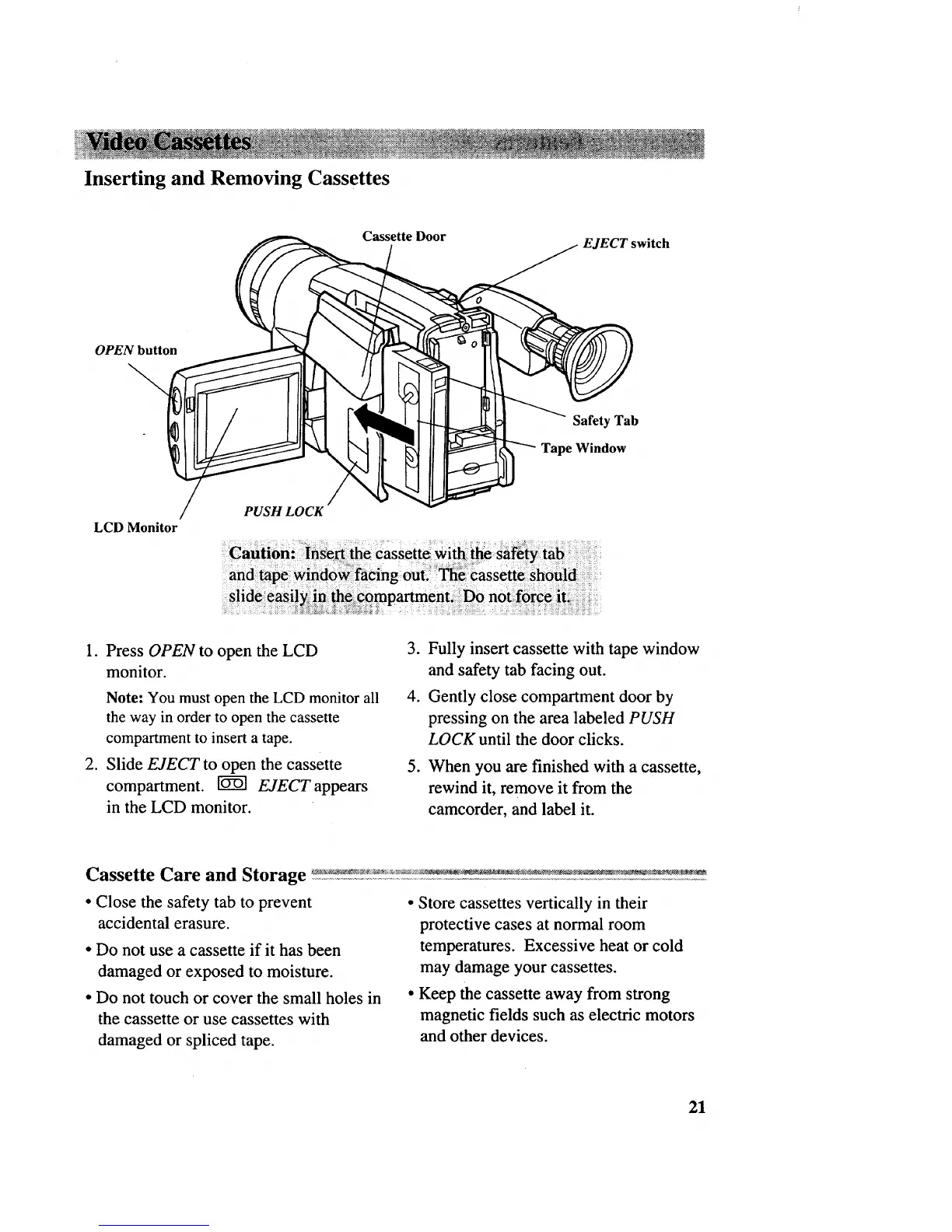
Cassette Door
EJECT switch
OPEN button
\
Safety Tab
Tape Window
LCD Monitor
PUSHLOCK
1. Press OPEN to open the LCD
monitor.
Note: You must open the LCD monitor all
the way in order to open the cassette
compartment to insert a tape.
2. Slide EJECT to open the cassette
compartment. _ EJECT appears
in the LCD monitor.
3. Fully insert cassette with tape window
and safety tab facing out.
4. Gently close compartment door by
pressing on the area labeled PUSH
LOCK until the door clicks.
.
When you are finished with a cassette,
rewind it, remove it from the
camcorder, and label it.
• Close the safety tab to prevent
accidental erasure.
• Do not use a cassette if it has been
damaged or exposed to moisture.
• Do not touch or cover the small holes in
the cassette or use cassettes with
damaged or spliced tape.
• Store cassettes vertically in their
protective cases at normal room
temperatures. Excessive heat or cold
may damage your cassettes.
• Keep the cassette away from strong
magnetic fields such as electric motors
and other devices.
21



 To Next Page