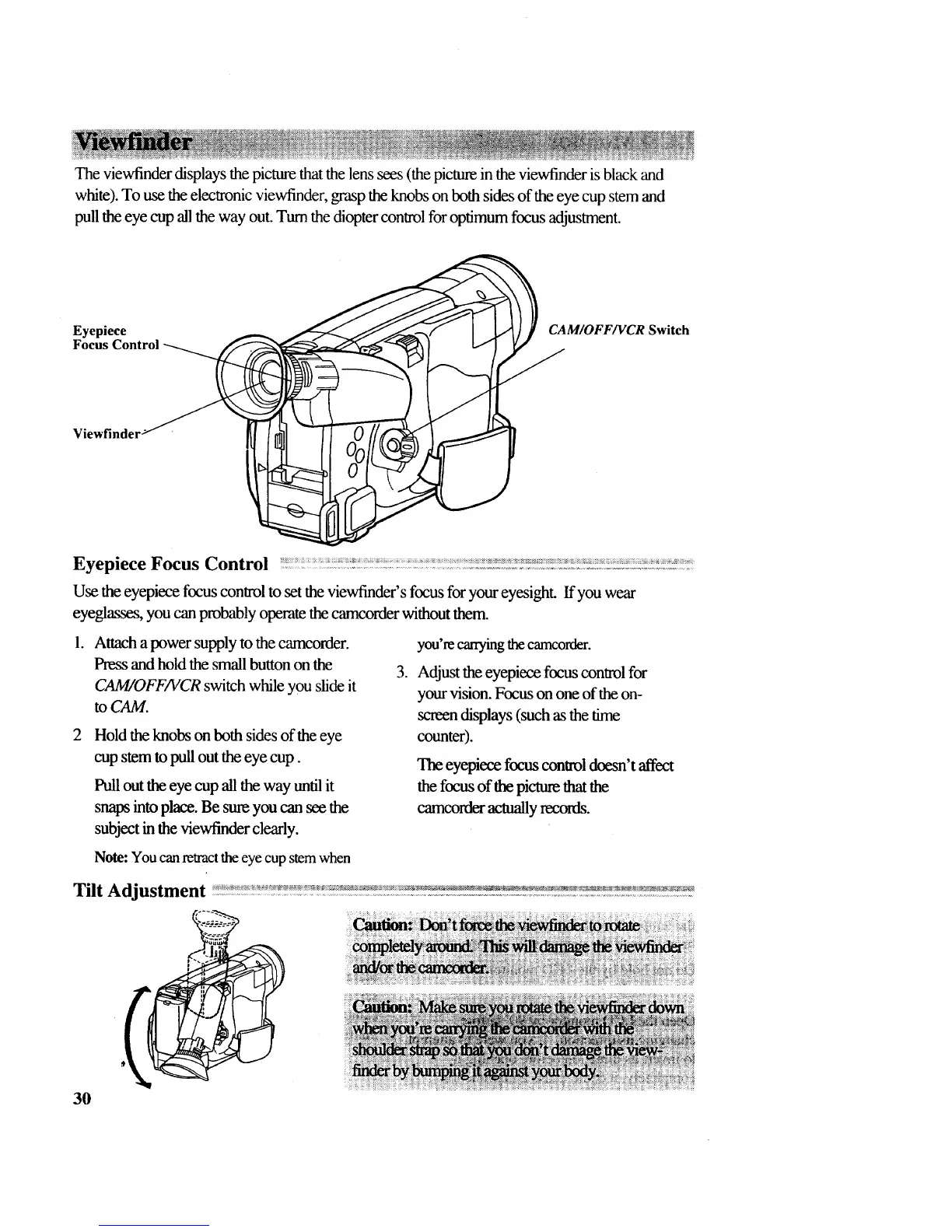
Theviewfinderdisplaysthepicturethatthelenssees(thepictureintheviewfinderisblackand
white).Tousetheelectronicviewfinder,grasptheknobsonbothsidesof theeyecupstemand
pulltheeyecupall the way out. Tum the diopter control for optimum focus adjustment.
Eyepiece _ _,_____.-_ CAM/OFF/VCR Switch
Focus Contro__
ViewfinderJ
Eyepiece Focus Control
Use the eyepiece focus control to set the viewfinder's focus for your eyesight. If you wear
eyeglasses, you can probably operate the camcorder without them.
°
Attach a power supply to the camcorder.
Press and hold the small button on the
CAM/OFF/VCR switch while you slide it
to CAM.
Hold the knobs on both sides of the eye
cup stem to pull out the eye cup.
Pull out the eye cup all the way until it
snaps into place. Be sure you can see the
subject in the viewfinder clearly.
.
you're carrying the camcorder.
Adjust the eyepiece focus control for
your vision. Focus on one of the on-
screen displays (such as the time
counter).
The eyepiece focus control doesn't affect
the focus of the picture that the
camcorder actually records.
Note: You can reuact the eye cup stem when
Tilt Adjustment
tf_ _._:::_
30



 To Next Page