Manual Focus
@ AE Shutter Speed\
@ Fade AE: 1000
Electronic /
Image Stabilizer
Digital Effects
@ ZOOM,
I.ZOOM,
Zoom Level
Status
FO US
w
A/V
I
[ k._ Time Counter
with Memory
0:00:35M
l-- -@ Time
Remaining
.@ Battery Level
Indicator
16X9
ZOOM
TAPE_
_-_ _ TAPE, NO TAPE,
"-1 or TAPE END
DUB 10 : 30AM _@Time and Date
11/18/1997/I
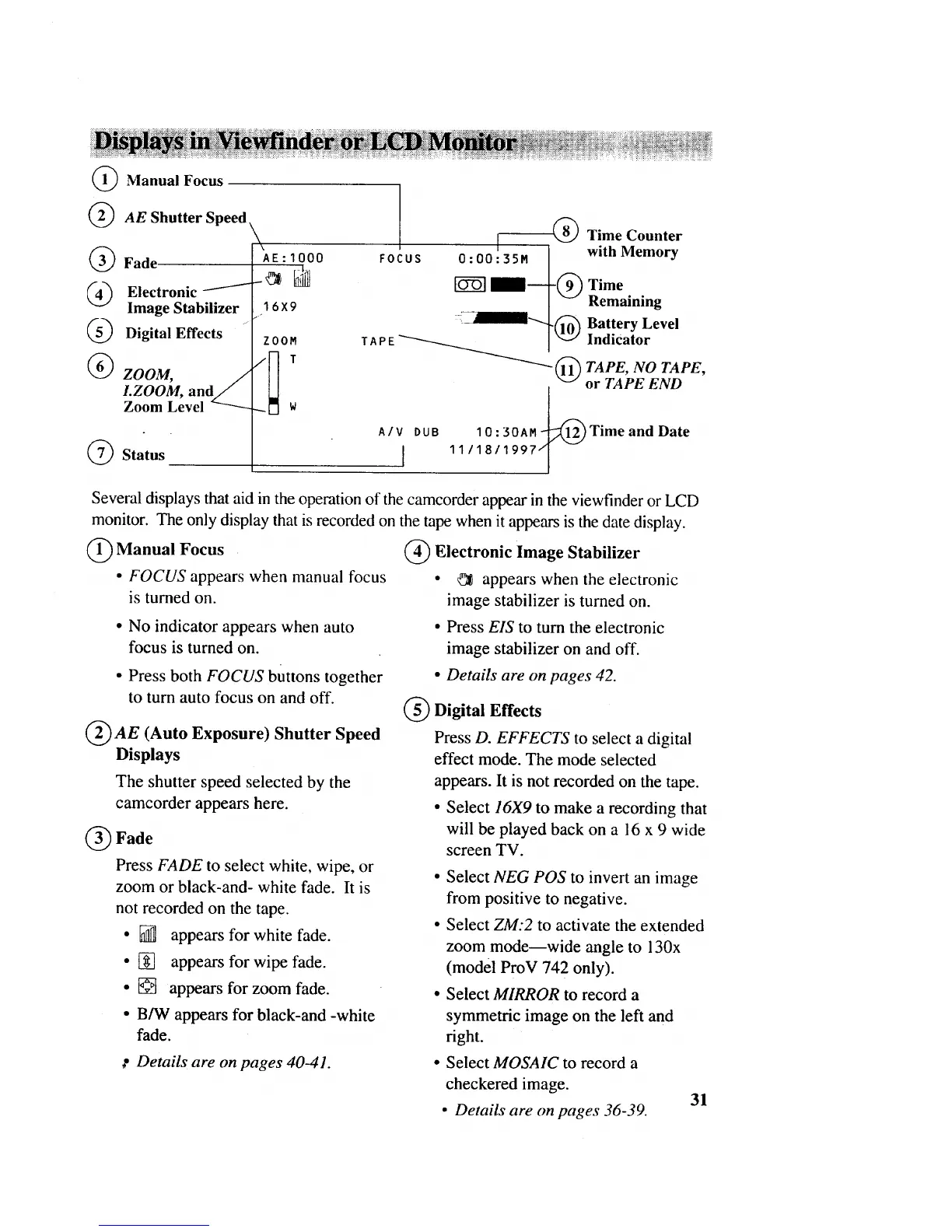
Several displays that aid in the operation of the camcorder appear in the viewfinder or LCD
monitor. The only display that is recorded on the tape when it appears is the date display.
Manual Focus @ Electronic Image Stabilizer
• FOCUS appears when manual focus • _ appears when the electronic
is turned on. image stabilizer is turned on.
• No indicator appears when auto
focus is turned on.
• Press both FOCUS buttons together
to turn auto focus on and off.
@ AE (Auto Exposure) Shutter Speed
Displays
• Press EIS to turn the electronic
image stabilizer on and off.
• Details are on pages 42.
Digital Effects
Press D. EFFECTS to select a digital
effect mode. The mode selected
The shutter speed selected by the
camcorder appears here.
Fade
Press FADE to select white, wipe, or
zoom or black-and- white fade. It is
not recorded on the tape.
• [] appears for white fade.
• [] appears for wipe fade.
• [] appears for zoom fade.
• B/W appears for black-and -white
fade.
appears. It is not recorded on the tape.
• Select 16X9 to make a recording that
will be played back on a 16 x 9 wide
screen TV.
• Select NEG POS to invert an image
from positive to negative.
• Select ZM:2 to activate the extended
zoom mode--wide angle to 130x
(model ProV 742 only).
• Select MIRROR to record a
symmetric image on the left and
right.
_" Details are on pages 40-41.
Select MOSAIC to record a
checkered image.
• Details are on pages 36-39.
31



 To Next Page