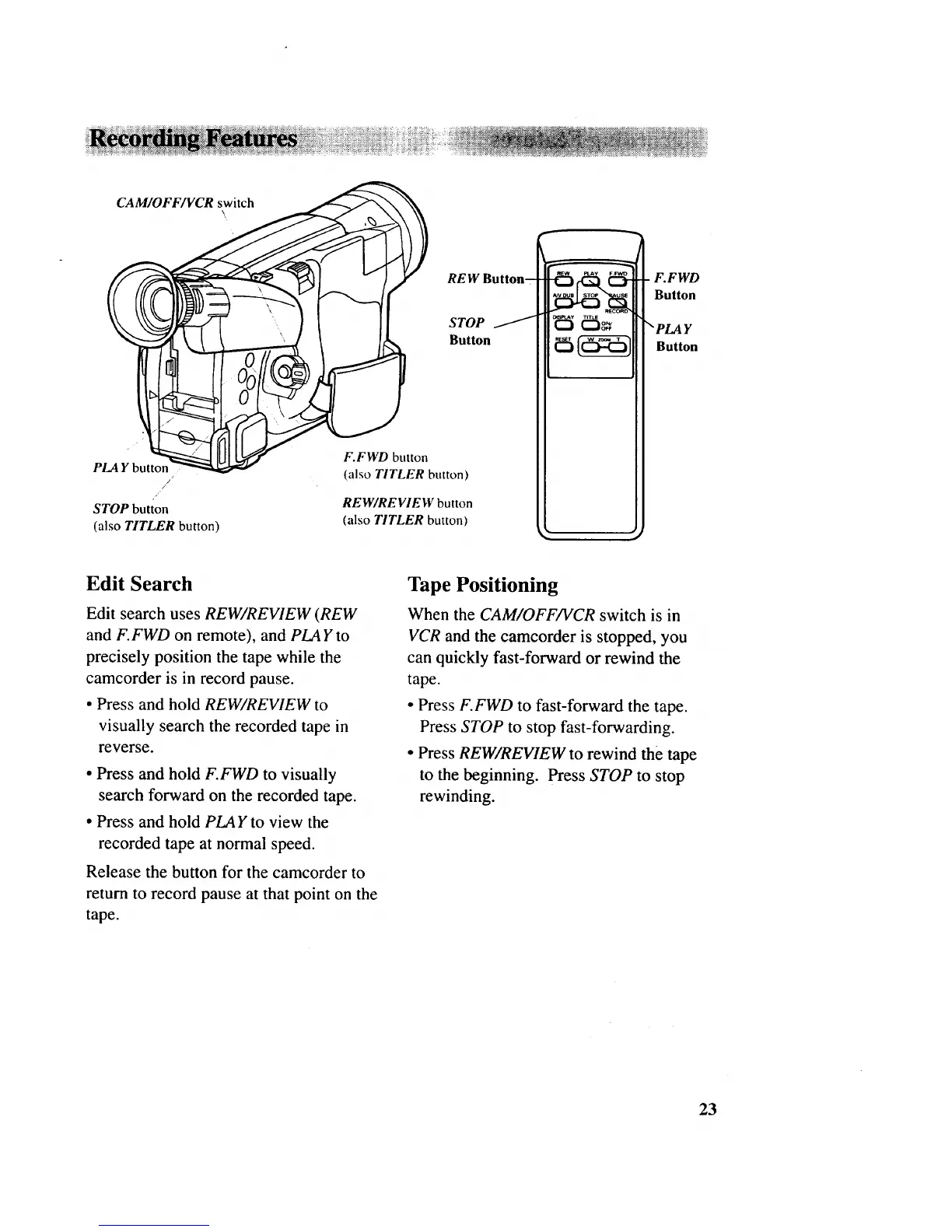
CAM/OFF/VCR switch
(
PLAY butto_
/
/
STOP button
(also TITLER button)
\,
REW Button-
STOP
Button
F.FWD button
(also TITLER button)
REW/RE VIE W button
(also TITLER button)
F.FWD
Button
"PLA Y
Button
Edit Search
Edit search uses REW/REVIEW (REW
and F.FWD on remote), and PLAY to
precisely position the tape while the
camcorder is in record pause.
• Press and hold REW/REVIEW to
visually search the recorded tape in
reverse.
• Press and hold F.FWD to visually
search forward on the recorded tape.
• Press and hold PLAYto view the
recorded tape at normal speed.
Release the button for the camcorder to
return to record pause at that point on the
tape.
Tape Positioning
When the CAM/OFF/VCR switch is in
VCR and the camcorder is stopped, you
can quickly fast-forward or rewind the
tape.
• Press F.FWD to fast-forward the tape.
Press STOP to stop fast-forwarding.
• Press REW/REVIEW to rewind the tape
to the beginning. Press STOP to stop
rewinding.
23



 To Next Page