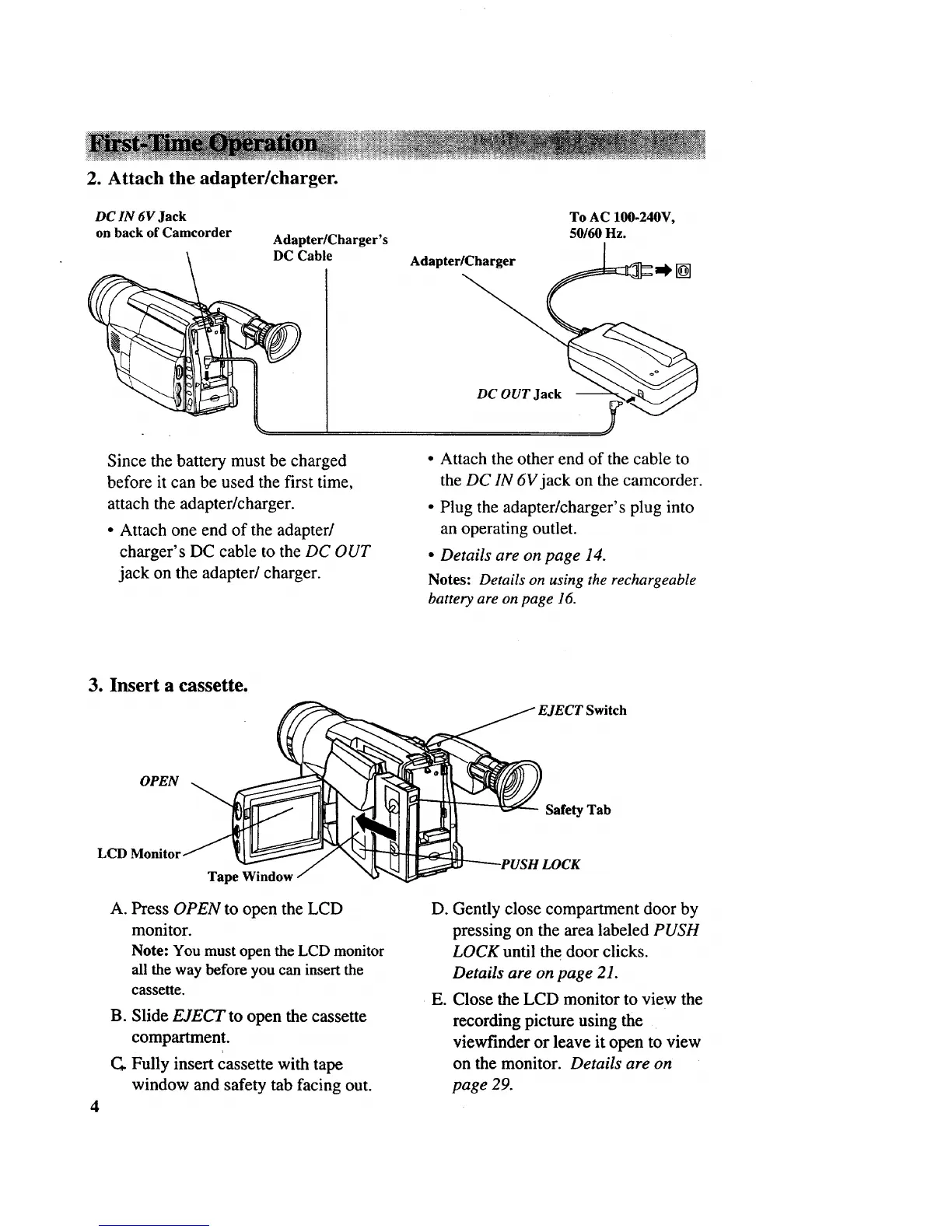
2. Attach the adapter/charger.
DC IN 6V Jack
on back of Camcorder
Adapter/Charger's
DC Cable
Adapter/Charger
To AC 100-240V,
50160Hz.
[]
Since the battery must be charged
before it can be used the first time,
attach the adapter/charger.
• Attach one end of the adapter/
charger's DC cable to the DC OUT
jack on the adapter/charger.
DC OUT Jack
.y
• Attach the other end of the cable to
the DC IN 6V jack on the camcorder.
• Plug the adapter/charger's plug into
an operating outlet.
• Details are on page 14.
Notes: Details on using the rechargeable
battery are on page 16.
3. Insert a cassette.
EJECT Switch
OPEN
Safety Tab
LCD
Tape Window
A. Press OPEN to open the LCD
monitor.
Note: You must open the LCD monitor
all the way before you can insert the
cassette.
B. Slide EJECT to open the cassette
compartment.
Fully insert cassette with tape
window and safety tab facing out.
D. Gently close compartment door by
pressing on the area labeled PUSH
LOCK until the door clicks.
Details are on page 21.
• E. Close the LCD monitor to view the
recording picture using the
viewfinder or leave it open to view
on the monitor. Details are on
page 29.



 To Next Page