Using the Adapter/Charger to Power Your Camcorder
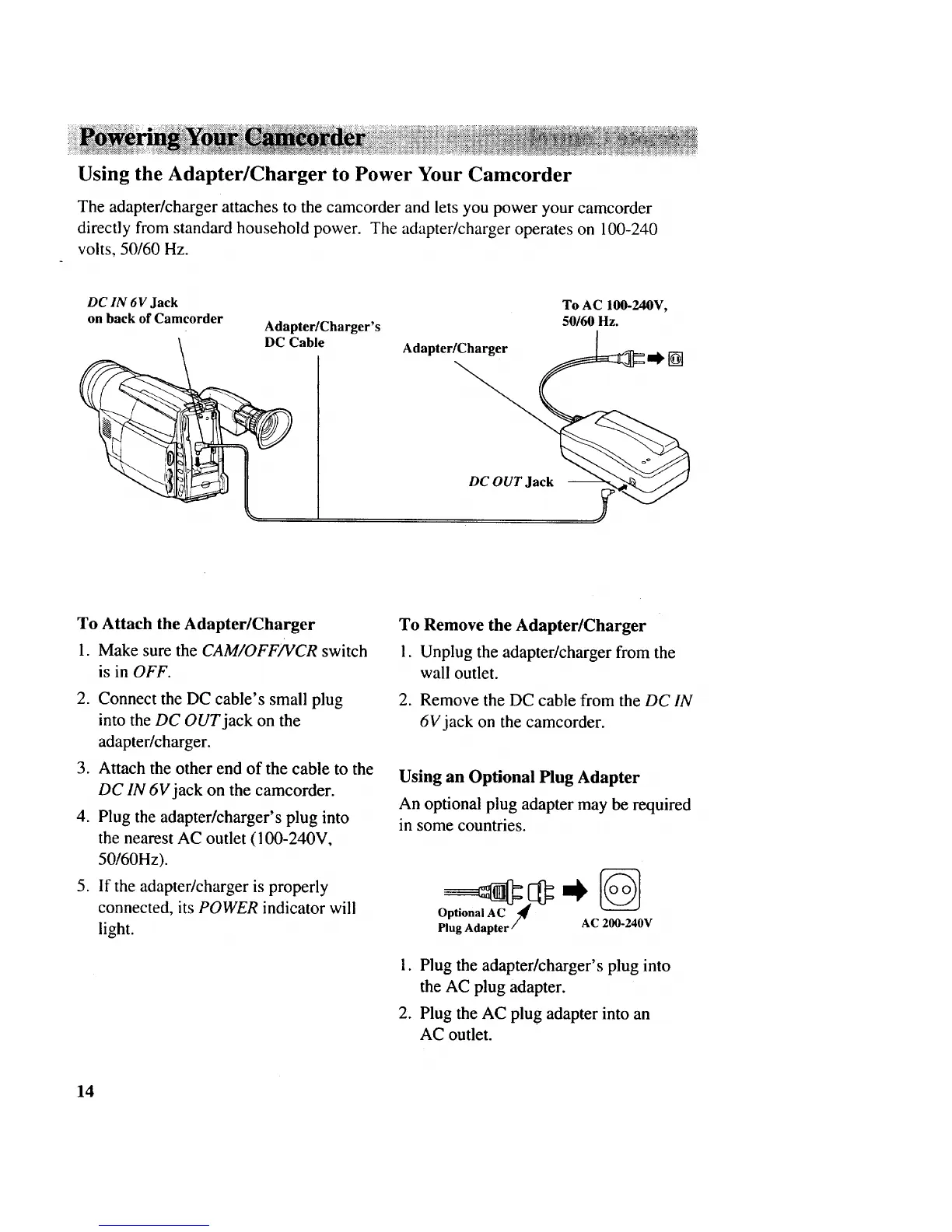
The adapter/charger attaches to the camcorder and lets you power your camcorder
directly from standard household power. The adapter/charger operates on 100-240
volts, 50/60 Hz.
DC IN 6V Jack
on back of Camcorder
Adapter/Charger's
DC Cable
Adapter/Charger
To AC 100-240V,
50160 Hz.
[]
DC OUT Jack
To Attach the Adapter/Charger
1. Make sure the CAM/OFF/VCR switch
is in OFF.
2. Connect the DC cable's small plug
into the DC OUT jack on the
adapter/charger.
3. Attach the other end of the cable to the
DC IN 6V jack on the camcorder.
4. Plug the adapter/charger's plug into
the nearest AC outlet (100-240V,
50/60Hz).
5. If the adapter/charger is properly
connected, its POWER indicator will
light.
To Remove the Adapter/Charger
1. Unplug the adapter/charger from the
wall outlet.
2. Remove the DC cable from the DC IN
6V jack on the camcorder.
Using an Optional Plug Adapter
An optional plug adapter may be required
in some countries.
Optional AC "/#€
Plug Adapter / AC 200-240V
1. Plug the adapter/charger's plug into
the AC plug adapter.
2. Plug the AC plug adapter into an
AC outlet.
14



 To Next Page