Home
RED
Camcorder
SCARLET-X
Page 127
RED SCARLET-X - Page 127
242 pages
Manual
Save Page as PDF
To Next Page
To Next Page
To Previous Page
To Previous Page
Loading...
955
-
0003_
v3.2, Rev
- A1
COPYR
IGHT © 20
12 R
ED
Di
gital Cin
ema
125
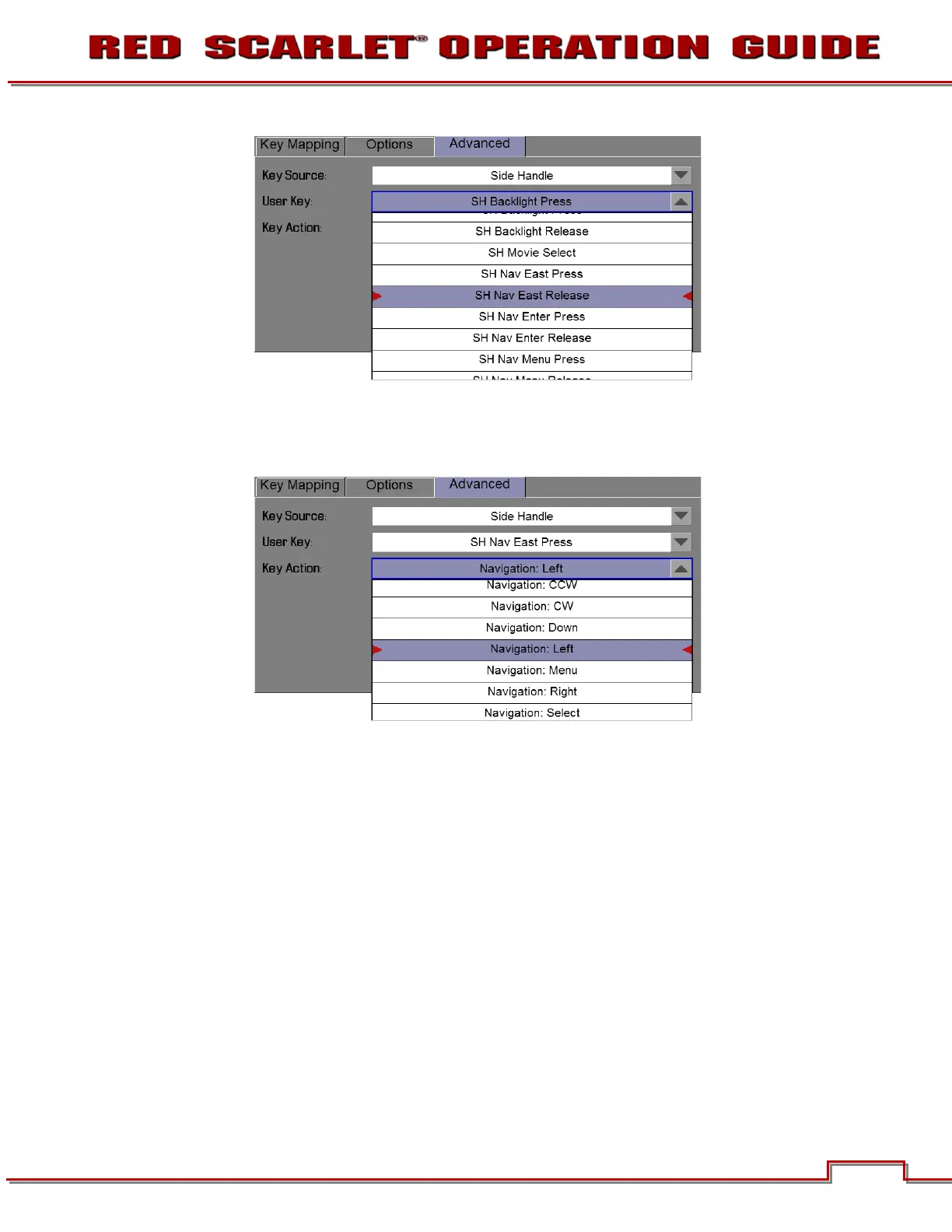
User Key
Key Action
WARNING
:
Do
not
r
emap the navig
ation k
eys (
Up, Do
wn, Left,
Right,
Select (Ent
er), o
r Menu) o
n the
side hand
le doing s
o could r
ender t
he camera ino
perab
el.
126
128
Table of Contents
Main Page
Table of Contents
3
Disclaimer
5
Copyright Notice
5
Trademark Disclaimer
5
Compliance
6
Industrial Canada Emission Compliance Statements
6
Federal Communications Commission (FCC) Statement
6
Commission (FCC Statement
6
Australia and New Zealand Statement
7
Japan Statements
7
European Union Compliance Statements
7
Before You Start
9
Important Safety Instructions
9
Theory of Operation
12
Image Processing
12
MYSTERIUM X ® Sensor
12
Sensor
12
Hdrx
13
Audio Recording
14
Magic Motion
14
Microphone Level Analog Inputs
14
Line Level Analog Inputs
15
Video Monitoring Outputs
15
Bomb EVF
15
Red Lcd
15
Hd-Sdi
15
Hdmi
15
Digital Magazine (Media)
17
Metadata
18
Clip Naming Conventions
18
SMPTE Timecode
20
Power Consumption
20
Redmote
17
Camera Operational Controls
21
Brain
21
Side SSD Module
22
Side Handle
24
Top
24
Front
25
Rear
26
Installation / Removal
28
DSMC Modules
30
Rear SSD Module
30
Quad Battery Module
30
Dual Battery Module
31
Module Installation / Removal
31
Redmote
35
Displays
37
BOMB EVF and Bomb EVF (OLED)
37
Touchscreen LCD
39
Basic Operation
40
Power Sources
40
Side Handle
40
Quad Battery Module
41
Redvolt and Redvolt Xl
41
Quickplate
42
Ac Power Adaptor - (Dsmc)
43
External DC Power
44
Power up
45
Power down
46
Graphical User Interface and Navigation
47
RED Lcd/Touchscreen LCD, BOMB EVF, External Monitors
47
Side Handle
53
Redmote
53
Navigating Menus
54
Using Touchscreen LCD
55
Touchscreen Shortcuts
56
Power down
57
Touchscreen Opreration
58
First Time Use - Setting up Your Red Epic
59
Attach Power Source
59
Battery
59
Quad Battery Module
60
RED Brick
61
DC Power
61
Power up
61
Preparing to Record
61
Connect and Format Media
61
Perform a Black Shading Calibration
63
Adjust Project Settings
63
Recording
65
Record Indicator
65
Playback
66
Menu Controls
67
Adjustments
67
Advanced Setting Menus
68
Main Menu
69
Fps
69
Varispeed
69
Basic Settings
70
Advanced Settings
70
ISO (Sensitivity)
71
F Stop
71
Exposure
73
Basic Settings
73
Advanced Settings
74
White Balance
76
Basic Settings
76
Advanced Settings
77
Resolution
79
Redcode
79
Redcode Options for Various Frame Rates
80
Secondary Menus
80
HDR Menu
80
Hdr on / off
81
Stops
81
Focus Menu
81
Mode
82
DSMC Canon Mount Electronically Supported Lenses
85
Zones
86
Lens Information Display
89
RED DSMC Ti PL Mount + Lens
89
DSMC Canon Mount + Lens
89
Exposure Menu
90
Presets Menu
90
Camera Presets
90
Looks Presets
94
Media Menu
95
Select Media
95
Format Media
95
Eject Media
96
Utilities
97
Settings Menu
98
Display
98
Look
110
Project
114
System Status
117
Audio/Video
118
Setup
125
Maintenance
136
Playback
146
Power
155
Power Status
155
Shutdown
156
Appendix A: Upgrading Camera Firmware
157
Verify Current Camera Firmware
157
Upgrade Procedure
157
Appendix B: Managing Digital Media
158
Media
158
Formatting Media
158
Media Capacity Remaining Status
160
Eject Media from Camera (Unmount)
160
Using REDMOTE / Touchscreen LCD
160
Using Side Handle
161
Using Side SSD
161
Copying Media
161
Erasing Media
162
Macintosh os X
162
Windows
162
Appendix C: Input / Output Connectors
163
Camera Brain Front
163
Microphone Audio)
164
Camera Brain Rear
165
Hd-Sdi
166
Headphone
167
SYNC (Video Sync)
167
CTRL (RS232 Control)
170
GIG-E (Ethernet)
171
DC in (Power Input)
172
HDMI out
173
Side SSD Module
174
Redmote
175
Appendix D: Default Key Functions
176
Appendix E: Redmote
177
Operation
178
Control, Connectors and Display
178
Controls
178
Operation
181
Docking and Undocking
181
Power up / down
182
Recording
184
Accessing Camera Controls / Settings
184
OPERATION: REDMOTE Menus
186
Maintenance
194
Internal Battery
194
Upgrading REDMOTE Firmware
196
Appendix F: 3D Setup / Operation
209
Overview
209
Camera Setup
209
Master Camera
209
Slave Camera
210
Clip Naming Conventions
210
Reel No. / Slate (Camera ID) / Camera Position
210
Connecting Cameras
211
Operation
212
Changing Settings
212
Recording
212
Power down
212
Iso
213
Appendix G: Exposure - Using False Color and
213
Underexposure (~ 2 Stops)
213
Using False Color and Iso
213
Overexposure (~ 2 Stops)
215
Appropriate Exposure
218
Adjusting the ISO Rating
221
Appendix H: Post Production
223
Monitoring
223
Redcine-Xpro
224
Appendix I
225
Appendix I: Maintenance
225
Cleaning
225
Camera and Accessory Exterior Surfaces
225
Brain
225
LCD Screen
225
Touchscreen)
225
Evf
226
REDMOTE Screen
226
Lenses
226
Side Handle LCD
226
Back Focus Adjustment
227
Appendix J: Troubleshooting
230
No Media Attached
230
Recording Halted: Record Error - Shutdown
230
Preset Could Not be Applied
230
Camera Cannot be Paired to REDMOTE
230
Cannot See Menus on LCD Touch Screen
230
Appendix K: Technical Specifications
231
Camera Brain Dimensions
232
Appendix L: Resolution Chart
236
Appendix M: Menu Maps
237
Related product manuals
RED SCARLET-W Series
200 pages
RED WEAPON Series
200 pages


 To Next Page