6.37
ENG_UD68542_4
Véhicule électrique (XNX - A-IVI - Renault)
ELECTRIC VEHICLE (2/5)
Charging programming
Start at End at
Close
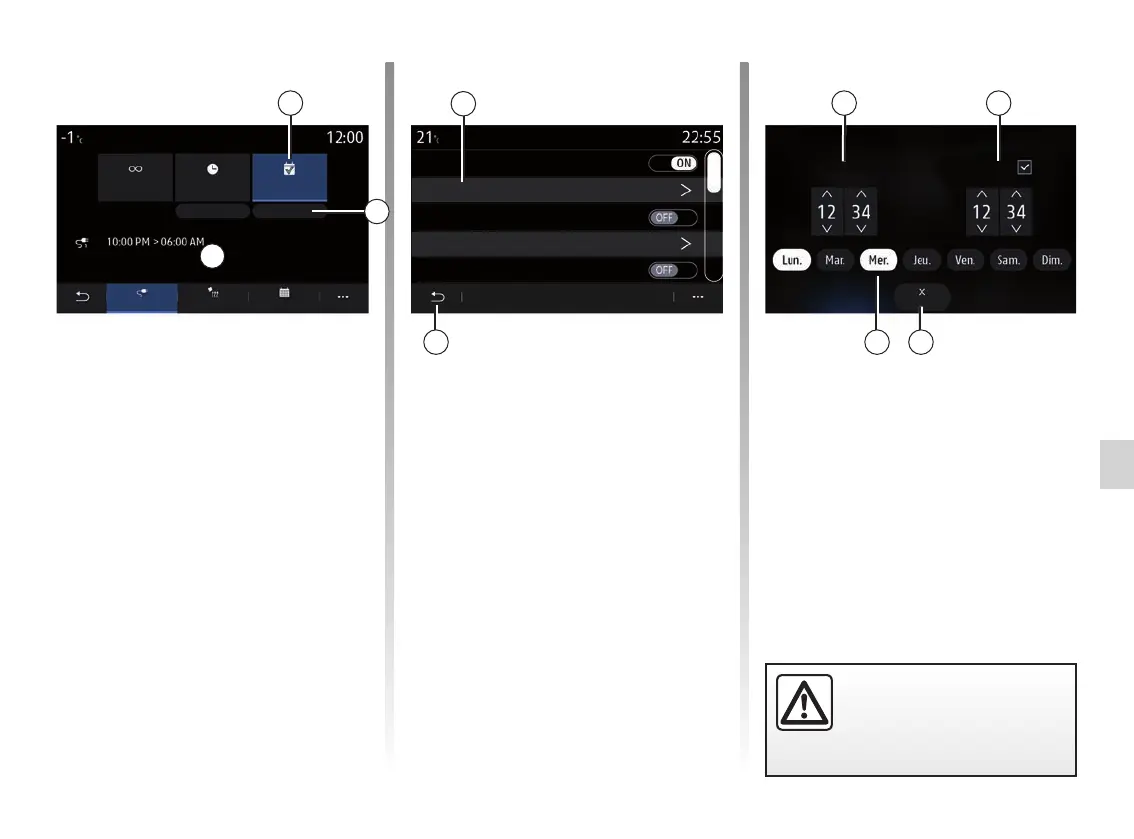
“Program” 3
You can save several programmed
charging times per week.
Programmed times are displayed in
field C.
Press “Edit” 6 to open the programming
configuration settings.
Program
Charging programme 1
12:34 PM -> 12:24 AM L M M J V S D
10:00 PM -> 06:00 AM L M M J V S D
Charging programme 2
Charging programme 3
7
For safety reasons, carry
out these operations when
the vehicle is stationary.
Note:
– if the start and end times are identi-
cal, the charging period is 24 hours;
– you cannot confirm a charging pro-
gramme if you do not select a day of
the week.
Programming
Immediate
charge
Postponed
charging
Edit Edit
ClimateCharge Calendar
Program
3
C
L M M J V S D
8
6
Select the programme time 7 that you
wish to change to access the settings.
Set the charging start 9 and end 10
times as well as the days 12 to which
these times will apply, then press
“Close” 11.
To confirm, press the return button 8
after ensuring that the desired program
issetto“ONˮ.
Todeactivateaprogram,press“OFFˮ.
109
12 11



 To Next Page