ventilation
heating and air conditioning system ....
(current page)
6.38
ENG_UD68542_4
Véhicule électrique (XNX - A-IVI - Renault)
ELECTRIC VEHICLE (3/5)
Comfort programme
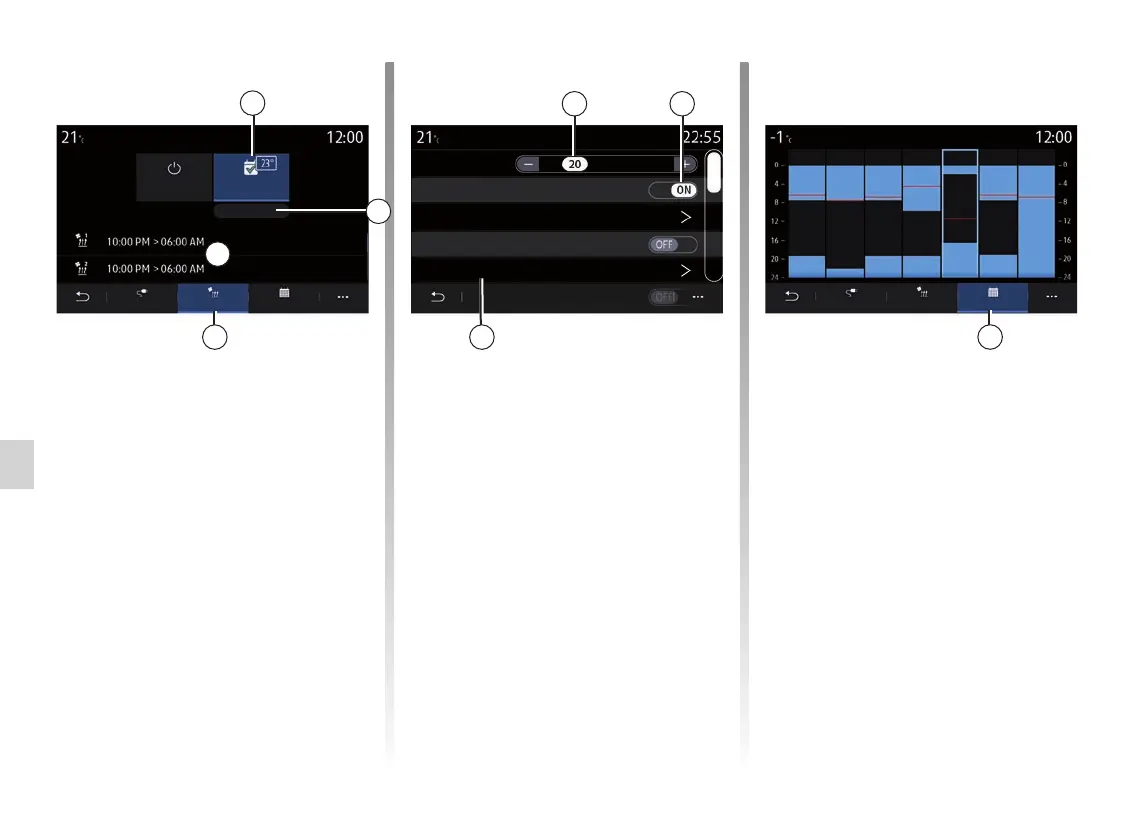
From the “Climate” tab 14, you can
activate/deactivate the “Comfort pro-
grams” or set the comfort temperature
and time.
Programmed times are displayed in
area D.
Note: the minimum time period be-
tween each programme is 2 hours.
Press “Edit 13” to access the comfort
settings.
EV programming
OFF
ClimateCharge Calendar
Program
Edit
14
L M M J V S D
L M M J V S D
You can save several “Comfort pro-
grams”.
From this menu, you can adjust the
temperature 15 (depending on the
equipment) and activate/deactivate the
“Comfort programs” saved by pressing
the 16 button.
Select the programme time 17 that you
wish to change to access the settings.
Note: the selected temperature is dis-
played on the menu 8.
Comfort programs
Comfort programme 1
Temperature
06:00 AM L M M J V S D
09:00 AM L M M J V S D
Comfort programme 2
13
15
D
8
Ready at
Ready at
17
Calendar
From the “Calendar 18” tab, you can
see an overview of all the active charg-
ing and comfort programmes.
If immediate charging is activated, the
histogram will be filled with the charg-
ing colour.
If deferred charging is activated, the
charging progress colour is displayed
once the charging start time is reached.
Press a day on the calendar to view
your settings.
Mon. Tue. Wed. Thu. Fri. Sat. Sun.
EV programming
Climate
Charge
Calendar
18
16



 To Next Page