map
display ..................................................
(up to the end of the DU)
map
scale.....................................................
(current page)
map
settings.................................................
(up to the end of the DU)
map
map symbols ........................................
(current page)
guidance
map ......................................................
(up to the end of the DU)
navigation system ......................................
(up to the end of the DU)
2.2
ENG_UD68946_6
Carte (XNX - Renault)
Map
MAP (1/7)
Map
Displaying the map
From the home screen, press Menu,
then Navigation to access the map.
You can also access the map from the
Navigation widget.
The map displays your current position
and the information that you configured
(display POI, weather, traffic informa-
tion etc.).
To move around the navigation map,
press and hold the map then slide your
finger across the screen in the direction
required.
Press Q to return to your current posi-
tion.
For safety reasons, carry
out these operations when
the vehicle is stationary.
F
B
CG
H
J
K
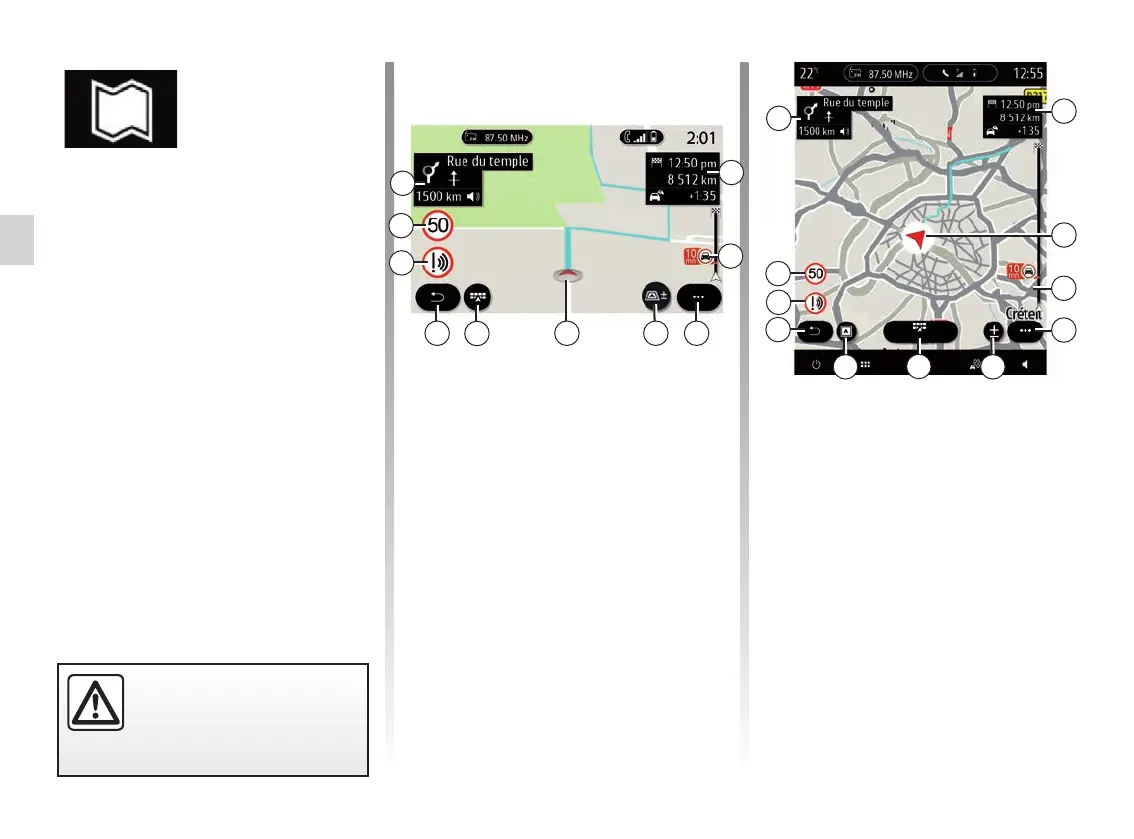
“Map” screen with a journey in
progress
A Journey information such as the ar-
rival time, additional time due to traf-
fic and the remaining distance to the
next stage or final destination (de-
pending on the parameters).
Note: press once on area A to enable
the multimedia system to display de-
tails on the journey stages.
D
F
B
C
H
G
J
K
LM
A
A
E
Route des rédacteurs
B Information on traffic conditions over
the next few miles. Press this area to
view the list of incidents on the route
in progress.
C Pop-up menu.
D Views/Zoom:
– press the “±” button to display the
front and rear zoom buttons;
– press the “Views” button to dis-
play a 2D/2D view facing North,
3D/3D Inception, “Traffic”.
E



 To Next Page