TMC Traffic Message Channel information
(up to the end of the DU)
traffic information .......................................
(up to the end of the DU)
2.27
ENG_UD68558_6
Trafic (XNX - Renault)
Traffic
TRAFFIC (1/2)
Precautions regarding
navigation
Use of the navigation
system does not in any way
replace the responsibility or vigi-
lance of the driver when driving the
vehicle.
From the home screen, press “Menu”,
“Navigation”, “Navigation menu” 6, then
“Traffic Map” to access updated traffic
information.
Use the pop-up menu 5 to open
“Settings”.
Note: the availability of the “Traffic
Map” services may vary.
“Traffic Map”
The “Traffic Map” function uses re-
al-time online information.
Note: the services must be activated in
order to display traffic information in re-
al-time. Please see the section entitled
“Activating services”.
5
1
2
Navigation menu
4
3
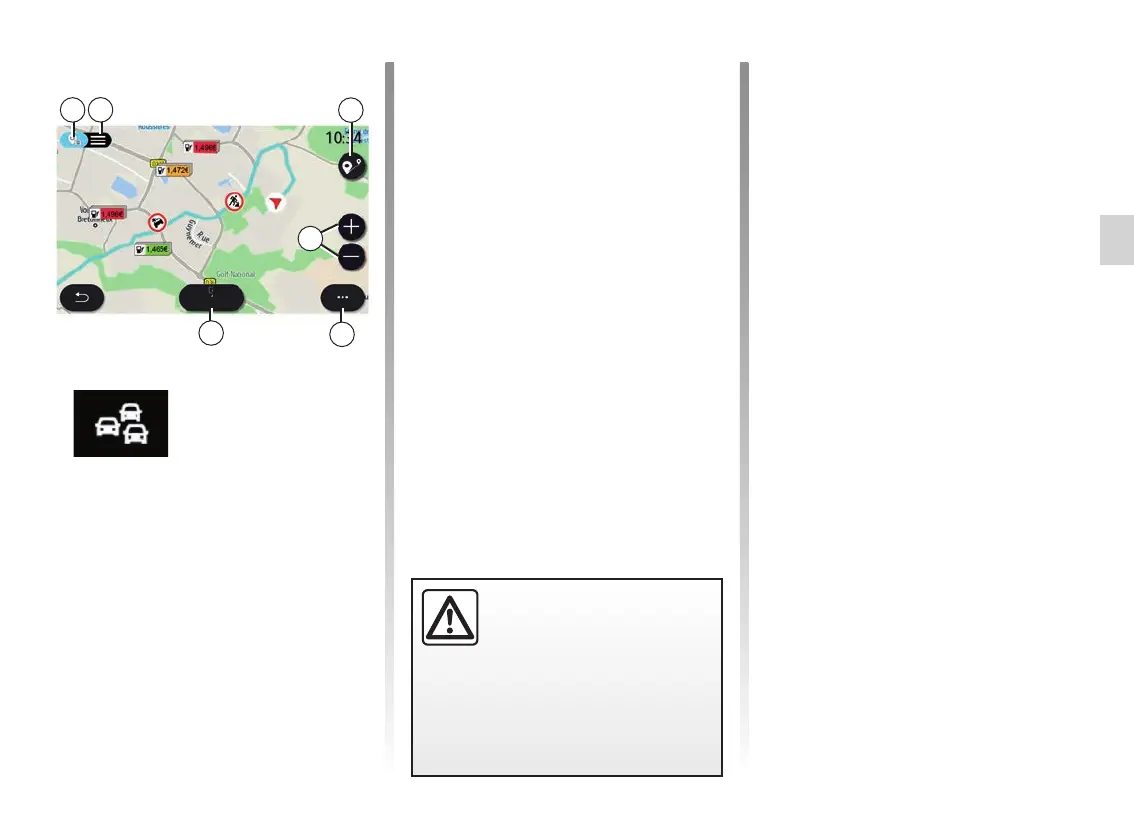
“Traffic Map” screen.
You can view the traffic incident display
on the map 1 or the list of traffic inci-
dents 2.
Press the zoom-in and zoom-out but-
tons 4 to adjust the map or slide two
fingers together/apart on the screen to
adjust the zoom distance.
While a route is in progress, press the 3
icon to re-centre the route after having
moved the map or zoom level 4.
If a route is not in progress, press the 3
icon to return to the vehicle’s position
after having moved the map or zoom
level 4.
6



 To Next Page