2.28
ENG_UD68558_6
Trafic (XNX - Renault)
TRAFFIC (2/2)
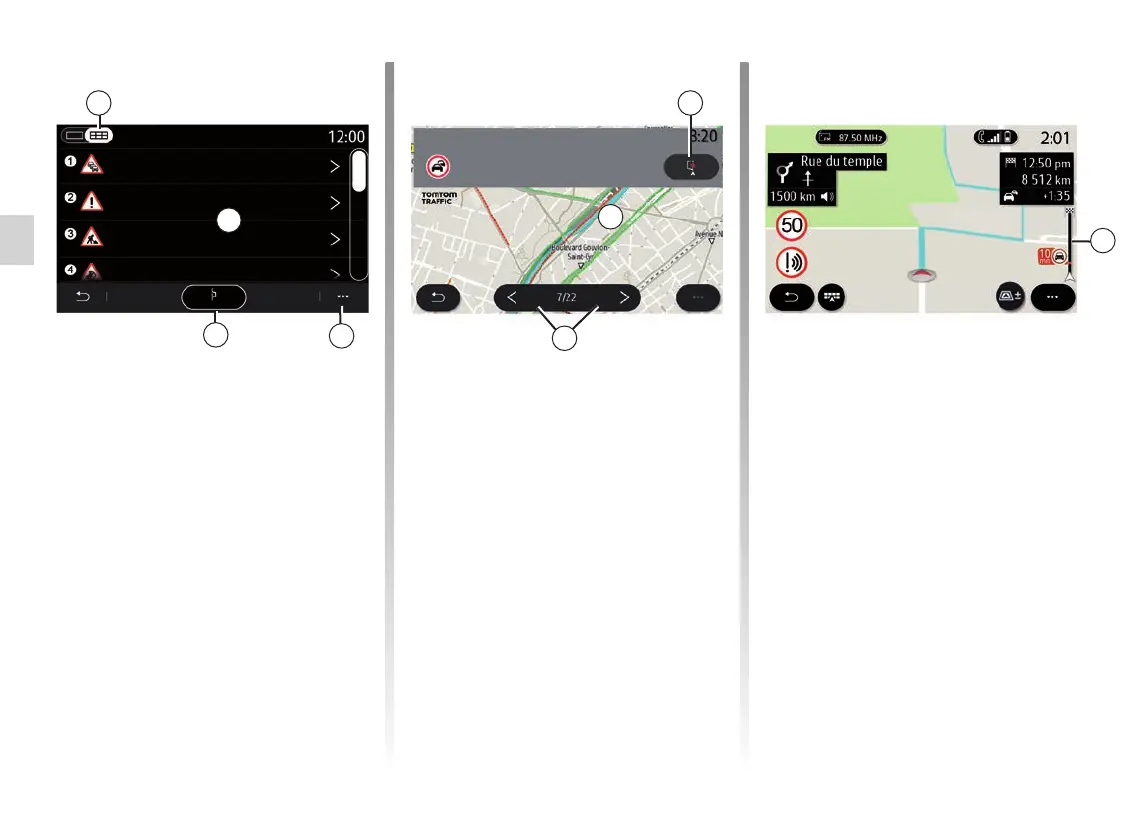
From the 8 pop-up menu, you can
access the various navigation settings,
see section: “Navigation settings”.
Use “Detour all” 9 to avoid congested
areas.
Traffic event list
From the incident list 7, you can access
the details of incidents on your route.
Select one of the incidents on the list 10
to display it in detail on the map.
Traffic incident details
Tap one of the items in the incident list
to view details and to display the rele-
vant section of the route on the map A.
You can scroll through the traffic inci-
dents using the arrows 12 and order the
system to avoid a selected incident by
pressing the 11 button.
7
10
Detour all
Traffic jams 300m
Warning 750m
Road works 1200m
Accidents 2500m
Traffic Map
9
8
12
A
Périphérique Intérieur Paris - Porte
Maillot > Paris - Porte de la Chapell...
7. Congestion for one mile (1.6 km)
11
Traffic information bar
The Traffic Information bar on your
route display 13 informs you of traffic
incidents along the route in progress.
Press the Traffic Information bar 13 to
display a detailed list of traffic incidents.
13



 To Next Page