Bluetooth® .................................................
(up to the end of the DU)
USB key.....................................................
(up to the end of the DU)
MP3 player ................................................
(up to the end of the DU)
MP3 ...........................................................
(up to the end of the DU)
3.7
ENG_UD69791_4
Musique (XNX - Renault)
Playback
Music
MUSIC (1/3)
“Music” menu
From the main menu, press “Music”,
from other menus press the shortcut in
area A.
Use this menu to listen to music from
an external source (USB, AUX etc.).
Select an input source connected to the
system from the following list:
– “USB1” (USB port);
– “USB2” (USB port);
– “Bluetooth®” ;
– “AUX” (Jack).
The music sources described above
may vary according to the equipment
level. Only the sources that are avail-
able are displayed and can be selected
on the multimedia screen.
Note:
– some formats may not be recognised
by the system;
– the USB flash drive in use must be
FAT32 formatted and have a mini-
mum capacity of 8 GB and a maxi-
mum capacity of 64 GB.
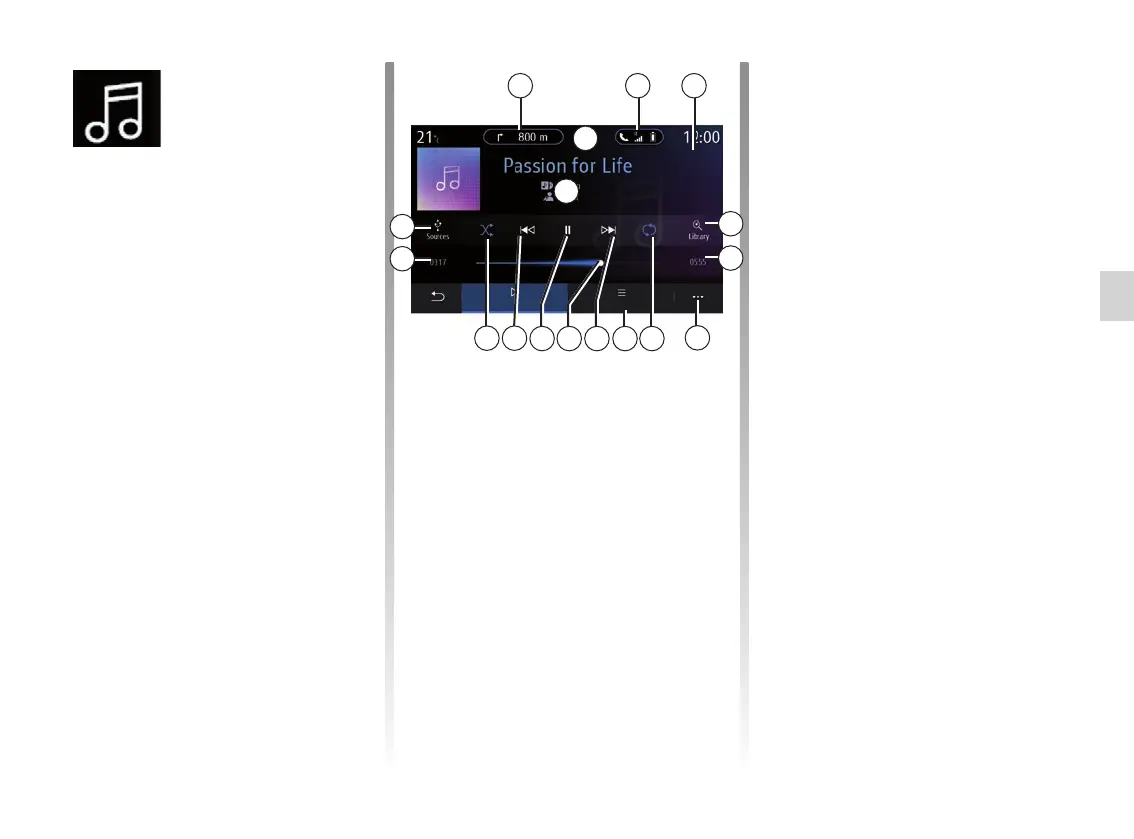
Play mode
B Information on the audio track
currently playing (song title, artist
name, album title and visual of
the cover, if transferred from the
source).
1 Shortcut to the “Navigation”
menu.
2 Shortcut to the “Phone” menu.
3 Name of the source currently
playing.
4 Shortcut to the audio playlist clas-
sified by category.
2 3
B
A
6
8
12
9
13
1011 7
1
14
15
4
5
5 Length of the audio track playing.
6 Access to the pop-up menu.
7 Activate/deactivate repeat of the
track or playlist.
8 Access the current playlist;
9 Short press: Play the next audio
track.
Press and hold: Fast forward.
10 Currently playing audio track
progress bar.
11 Pause/resume the audio track.
12 Short press: return to the start of
the current audio track.
Second short press (less than
3 seconds after the first short
press): play the preceding audio
track.
Press and hold: Rewind.
13 Activate/deactivate random play-
back of the audio tracks.
14 Current audio track playback
time.
15 Access the audio sources.
Musique
List



 To Next Page