4.9
ENG_UD61119_2
Appel téléphonique (XNX - Renault)
Grégory
PHONE CALL (2/3)
Receiving a call
When receiving a call, the “Calls re-
ceived” screen is displayed, giving the
following information:
– the name of the contact (if the
number is present in your handset
memory or the phonebook list);
– the caller’s number (if the number is
not present in your handset memory);
– “Private number” (if the number
cannot be viewed).
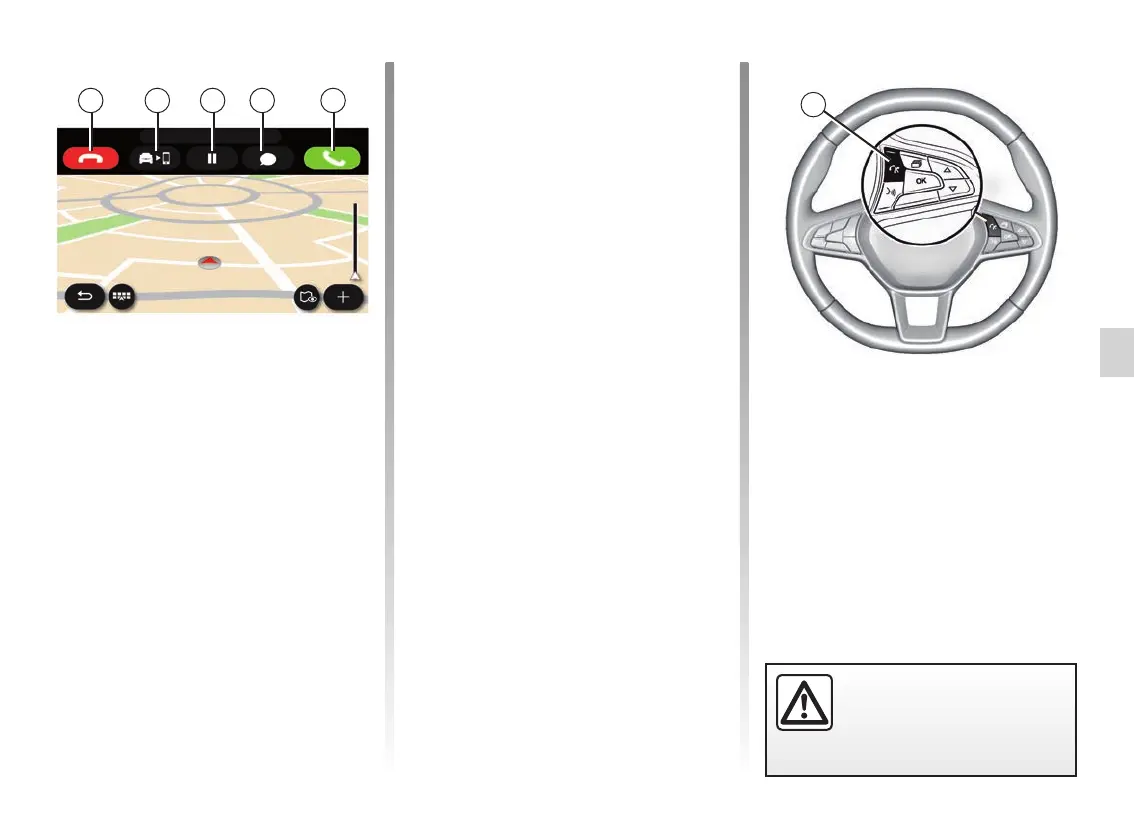
“Answer”
To pick up a call, press the “Answer”
key 16. Press the “End call” key 12 to
end the call.
“Reject” a call
To reject an incoming call, press the
“Reject” key 12. The person calling you
will be redirected to your voicemail.
Put the call “on hold”
Press the Hold key 14. The multime-
dia system will hang up and automati-
cally put incoming calls on hold. A syn-
thesised message asks your callers to
wait.
Transfer to phone
Press the Transfer key 13 to transfer
the call from the vehicle to the tele-
phone.
Note: some telephones may discon-
nect from the multimedia system during
a call transfer.
Keypad
Press the “Keypad” key 15 to access
the keypad.
You can answer/end a call by pressing
directly on control 17 on the steering
wheel.
12 13 15 16
For safety reasons, carry
out these operations when
the vehicle is stationary.
14
17



 To Next Page