59
Moving the platform manually (Equator 300 only)
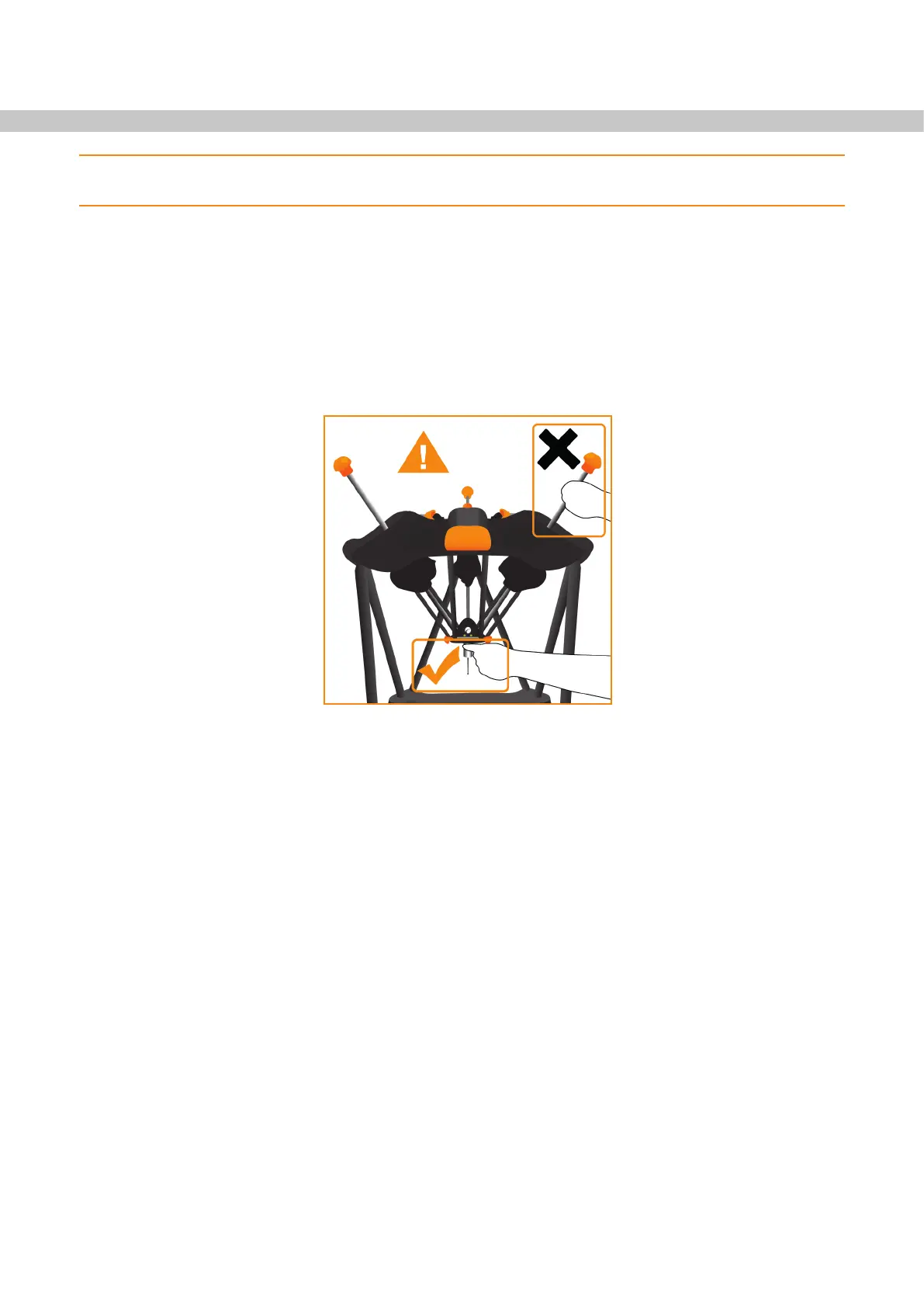
NOTE: Only move the platform manually if an error has caused Equator to stop with the stylus in a
region where the joystick and manual mode button do not work.
• Before entering the working volume, activate the stop button. This ensures that the machine will not start to
move automatically.
• To move the platform, hold the probe close to the underside of the platform and then reposition the
machine as required.
• Be careful not to disengage the module from the probe body. If the module is disconnected, reconnect the
module making sure that the alignment marks are aligned correctly and recalibrate the probing tools by
using the ‘calibrate probes’ button within Organiser. Once clear of the working volume, disengage the stop
button by twisting it and clear any errors.
Hold mode
When the stop button is engaged, hold mode is activated and the machine status light on the floating platform
flashes amber. In hold mode, a slow, servo assisted movement of the platform will be allowed. The probe should
be held close to the platform to reposition in the desired direction. The module and stylus should not be used to
move the platform.
If the platform is moved outside of the working volume, braking takes over and the platform will drop slowly
under its own weight. The platform needs to be moved back inside the working volume, the stop button needs to
be released and the machine needs to be reset using the software before the system can be used again.


 To Next Page