User Manual
9
ChapTer 4: deviCe ConTrols and
display feaTures
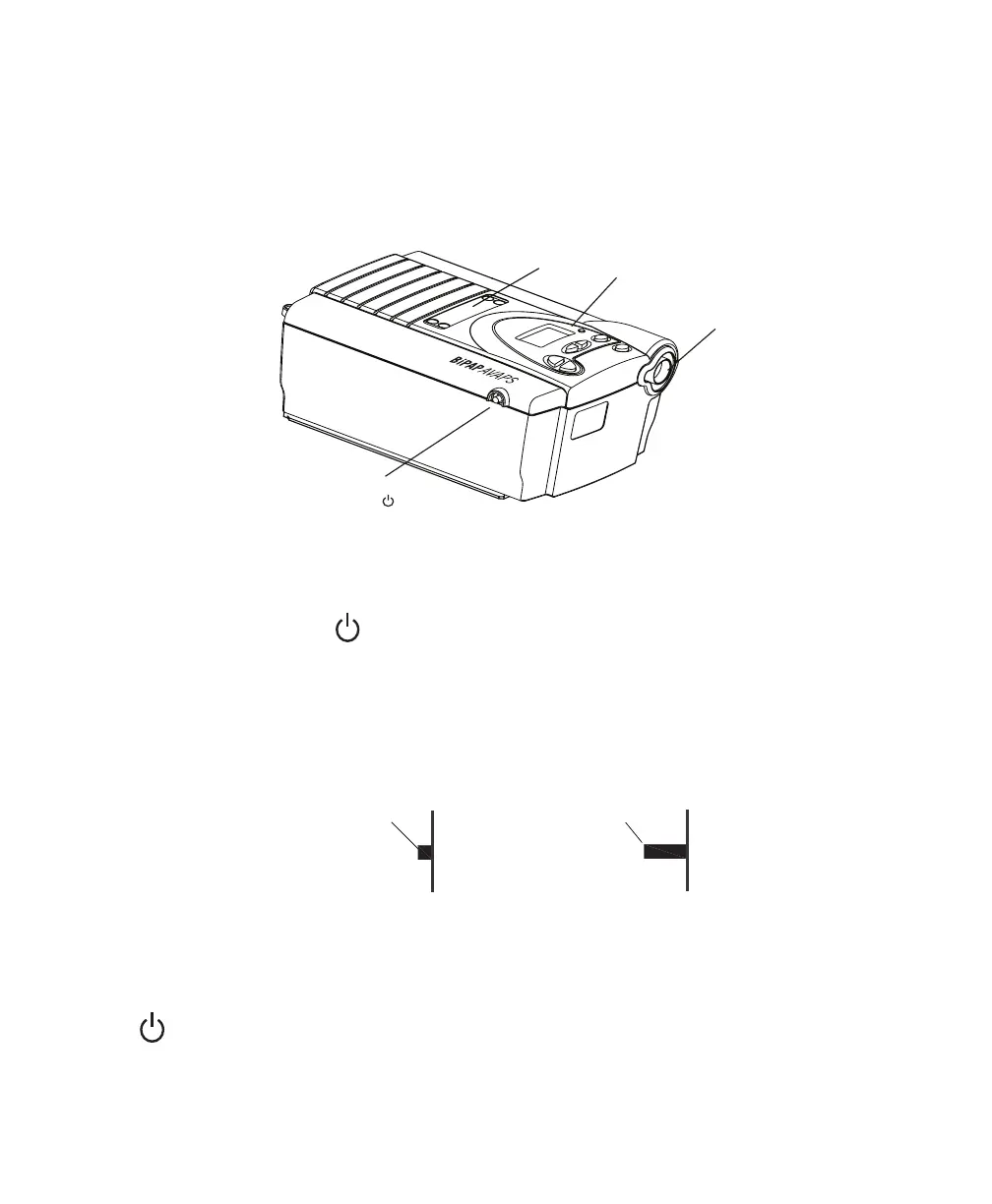
Figure 4–1 shows the location of the device’s alarm power indicators, control panel, Pressure On/Off
button, and the breathing circuit connection.
Pressure On/Off
Button
Breathing
Circuit
Connection
Control
Panel
Alarm and
Power
Indicators
Figure 4–1 Device Front and Top
4.1 Pressure on/off Button
e device’s Pressure On/Off button, located on the side of the device, starts and stops the device’s
airflow.
• To turn the airflow on, press the button in, as shown in Figure 4–2. is puts the device in the
Operate state.
• To turn the airflow off, press the button again. is puts the device in the Standby state.
Figure 4–2 Pressure Button On/Off Positions
When the device is in Standby, any ramp in progress is terminated, the alarms are reset (except for the
System Errors alarm), and the humidifier is turned off.
e button is independent of the display screen.














 To Next Page