10
User Manual
4.2 Control Panel
e control panel contains the following control buttons and indicators.
4.2.1 Control Buttons
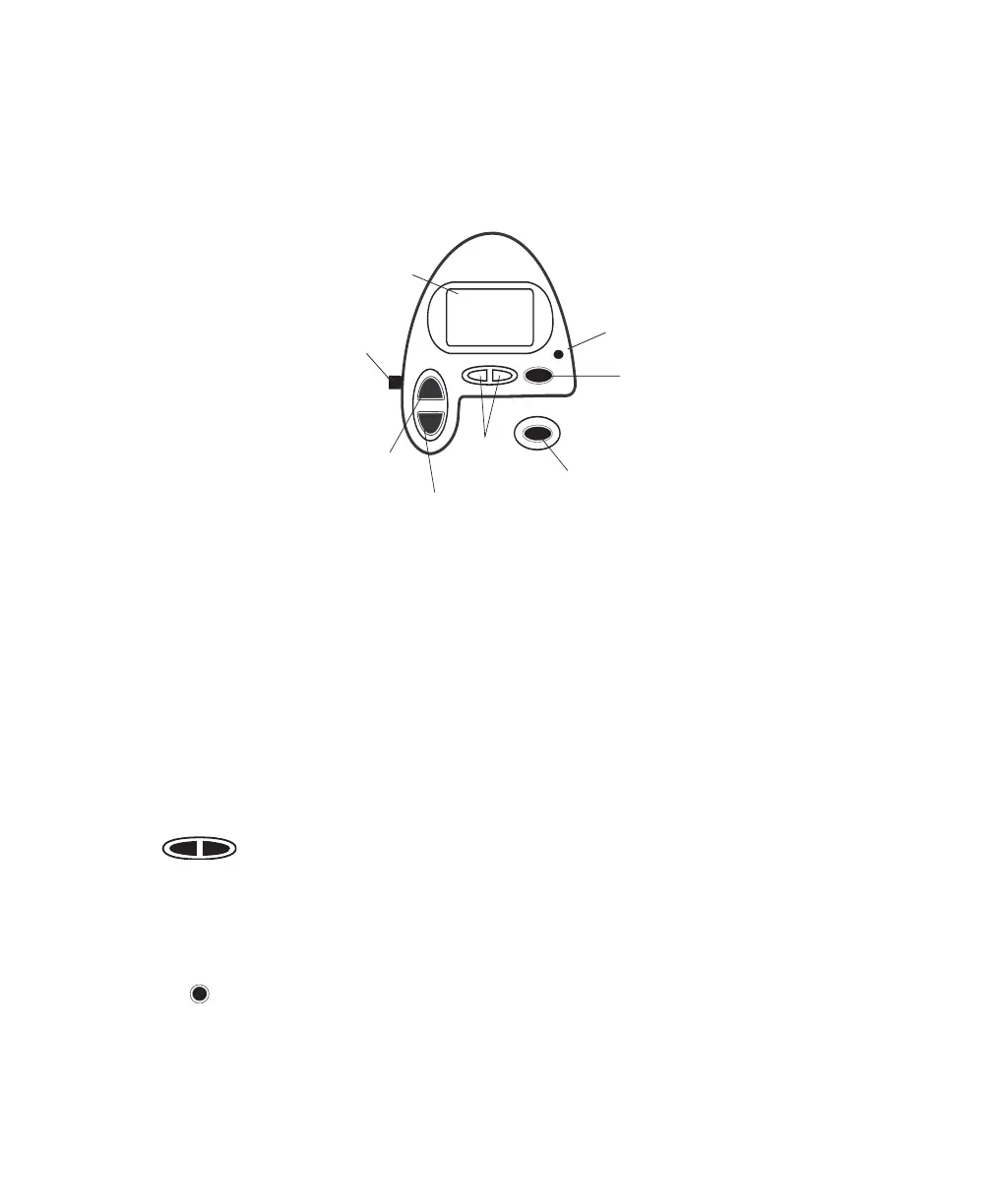
e control buttons on the control panel are shown in Figure 4–3.
Scroll
Button
Alarm
Silence
Button
Ramp
Button
Heated
Humidifier
Button
User
Buttons
RAMP
HEAT
SILENCE
RESET
Alarm
Reset
Button
Display
Screen
Pressure On/Off
Button
Figure 4–3 Control Panel
HEAT
When the optional REMstar Heated Humidifier has been prescribed,
this button controls the humidifier’s output. Follow the instructions
included with the humidifier. You can also use this button to adjust the
settings shown in the user menu screens.
RAMP
When the airflow is turned on and the ramp function is enabled, this
button lowers the airflow pressure, allowing you to fall asleep more
easily. You can also use this button to adjust the settings shown in the
user menu screens.
Press the left and right user buttons to navigate the display screens.
SILENCE
is button silences the audible portion of an alarm for one minute.
You can also use this button to exit the user menu screens.
RESET
is button allows you to clear an alarm and reset the device for alarm
detection.
Use this button to scroll through the monitoring parameters.














 To Next Page