User Manual
15
ChapTer 5: seTTing up The deviCe
is chapter provides instructions on how to:
• Install the air filters
• Position the device
• Connect the breathing circuit
• Plug the device in using AC or DC power
5.1 installing the air filters
CAUTION: A properly installed, undamaged gray foam filter is required for proper operation.
e device uses a gray foam filter that is washable and reusable, and an optional white, ultra-fine filter that
is disposable. One filter of each kind is supplied with the device.
If your home care provider did not install the inlet air filters, you must install at least the gray foam filter
before using the device.
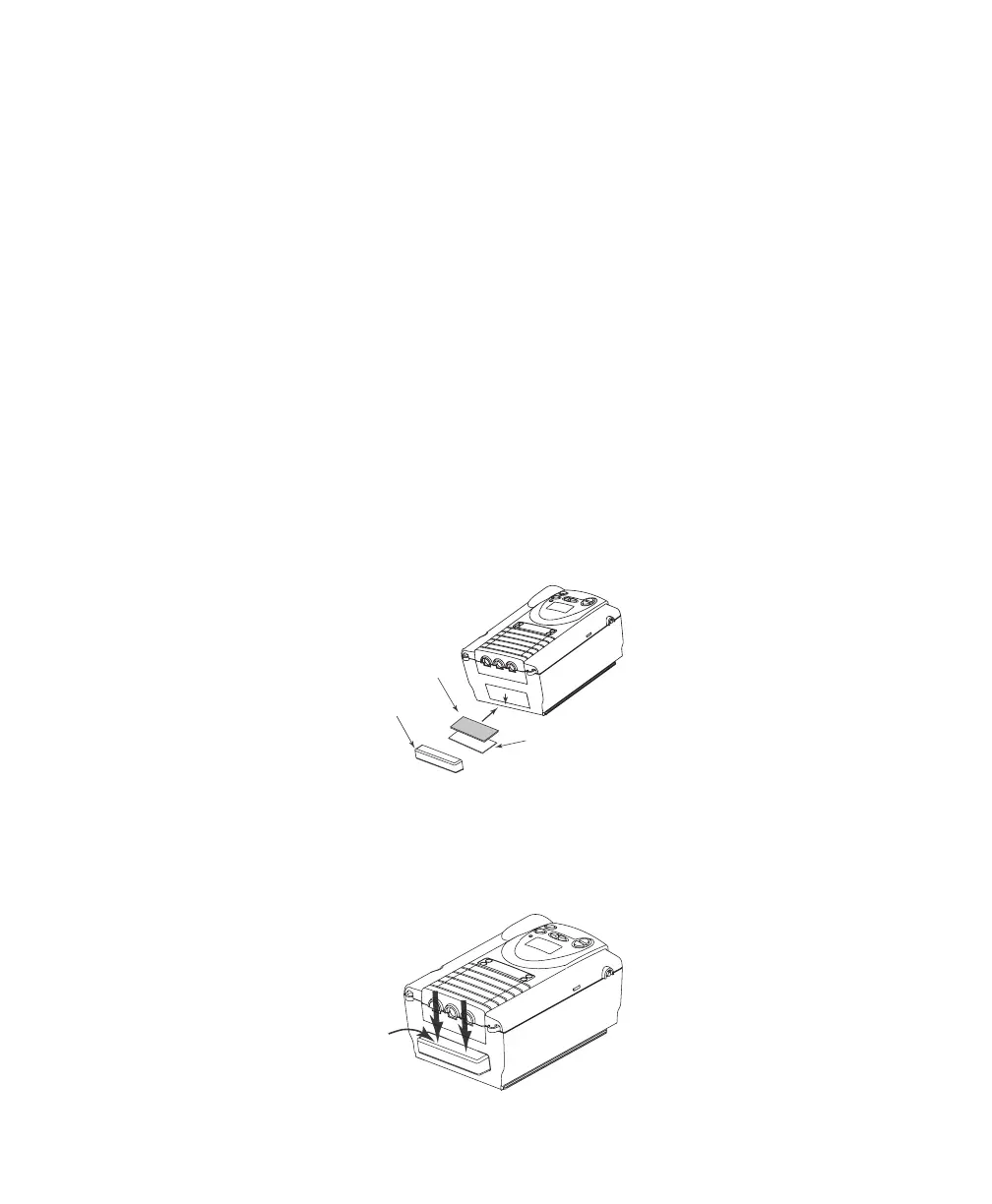
1. Place the gray foam filter on top of the ultra-fine filter (if using the ultra-fine filter).
. Slide the filters into the air inlet at the rear of the device, and push them down into the recess as
shown in Figure 5-1.
Reusable Gray
Foam Filter
(required)
Disposable Ultra-fine
Filter (optional)
Filter
Cap
Figure 5–1 Installing the Filters
. Attach the filter cap as shown in Figure 5–2. Position the cap so that the small opening on the cap is
facing down. Insert the cap’s bottom tabs into the openings below the filter area. Snap the cap into
place.
Figure 5–2 Attaching the Filter Cap














 To Next Page