26
User Manual
6.3 monitoring measured Parameters
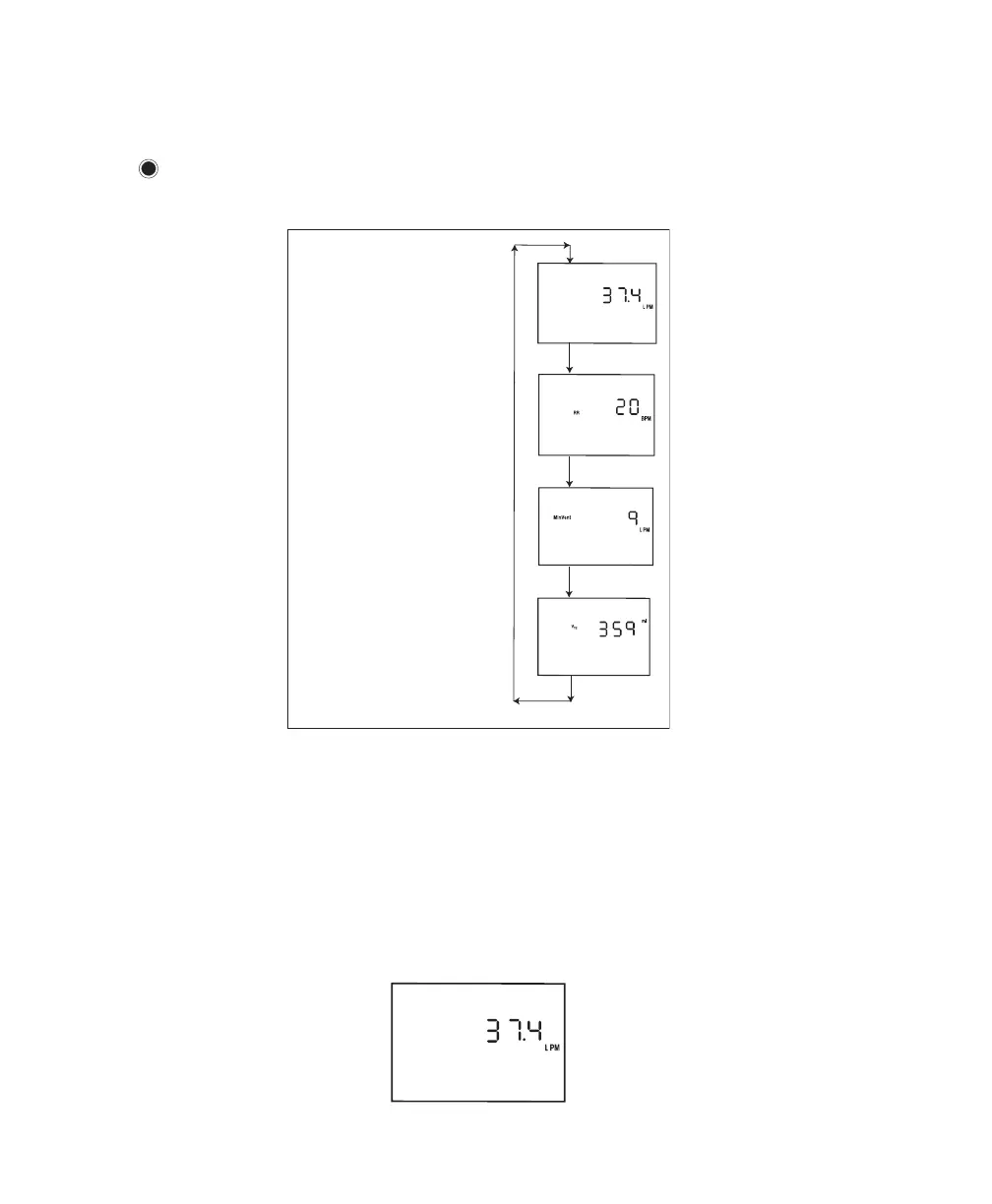
You can view four measured parameters—leak, respiratory rate, minute ventilation, and exhaled tidal
volume. To access these screens from the Monitoring or Standby screens, press the small circular Scroll
button (
) located near the RESET button.
Figure 6–12 shows how to navigate the measured parameter screens.
Scroll
Button
Scroll
Button
Scroll
Button
Scroll
Button
Leak Screen
Respiratory Rate Screen
Minute Ventilation Screen
Exhaled Tidal Volume Screen
LEAK
Figure 6–12 Measured Parameter Screen Navigation
To return to the Monitoring or Standby Screen from these Measured Parameter screens, press the
SILENCE button.
NOTE: If you view these screens from the Standby screen, each of these screens will display a value of
zero, because no therapy is being delivered.
1. Leak Screen
is screen, shown in Figure 6–13, shows the average of the leak values for the previous six breaths.
Figure 6–13 Leak Screen














 To Next Page