Packaging, Transport and Installation
16
3.8 Creating interface connection
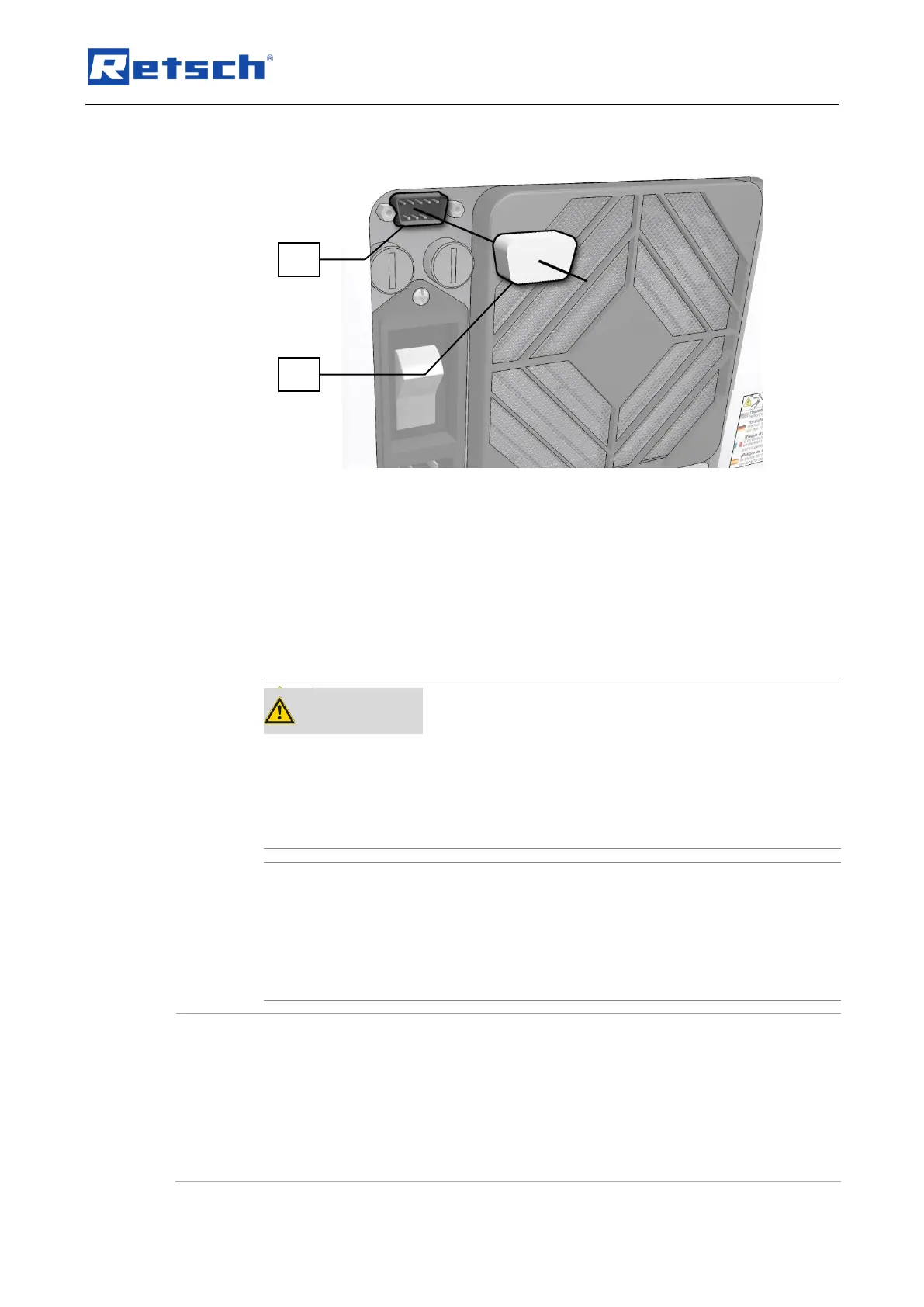
Fig. 2: Serial interface
– When updating the device control or display software, a connection with the
PC is established using the RS232 interface (S).
• Leave the cap (SW) on the interface (S) when the connection is not needed.
NOTICE
The interface cables must not be longer than 2.5m. Longer cables can lead to faults in data
transmission.
3.9 Transport
Serious personal injury
Falling loads
– The appliance is very heavy and can therefore cause serious personal
injuries if it falls down.
• Lifting above head height is not permissible!
Transport
– Mechanical or electronic components may be damaged.
• The machine may not be knocked, shaken or thrown during
transport.
Transportation lock
Transport without transportation lock, or operation with transportation lock
− Mechanical components may be damaged.
• Only transport the device with mounted transportation lock.
• Do not operate the device with built-in transportation lock.


 To Next Page