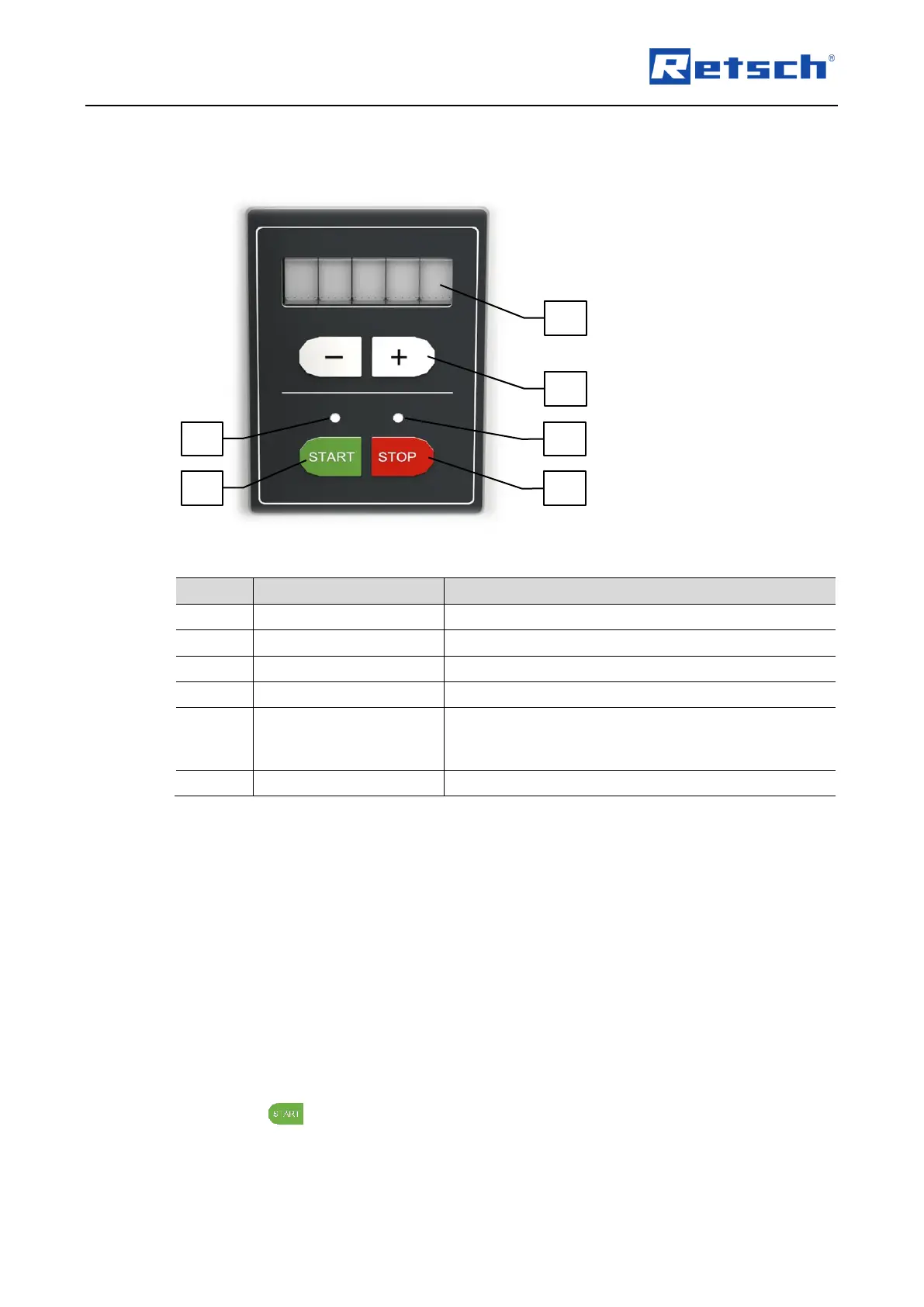
Decreases or increases the rotation speed by
pressing the "–" or "+" button, respectively in the
range of 3 000 to 10 000 revolutions per minute
7.2 Manual Mode
7.2.1 Setting the Rotation Speed
The rotation speed can be set between 3 000 and 10 000 revolutions per minute (rpm) using the
"+" and "–" buttons (B5).
Press the "+" button to increase the rotation speed in steps of 500 rpm.
Press the "–" button to decrease the rotation speed in steps of 500 rpm.
The rotation speed can also be changed during operation by pressing the "+" or "–" button (B5).
An exceeding or falling below of 10 000 rpm or 3 000 rpm respectively is not possible.
7.2.2 Start Process
Press the button (B2) to start the grinding process.
The status LED (B4) lights up, the electrical locking mechanism is automatically activated and
the rotor starts running.



 To Next Page