RichAuto S & T Co., Ltd
Add: 5th
floor, No.4 building, No 4. Yard, life Rd, life science park, beiqing St., changping district Beijing, China
Tel:010-53275118 Fax:010-53275110/53275111 Web site:www.richnc.com.cn
5
1.2 Description of Each Component
1.2.1 Handle
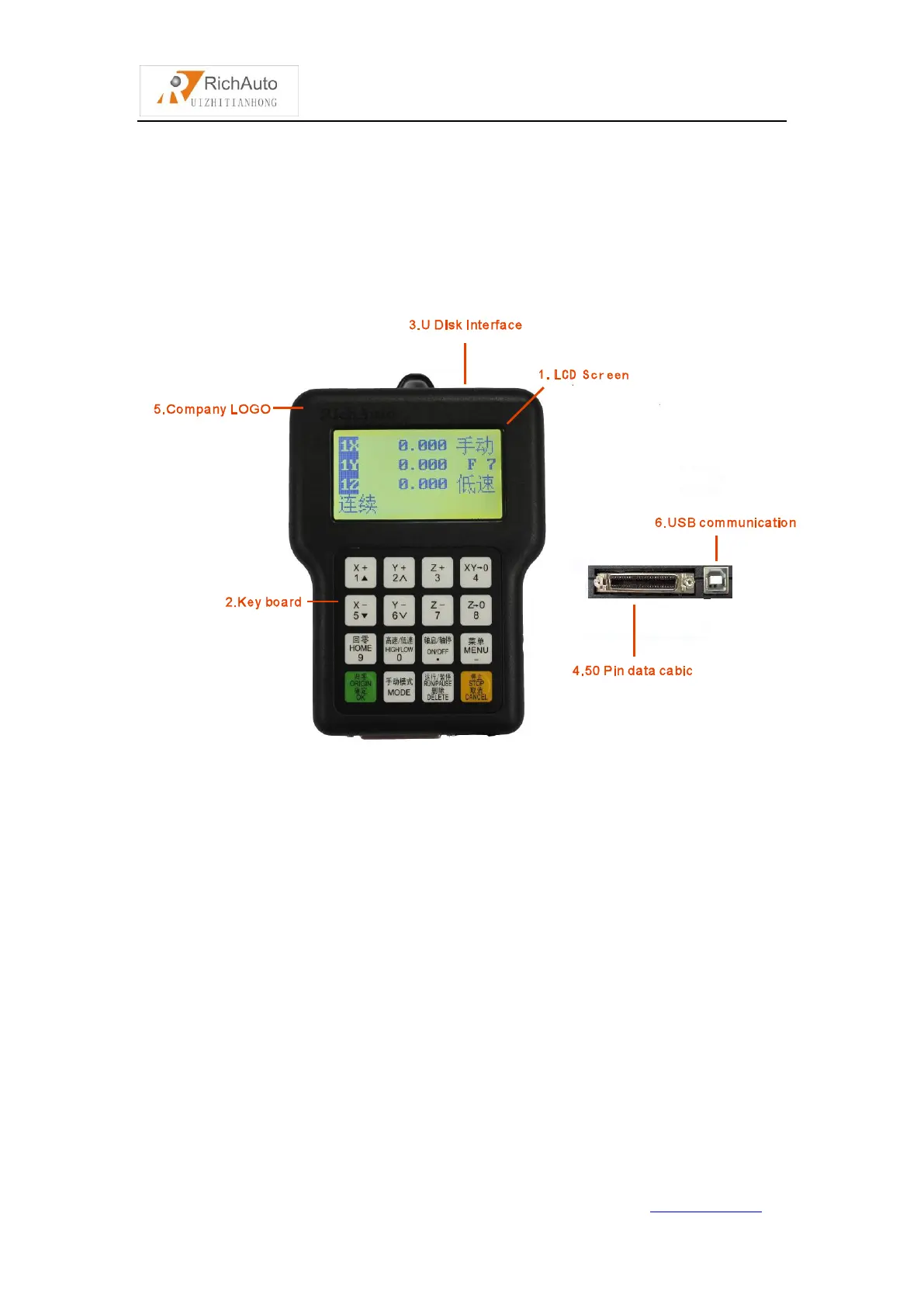
As shown below,including 6 parts:
Handle
1) LCD:128 * 64 resolution LCD display,to display the machine motion,
system settings and other information.
2) Key Board:Contains 16 buttons to input system parameter information and
operate the machine.
3) U Disk Interface: The port of U disk(FAT16/32) and the memory card.
4) 50-pin Data Cable port: The port of 50-pin data cable,it connect the handle
with the interface board to realize controling the machine.
5) Company LOGO.
6) USB Communication Port: The port of USB communication cable. It is used
to connect the handle with your computer.



 To Next Page