Home
Ricoh
Finishers
SR5090
Page 60 (Lower Tray)
Ricoh SR5090 - Lower Tray; Proof Tray
107 pages
Manual
Save Page as PDF
To Next Page
To Next Page
To Previous Page
To Previous Page
Loading...
2.Replace
ment and
Adju
stment
56
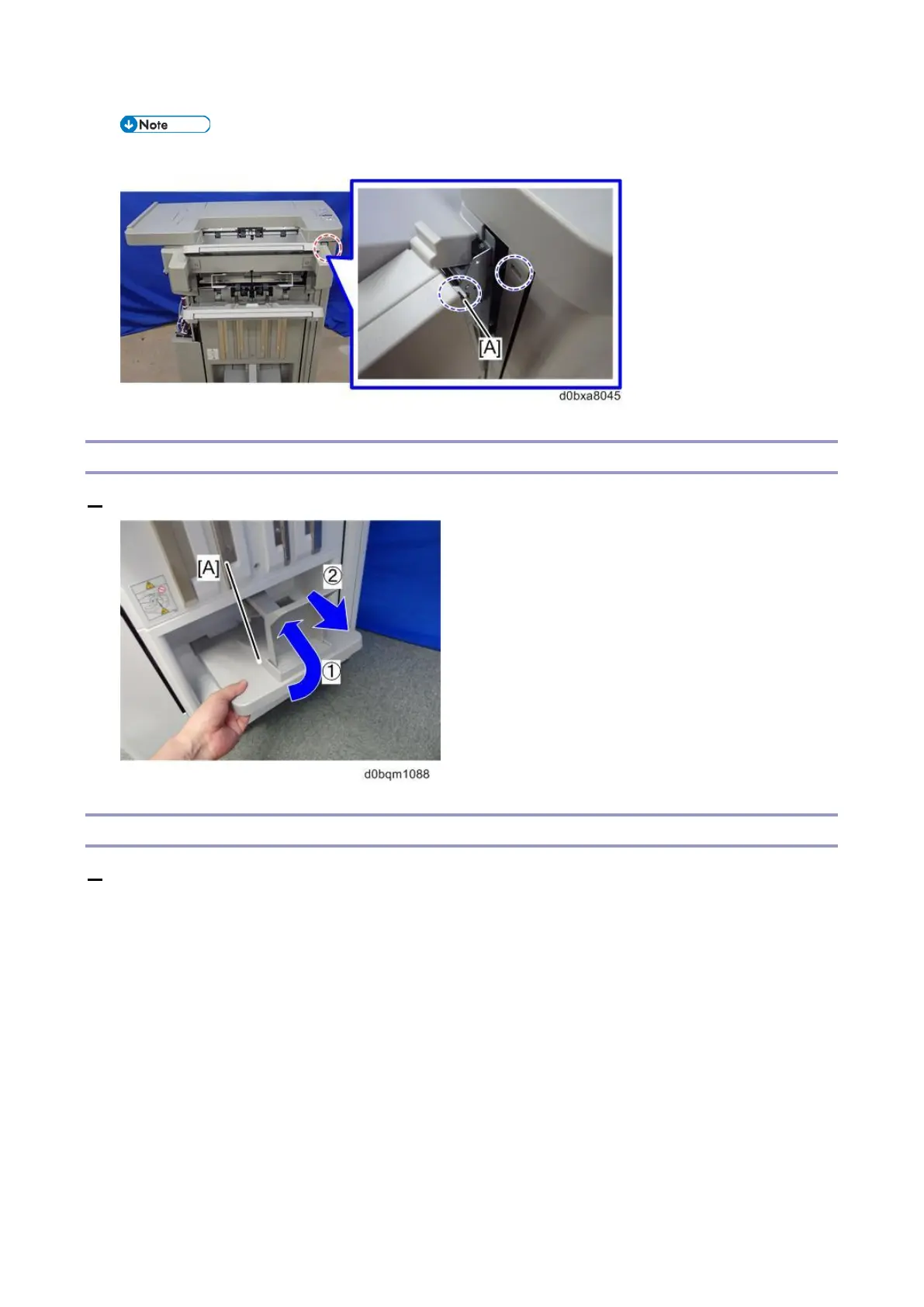
Remove
the hook [A] at
the right si
de.
Lower
T
ray
1.
Remove
the lower tray
[A].
Proof T
ray
1.
Remove
the following c
overs.
•
Upper cov
er (
Rear Upp
er Cover
,
Rear Lower Cov
er
)
•
Paper guide
cover (
Pa
per Guide
Cover
)
59
61
Table of Contents
Main Page
Default Chapter
5
Table of Contents
5
1 Detailed Descriptions
8
Major Changes from the Previous Machine
8
Improved Stackability of Stapled Sheets
8
Easier Replacement of Staple Cartridge
10
Storing Extra Staple Cartridges
11
Detaching and Reattaching the Booklet Tray End Fence by the Customer
12
Staple Near-End Detection
12
Specifications
13
Finisher SR5090
13
Booklet Finisher SR5100
15
Paper Specifications
18
Punch Unit PU3090
20
Layout
22
General Layout
22
Electrical Component Layout
23
Transport Layout
28
Proof Transport Layout (Drive)
28
Proof Transport Layout (Sensors)
29
Shift Transport Layout (Drive)
29
Mechanisms
30
Shift Transport
30
Pre-Stack (Corner Stapling)
30
Pre-Stack (Booklet Stapling)
31
Shift Tray Movement/ Paper Height Detection/ Tray Full Detection
33
Pull-In Roller/ Paper Stack Holder
37
Corner Stapling
40
Staple Near-End Detection
45
Saddle Stitching (Booklet Stapling)
46
2 Replacement and Adjustment
56
Covers
56
Rear Upper Cover, Rear Lower Cover
56
Upper Cover
56
Front Cover
58
Front Left Side Cover
58
Paper Guide Cover
59
Lower Tray
60
Proof Tray
60
Shift Tray (Upper Tray)
61
End Fence
61
Boards
65
Controller Board (PCB1)
65
Corner Stapling Unit, Trailing Edge Alignment Unit
68
Corner Stapling Unit
68
Trailing Edge Alignment Unit
72
Main Unit (Motors)
73
Stacking Sponge Roller Lift Motor
73
Leading Edge Guide Motor
73
Paper Stacking Holder Motor
74
Exit Motor
75
Feed-Out Belt Motor
75
Jogger Motor
76
Main Unit (Sensors)
77
Shift Tray Paper Height Sensor
77
Paper Stacking Holder HP Sensor
78
Stacking Sponge Roller HP Sensor
79
Staple Tray Paper Sensor (S31)
80
Feed-Out Belt HP Sensor
80
Leading Edge Guide HP Sensor
81
Upper Tray Height Limit Switch
82
Sub Height Sensor
82
Saddle Stitch Unit (Motors)
84
Saddle Stitch Unit
84
Press Fold Motor
85
Booklet Jogger Motor
89
Paper Guide Unit
91
Paper Guide HP Sensor
93
Paper Guide Motor
95
Stapler Unit
97
Punch Unit
100
Fold Adjustments
102
Adjusting the Alignment of the Flat Fold Rollers
102
Adjusting the Folding Speed
104
Flat Fold Booklet Unit Home Position Adjustment
105
Related product manuals
Ricoh SR5050
185 pages
Ricoh SR5060
185 pages
Ricoh SR790
25 pages
Ricoh SR3270
128 pages
Ricoh SR3260
128 pages
Ricoh SR4110
60 pages
Ricoh SR3300
44 pages
Ricoh SR3020
82 pages
Ricoh SR3290
108 pages
Ricoh SR4120
95 pages



 To Next Page