Agility 3 User Manual
Page 36
Appendix A - Keypad User Operations
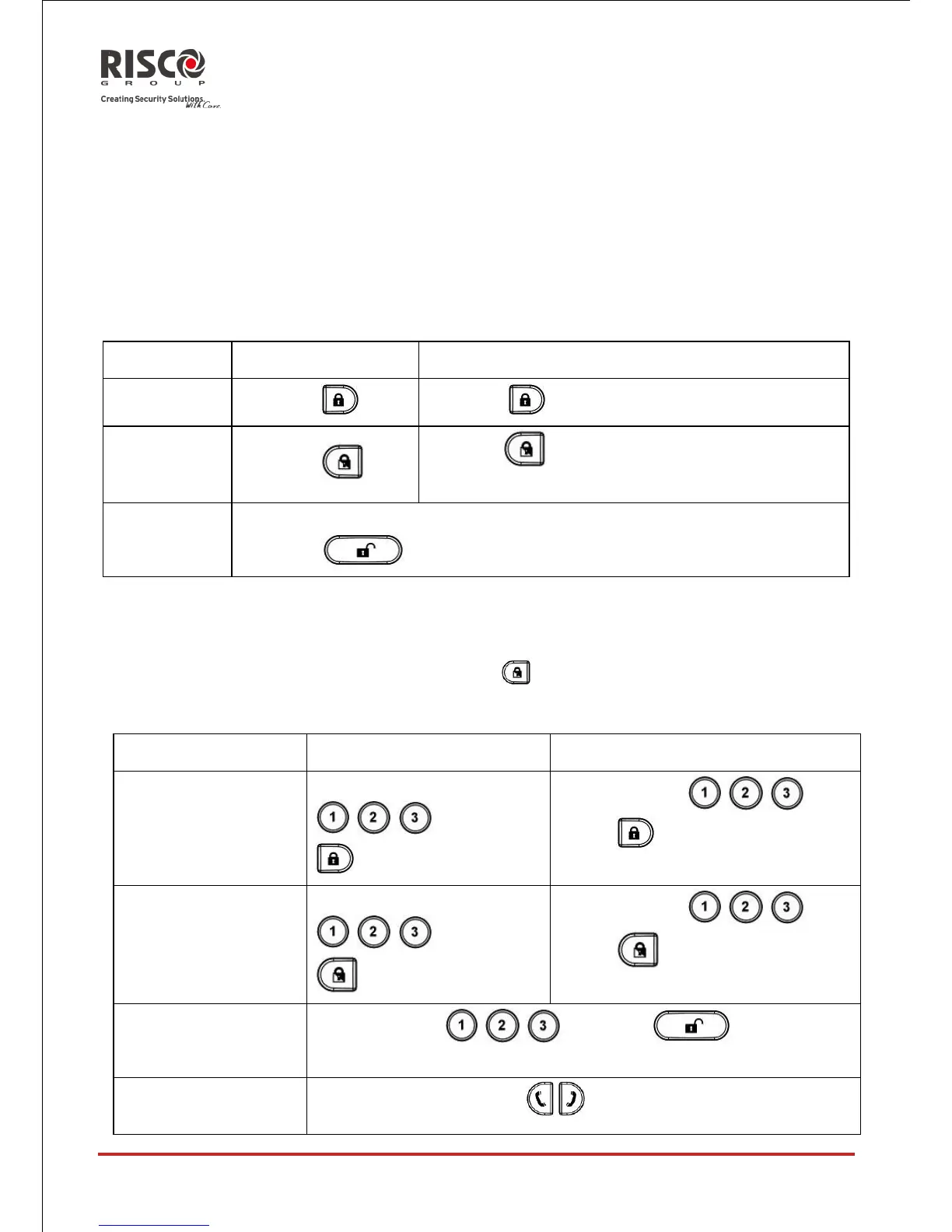
The following section details the user operations from the 2-way LCD wireless keypad.
User operation can be defined to be activated by a quick mode or high security mode that
requires the use of a code or proximity tag.
In the high security mode the proximity tag can be used as a substitute for inserting a user
code when the display prompts to "Insert a code".
Common Operations
Press followed by code or proximity tag
2
Press followed by code or proximity tag
Press followed by code or proximity tag
Consult your engineer for the operations defined with a code
For optimal use of the proximity tag, use it from a distance of 1-2 cm (0.4" - 0.7") from the
center of the keypad's door
For Part set Setting with no entry delay hold the key for two seconds
Advanced Operations
Full Setting Partition
1/2/3
Select partition
/ / and press
Select partition / / and
press followed by code or
proximity tag
Part set Setting
Partition 1/2/3
Select partition
/ / and press
Select partition / / and
press followed by code or
proximity tag
Select partition / / and press followed by
the code or the proximity tag
Panic alarm / Service
call
Press and hold both keys simultaneously
4





 To Next Page